
Utilities Windows
MeOCR Image To Text Converter
Convert scanned document images into editable text with MeOCR for Windows, with region-based OCR, a built-in editor and export to Microsoft Word.
- Operating system
- Windows; Softonic lists Windows 2003
- Architecture
- Not established by the cited sources
- Download package
- EXE installer
Publisher requires .NET Framework 3.5 or higher. Compatibility with current Windows versions is not established; software was not installed or run.
Link checked · Download guidance
What is MeOCR Image To Text Converter?
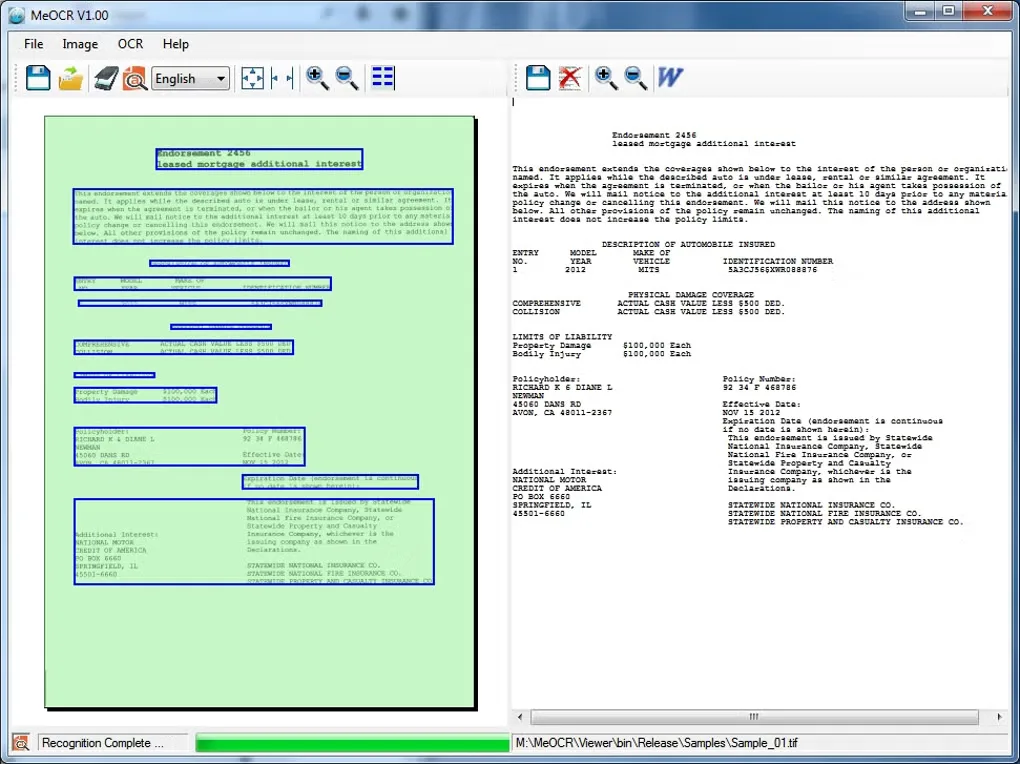
MeOCR turns scanned pages and image files into editable text. Load a BMP, TIFF, JPEG, GIF or PNG, or import an image from a TWAIN-compatible scanner. You can recognize the whole page or select a smaller region, edit the resulting text inside the application and export it to Microsoft Word. The publisher lists recognition support for 23 languages, including English, French, German and Spanish, and says the output retains document formatting.
This is the standalone MeOCR converter, not the separate MeOCRLib developer library. The publisher identifies the converter as version 1.00 and requires .NET Framework 3.5 or higher. Its download page is a legacy listing with a 2013 release entry; compatibility with current Windows versions is not established by the sources. Softonic labels the application free, while the publisher asks for an optional donation. Full license terms were not established.
What it offers
- Recognize text in BMP, TIFF, JPEG, GIF and PNG image files.
- Import scanned images through TWAIN-compatible devices.
- Run OCR on a mouse-selected region rather than the entire image.
- Edit recognized text in the built-in editor and export to Microsoft Word.
- Recognize 23 publisher-listed languages and produce formatted output.
Good to know
- The publisher requires .NET Framework 3.5 or higher.
- The publisher download listing dates to 2013; support for current Windows releases and CPU architectures is not established.
- Softonic lists it as free, but full software license terms were not established from the accessible publisher pages.
Product images
Sources
References used for this listing. Retrieval dates do not indicate hands-on testing.
More in utilities
View category ↗
1.1.1.1 with WARP 2026.8.2115.0
Encrypt traffic from your Mac to Cloudflare’s network with WARP, or use DNS-only mode for encrypted DNS queries to the 1.1.1.1 resolver.
1.1.1.1 with WARP 2026.8.2115.0
Encrypt traffic between your Windows PC and Cloudflare, or use encrypted DNS only, with the free 1.1.1.1 with WARP app.

3uTools 9.12.005
Manage iPhone and iPad photos, music, apps and backups from Windows with 3uTools, a free utility that also includes device checks and firmware flashing tools.