

Utilities Windows
Metapad for Windows
Edit plain-text files with Metapad, a free Windows Notepad alternative with find and replace, auto-indent, UNIX text support and portable settings.
- Operating system
- Windows 95/98/NT/XP/Vista/7, as listed by the publisher
- Architecture
- Not specified on the cited publisher download page
- Download package
- ZIP archive, regular edition
The publisher also offers a separate Light Edition package. Windows 10/11 compatibility and a native 64-bit build were not established by the cited sources.
Link checked · Download guidance
What is Metapad?
Metapad is a plain-text editor for people who want a Notepad-style Windows application with more editing controls. It combines find and replace with auto-indent, block indentation, configurable tab stops and Go to Line/Column. You can switch between two configured fonts, follow hyperlinks in the full edition and open the current file in an external viewer.
The publisher offers regular and Light Edition ZIP packages. This entry links to the regular 3.6 package, released on May 28, 2011. The regular edition includes multiple undo/redo, hyperlink display and drag-and-drop text editing that LE lacks. For portable settings, the publisher documents an INI mode that stores preferences beside the executable instead of in the Windows Registry.
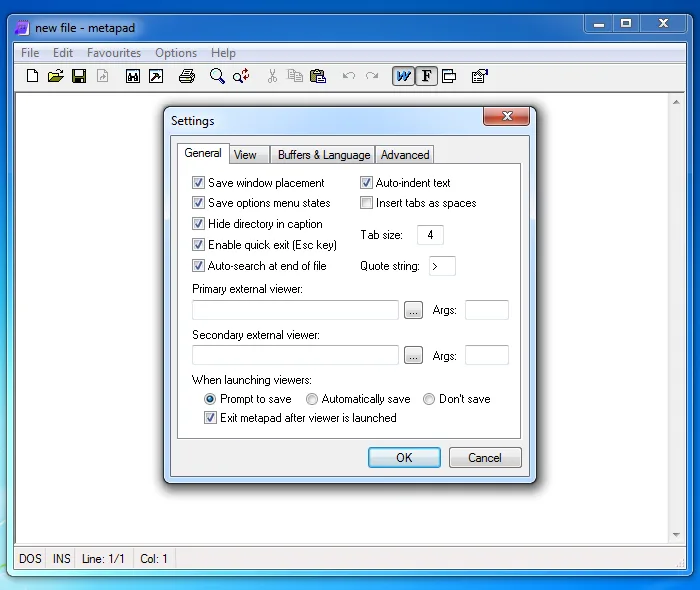
Metapad does not support column editing. Its publisher's compatibility list names Windows 95, 98, NT, XP, Vista and 7; this entry does not establish Windows 10 or 11 compatibility. The screenshots show the historical Windows interface rather than a newly tested installation.
What it offers
- Find and replace text, including tabs and newlines through the documented escape-sequence option.
- Use auto-indent, block indent/unindent, configurable tab stops and Go to Line/Column.
- Work with UNIX text files and switch between two customizable fonts.
- Use multiple undo/redo, hyperlink display and drag-and-drop text editing in the regular edition.
- Keep settings in a local metapad.ini file through portability mode.
Good to know
- Column editing is not supported, according to the publisher's FAQ.
- Version 3.6 dates to May 2011; the cited publisher compatibility list stops at Windows 7 and does not establish support for Windows 10 or 11.
Product images
Sources
References used for this listing. Retrieval dates do not indicate hands-on testing.
- Metapad: fast, tiny and powerful Windows notepad replacement ↗Retrieved
- Metapad download ↗Retrieved
- Metapad FAQ ↗Retrieved
- Metapad: source code ↗Retrieved
- Metapad Screenshots ↗Retrieved
- Metapad - Download ↗Retrieved
More in utilities
View category ↗
1.1.1.1 with WARP 2026.8.2115.0
Encrypt traffic from your Mac to Cloudflare’s network with WARP, or use DNS-only mode for encrypted DNS queries to the 1.1.1.1 resolver.
1.1.1.1 with WARP 2026.8.2115.0
Encrypt traffic between your Windows PC and Cloudflare, or use encrypted DNS only, with the free 1.1.1.1 with WARP app.


3uTools 9.12.005
Manage iPhone and iPad photos, music, apps and backups from Windows with 3uTools, a free utility that also includes device checks and firmware flashing tools.