
Utilities macOS
MiddleDrag
Add middle-click and middle-drag to a Mac trackpad with three-finger gestures. MiddleDrag is a free, open-source menu bar utility for macOS 15 or later.
Version 1.4.3 · Direct publisher file
Link checked · Download guidance
What is MiddleDrag?
MiddleDrag turns a three-finger tap into a middle mouse click and a three-finger drag into a middle mouse drag. It is useful when a browser, editor or CAD application expects a middle button but you want to keep using a trackpad. In applications that support those inputs, you can open links in background tabs, close tabs or pan and orbit a viewport. The receiving application determines what each middle-button action does.
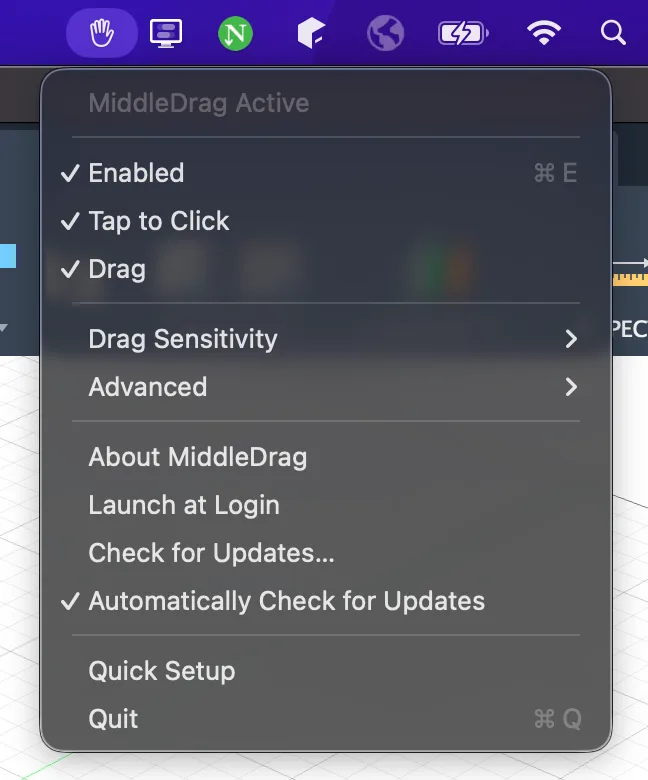
The utility runs in the macOS menu bar. Its controls let you enable gesture recognition, adjust drag sensitivity and choose whether it launches at login. The publisher supports built-in MacBook trackpads and external Magic Trackpads. It requires macOS 15 Sequoia or later and Accessibility permission under System Settings > Privacy & Security > Accessibility.
This entry links to the publisher's version 1.4.3 PKG installer. The documented manual setup is to open the package, follow the installation prompts, launch MiddleDrag from Applications and grant the requested Accessibility permission. Homebrew and MacPorts installation are also documented by the publisher. MiddleDrag is designed to coexist with macOS gestures, but the README warns that pressing down hard can still trigger Mission Control; use soft taps rather than physical clicks. After an update, the publisher recommends toggling its Accessibility permission off and on and restarting the app if gestures stop working.
What it offers
- Generate a middle mouse click with a three-finger tap.
- Generate middle-button dragging for pan or orbit actions in applications that support it.
- Adjust drag sensitivity and enable or disable gesture recognition from the menu bar.
- Choose launch at login for automatic startup with macOS.
Good to know
- Requires macOS 15 Sequoia or later, a built-in MacBook trackpad or Magic Trackpad, and Accessibility permission.
- Middle-button actions depend on support in the receiving application; terminal paste and autoscroll are not universal.
- Pressing down hard can still trigger Mission Control; the publisher recommends soft taps.
- If gestures stop after an update, Accessibility permission may need to be toggled off and on before restarting MiddleDrag.
Product images
Sources
References used for this listing. Retrieval dates do not indicate hands-on testing.
More in utilities
View category ↗
1.1.1.1 with WARP 2026.8.2115.0
Encrypt traffic from your Mac to Cloudflare’s network with WARP, or use DNS-only mode for encrypted DNS queries to the 1.1.1.1 resolver.
1.1.1.1 with WARP 2026.8.2115.0
Encrypt traffic between your Windows PC and Cloudflare, or use encrypted DNS only, with the free 1.1.1.1 with WARP app.


3uTools 9.12.005
Manage iPhone and iPad photos, music, apps and backups from Windows with 3uTools, a free utility that also includes device checks and firmware flashing tools.