
Utilities Windows
Mobile Mouse Server
Control a Windows PC from your iPhone with Mobile Mouse Server, the free desktop companion for Mobile Mouse's Wi-Fi trackpad, keyboard and remote controls.
- Operating system
- Windows 10 or newer, according to the publisher
- Architecture
- Not specified in the inspected publisher pages
- Download package
- EXE installer
Requires the compatible Mobile Mouse mobile app and a reachable PC. Softonic lists Windows 11 and version 3.6.5; the publisher states Windows 10+. The exact installer build and CPU architecture were not independently established.
Link checked · Download guidance
What is Mobile Mouse Server?
Mobile Mouse Server connects the Windows computer you want to control to the Mobile Mouse app on your iPhone. It handles the desktop side of pointer movement, clicking, scrolling and typing, while the phone supplies the trackpad and keyboard. Application-aware controls also support media and web commands, with program definitions and custom shortcuts configured in the server. This is input control, not Windows screen mirroring on your phone.
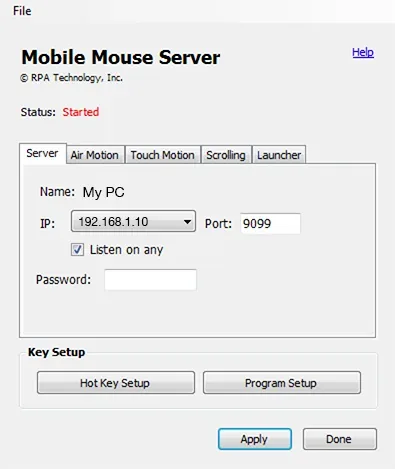
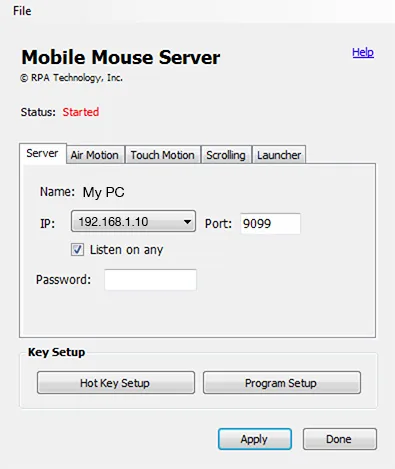
For local use, the publisher requires Windows 10 or newer and a network that allows the PC and phone to communicate. The PC can use Ethernet while the phone uses Wi-Fi on the same local network. Install and launch the server, allow it through Windows Firewall on your trusted private network, and select the PC in the phone app. If automatic discovery fails, use the IP address and port displayed by the server rather than disabling the firewall.
Leave the server running in the Windows system tray while you use the remote. Double-click its tray icon to open settings, or right-click it to quit. The server is not a standalone phone remote: it needs the compatible mobile app. Mobile Mouse's dedicated Bluetooth and USB products have separate setup paths and do not require this server. Softonic lists version 3.6.5; the publisher's unversioned installer link does not establish the version of the downloaded package.
What it offers
- Use an iPhone as a trackpad and keyboard for a Windows PC.
- Control supported media and web applications with application-aware remotes.
- Configure program definitions, keyboard shortcuts and custom remote actions in the server.
- Connect locally through automatic discovery or the server's displayed IP address and port.
Good to know
- Requires the compatible mobile app; the Windows server alone is not a complete remote-control setup.
- Controls pointer and keyboard input but does not mirror the Windows screen onto the phone.
- Local discovery requires a network that lets the phone and PC communicate; guest-network isolation or firewall rules can prevent connection.
- The inspected publisher pages do not identify the Windows installer's exact build or CPU architecture.
Product images
Sources
References used for this listing. Retrieval dates do not indicate hands-on testing.
More in utilities
View category ↗
1.1.1.1 with WARP 2026.8.2115.0
Encrypt traffic from your Mac to Cloudflare’s network with WARP, or use DNS-only mode for encrypted DNS queries to the 1.1.1.1 resolver.
1.1.1.1 with WARP 2026.8.2115.0
Encrypt traffic between your Windows PC and Cloudflare, or use encrypted DNS only, with the free 1.1.1.1 with WARP app.

3uTools 9.12.005
Manage iPhone and iPad photos, music, apps and backups from Windows with 3uTools, a free utility that also includes device checks and firmware flashing tools.