

Development Windows
Modbus Slave for Windows
Simulate Modbus slave devices on Windows to develop PLC programs before hardware arrives. Supports serial and network protocols, editable register data and Excel automation.
- Operating system
- Windows 7, 8, 8.1, 10 and 11
- Architecture
- x64
- Download package
- EXE installer
This link is for 64-bit Windows x64. Separate x86 and ARM64 installers are listed by the publisher; Windows XP requires an older release.
Link checked · Download guidance
What is Modbus Slave?
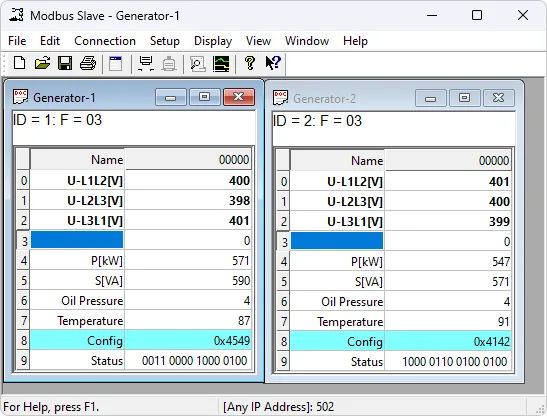
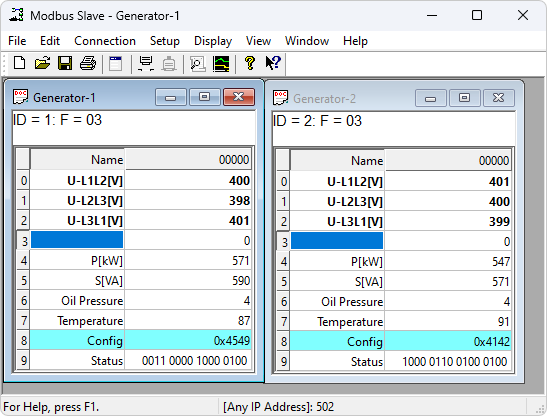
Modbus Slave lets a PLC programmer simulate device responses before the physical equipment is available. Each document window holds data for a slave node, with up to 100 simulated devices in 100 windows. Use it to expose coil and register values to a Modbus master application, inspect serial traffic and change the values your controller reads.
The publisher lists Modbus RTU, ASCII, TCP/IP and UDP/IP, plus RTU over TCP/IP and UDP/IP. Display formats, scaling, conditional colors and real-time charts help interpret the simulated data. OLE Automation connects the application with tools such as Excel and Visual Basic.
This entry links to the publisher’s Windows x64 EXE installer for version 10.0.0. Separate x86 and ARM64 installers are available from the publisher. The evaluation disconnects a connection after 10 minutes; restarting the application starts another demonstration period. After 30 days, the evaluation can no longer connect and continued use requires a paid license.
What it offers
- Simulate up to 100 Modbus slave devices in separate document windows.
- Support Modbus RTU, ASCII, TCP/IP, UDP/IP and RTU over TCP/IP or UDP/IP.
- Read and write coils and registers with the supported Modbus function codes.
- Inspect serial traffic and interpret values with 28 display formats, scaling, conditional colors and real-time charts.
- Use OLE Automation to interface with Excel or Visual Basic.
Good to know
- The trial disconnects after 10 minutes per connection; restarting the application begins another demonstration period.
- The evaluation cannot connect after 30 days; a paid license is required for continued use.
Product images
Sources
References used for this listing. Retrieval dates do not indicate hands-on testing.
- Modbus Slave Simulator — publisher product page ↗Retrieved
- Download — publisher Windows packages and evaluation limits ↗Retrieved
- Modbus Slave — publisher release history ↗Retrieved
- Modbus Slave user manual — evaluation license and UI illustration ↗Retrieved
- Modbus Slave - Download — observed Windows listing ↗Retrieved
More in development
View category ↗
010 Editor 17.0
Inspect and edit binary files on Mac with 010 Editor, a paid text and hex editor with Binary Templates, file comparison and a 30-day trial.
010 Editor 17.0
Inspect and edit binary files with 010 Editor for Windows, a text and hex editor with Binary Templates, file comparison and scripting. Includes a 30-day trial.
10x Editor
Edit and navigate C++ projects on Windows with a built-in parser, workspace search and Visual Studio project support. A paid license is required after the 30-day trial.