
Utilities Windows
Moneydance
Track accounts, budgets, investments and recurring payments with Moneydance for Windows, a commercial personal finance app with a 100-manual-transaction trial.
- Operating system
- Windows; minimum release not specified in the observed publisher catalog
- Architecture
- 64-bit (amd64 / x64)
- Download package
- EXE installer
Publisher labels this download 64-bit. HEAD verified file MIME and HTTP 200 only; no installation or runtime compatibility test performed.
Link checked · Download guidance
What is Moneydance?
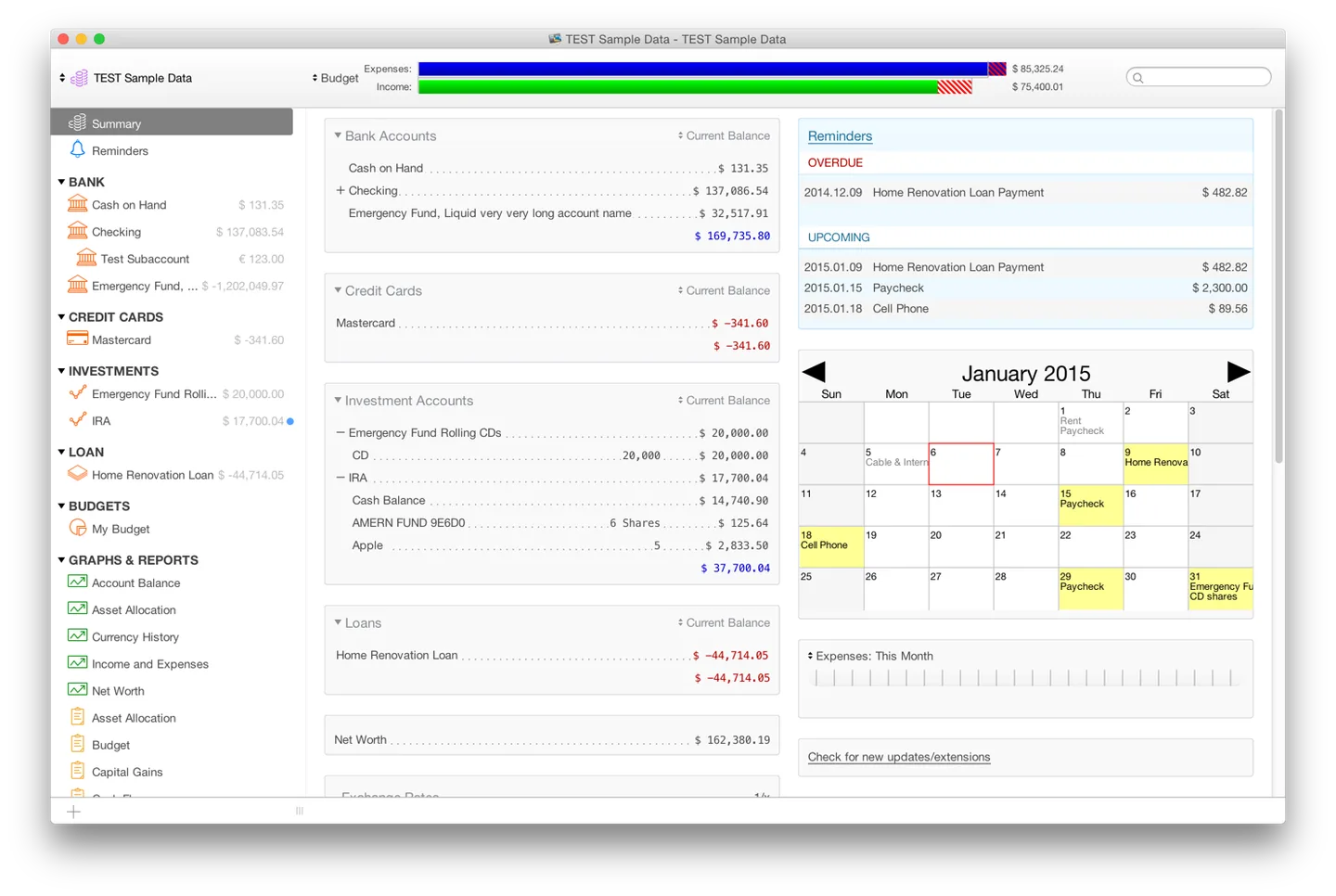
Moneydance brings account registers, budgeting and investment tracking into a desktop personal finance workspace. Its summary view combines balances, reminders and exchange-rate information, while individual registers let you enter, edit and categorize transactions or reconcile an account against a statement. It suits keeping a household financial record across bank accounts, credit cards, loans and investments rather than maintaining separate spreadsheets for each balance.
Graphs and reports help review income and spending over a chosen date range, and graphs can be printed or saved as PNG images. Single and recurring transaction reminders support planned payments. Online transaction downloads and bill payment are available through supported financial institutions; the publisher's general feature list does not establish support for your particular bank.
This entry links to the publisher's Windows 64-bit EXE. The publisher catalog labels the release 2024.4 (build 5253); the file was checked with HEAD only, not downloaded or installed. Moneydance is commercial software, not unrestricted freeware: its free trial is limited to 100 manually entered transactions. The screenshot illustrates the publisher's desktop Summary view with macOS-style window controls, not a tested Windows installation or a verified current-build appearance.
What it offers
- Enter, edit and categorize account transactions, with automatic balance calculation and payee auto-complete.
- View account balances, transaction reminders and exchange-rate information in the Summary workspace.
- Manage budgets and multiple currencies alongside investment accounts.
- Generate income and expense graphs, choose date ranges, and print or save graphs as PNG images.
- Schedule single or recurring transaction reminders and use online banking with supported financial institutions.
Good to know
- Commercial license required beyond the free trial's limit of 100 manually entered transactions.
- Online banking and bill payment depend on supported financial institutions; support for a particular bank was not verified.
- The selected package is Windows 64-bit. The observed publisher catalog does not specify a minimum Windows release.
Product images
Sources
References used for this listing. Retrieval dates do not indicate hands-on testing.
More in utilities
View category ↗
1.1.1.1 with WARP 2026.8.2115.0
Encrypt traffic from your Mac to Cloudflare’s network with WARP, or use DNS-only mode for encrypted DNS queries to the 1.1.1.1 resolver.
1.1.1.1 with WARP 2026.8.2115.0
Encrypt traffic between your Windows PC and Cloudflare, or use encrypted DNS only, with the free 1.1.1.1 with WARP app.

3uTools 9.12.005
Manage iPhone and iPad photos, music, apps and backups from Windows with 3uTools, a free utility that also includes device checks and firmware flashing tools.