

Utilities Windows
MultiMonitorTool for Windows
Enable or disable displays, restore monitor layouts and move windows between screens with MultiMonitorTool, a portable Windows multi-monitor utility.
- Operating system
- Windows XP through Windows 11, according to the publisher
- Architecture
- x64
- Download package
- Portable ZIP archive
This download is the x64 package. The publisher offers a separate 32-bit download; no installation process or additional DLL files are required.
Link checked · Download guidance
What is MultiMonitorTool?
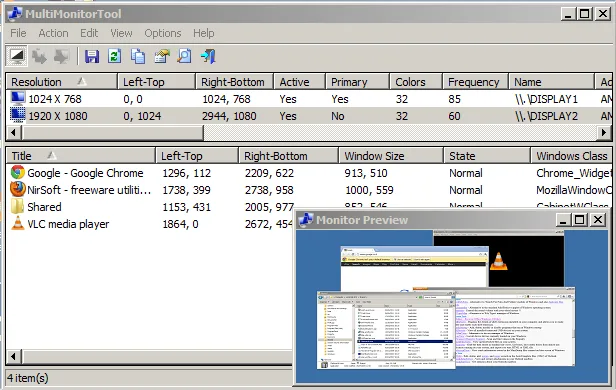
MultiMonitorTool manages an extended Windows desktop across multiple monitors. Its upper pane lists detected displays; selecting one shows its visible windows in the lower pane. You can change the primary monitor, enable or disable displays, and move windows to another screen from the same interface. A separate preview window shows the contents of a selected monitor.
Save a monitor configuration before changing a layout, then load it to restore screen resolution, color depth and monitor positions. Command-line options offer another way to apply configurations or move windows without opening the main interface. The utility needs no installation; this entry links to the publisher's x64 ZIP package.
It is intended for extended desktops, not displays that mirror the same content. NirSoft also warns that Windows may reposition a monitor after it is disabled and re-enabled in a setup with three or more screens. Saving and reloading the configuration is the publisher's suggested workaround.
What it offers
- Enable or disable monitors and select the primary display.
- Save and restore monitor configurations, including resolution, color depth and position.
- Move windows between monitors through the interface or command line.
- Preview a selected monitor in a separate window.
Good to know
- Useful for extended desktops, not multiple displays showing the same content.
- With three or more monitors, Windows may change a display's position after disabling and re-enabling it; save and reload the configuration to restore the layout.
Product images
Sources
References used for this listing. Retrieval dates do not indicate hands-on testing.
More in utilities
View category ↗
1.1.1.1 with WARP 2026.8.2115.0
Encrypt traffic from your Mac to Cloudflare’s network with WARP, or use DNS-only mode for encrypted DNS queries to the 1.1.1.1 resolver.
1.1.1.1 with WARP 2026.8.2115.0
Encrypt traffic between your Windows PC and Cloudflare, or use encrypted DNS only, with the free 1.1.1.1 with WARP app.

3uTools 9.12.005
Manage iPhone and iPad photos, music, apps and backups from Windows with 3uTools, a free utility that also includes device checks and firmware flashing tools.