
Utilities Windows
Multi Timer for Windows
Run multiple countdowns, stopwatches and scheduled alarms on Windows with Multi Timer. Group timers, keep event records and export timing lists to Excel; a trial is available.
- Operating system
- Windows 7, 8, 10 and 11
- Architecture
- 32-bit or 64-bit Windows, as listed by the publisher
- Download package
- EXE setup installer
The publisher lists support for both Windows architectures. The setup file's internal architecture and runtime requirements were not inspected; no installation or compatibility test was performed.
Link checked · Download guidance
What is Multi Timer?
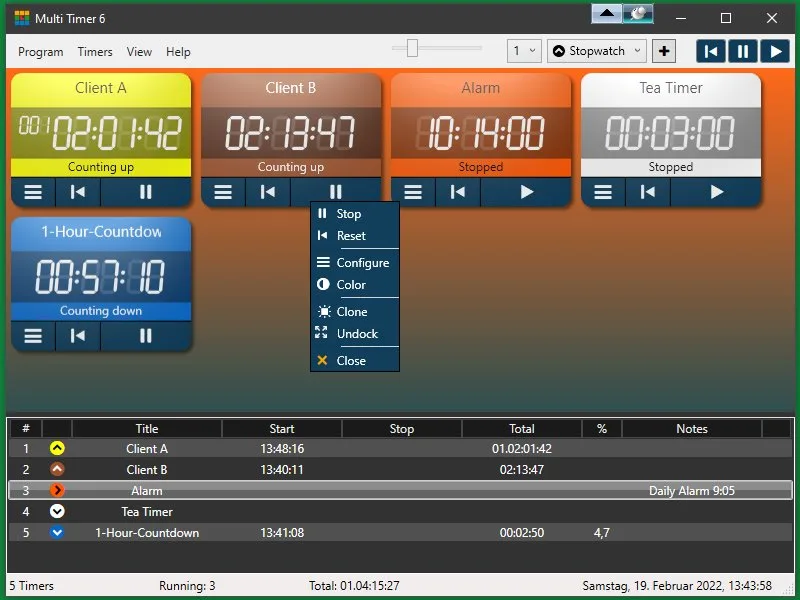
Multi Timer puts several timers in one Windows desktop window, with separate titles and colors so you can distinguish tasks. Each timer can count up as a stopwatch, count down from a chosen duration or act as an alarm clock for a date or recurring schedule. You can pause and resume timers, control selected groups, or undock individual timers to place them elsewhere on the desktop.
The connected list records start, stop and elapsed times and can be exported to Excel. Countdown chain mode starts the next timer in a group when the previous one finishes, making it useful for a sequence of timed activities. Cloning lets you reuse a timer's settings instead of configuring each copy separately.
The publisher offers a trial rather than describing the program as freeware. Email alerts also have a specific restriction: the publisher says Gmail accounts have not worked as senders since 2022. Check that limitation before relying on email notifications. This entry links to the publisher's Windows setup file; the installer has not been downloaded or run for this card.
What it offers
- Create multiple stopwatch, countdown and alarm-clock timers with individual titles and colors.
- Schedule alarms daily, on selected weekdays or for a specific date.
- Control timers individually or in groups, and undock them onto the desktop.
- Connect countdowns in chain mode and clone timers with matching settings.
- Export the timer list and event records to Excel and save timer configurations for later use.
Good to know
- The download is a trial, not a freeware license; no trial duration is confirmed here.
- The publisher states that Gmail accounts cannot be used as senders for email notifications.
Product images
Sources
References used for this listing. Retrieval dates do not indicate hands-on testing.
More in utilities
View category ↗
1.1.1.1 with WARP 2026.8.2115.0
Encrypt traffic from your Mac to Cloudflare’s network with WARP, or use DNS-only mode for encrypted DNS queries to the 1.1.1.1 resolver.
1.1.1.1 with WARP 2026.8.2115.0
Encrypt traffic between your Windows PC and Cloudflare, or use encrypted DNS only, with the free 1.1.1.1 with WARP app.

3uTools 9.12.005
Manage iPhone and iPad photos, music, apps and backups from Windows with 3uTools, a free utility that also includes device checks and firmware flashing tools.