
Utilities macOS
Auto Clicker by MurGaa
Automate repeated mouse clicks on Mac with two configurable clickers, keyboard shortcuts and adjustable delays. MurGaa offers a free trial followed by a time-limited paid license.
- Operating system
- macOS 11 Big Sur and later
- Architecture
- Intel 64-bit and Apple Silicon
- Download package
- ZIP archive
Compatibility is stated by the publisher; the application was not installed or run.
Link checked · Download guidance
What is Auto Clicker by MurGaa?
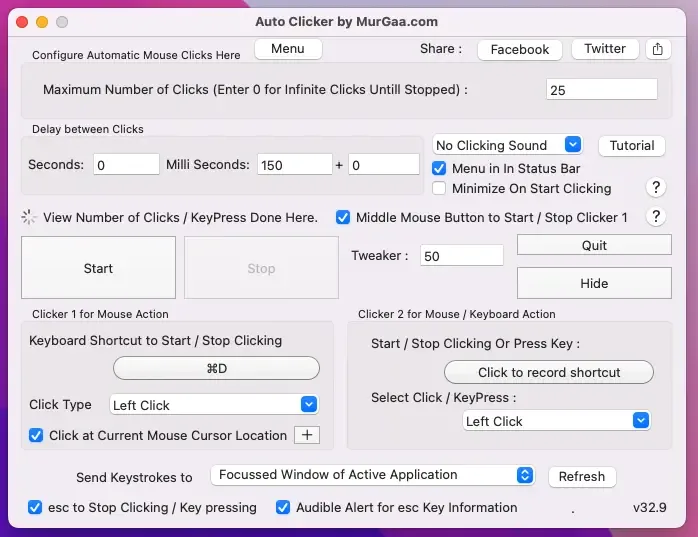
Auto Clicker by MurGaa repeats left or right mouse clicks on macOS. Its two clickers have individual keyboard shortcuts: the first can target the current pointer location or random positions within a selected screen area, while the second can perform mouse clicks or automated key presses. Adjustable delays and optional action sounds help configure repetitive input without manually clicking each time.
This is shareware, not an unrestricted free utility. The publisher offers a no-cost trial; the paid unlock permits use for up to six months on one Mac from payment. The linked ZIP is the publisher’s Mac package, listed for macOS 11 Big Sur and later on Intel 64-bit and Apple Silicon systems.
What it offers
- Automate left or right mouse-button clicks.
- Configure two clickers with individual start/stop keyboard shortcuts.
- Use the current cursor position or random positions within a selected area with the first clicker.
- Configure the second clicker for a mouse click or an automated key press.
- Adjust the interval between actions and enable optional sound notifications.
Good to know
- The free download is a trial; continued use after the trial requires payment.
- The publisher’s paid unlock lasts up to six months on one Mac from payment, rather than providing perpetual use.
Product images
Sources
References used for this listing. Retrieval dates do not indicate hands-on testing.
- Auto Clicker for Mac ↗Retrieved
- Auto Clicker for Mac - Download ↗Retrieved
More in utilities
View category ↗
1.1.1.1 with WARP 2026.8.2115.0
Encrypt traffic from your Mac to Cloudflare’s network with WARP, or use DNS-only mode for encrypted DNS queries to the 1.1.1.1 resolver.
1.1.1.1 with WARP 2026.8.2115.0
Encrypt traffic between your Windows PC and Cloudflare, or use encrypted DNS only, with the free 1.1.1.1 with WARP app.

3uTools 9.12.005
Manage iPhone and iPad photos, music, apps and backups from Windows with 3uTools, a free utility that also includes device checks and firmware flashing tools.