
Utilities Windows
My Lockbox
Hide, lock and password-protect a folder on Windows with My Lockbox. The free edition protects one folder and its subfolders; Pro adds multiple protected folders.
- Operating system
- Windows 10 and Windows 11
- Architecture
- x64 and ARM64
- Download package
- EXE installer
The publisher lists both 64-bit architectures and links one mylockbox_setup.exe installer. The installer was not downloaded or executed.
Link checked · Download guidance
What is My Lockbox?
My Lockbox is a Windows folder-protection utility from FSPro Labs. Choose a folder for private documents or other files, then lock it and require a password to regain access. The free edition covers one folder with any number of subfolders, so related files can stay together inside a single protected location. Protecting several separate folders requires the paid Professional edition.
An optional interactive password prompt keeps a protected folder visible but locked in File Explorer. Opening it brings up a password prompt instead of immediately exposing its contents. The publisher also lists Windows Hello authentication through a PIN, face or fingerprint, hotkeys for basic actions, and trusted-process settings that let selected backup or antivirus software access protected data.
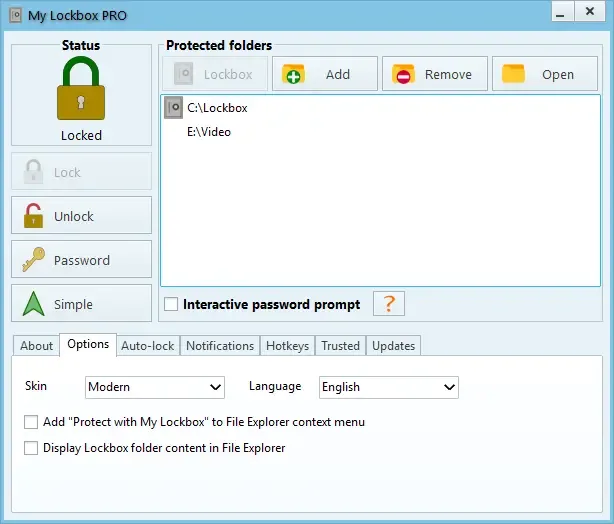
My Lockbox does not let you lock system-critical folders such as C:\Windows. Its purpose is controlling access to selected folders, not promising that every folder on a PC can be protected. The publisher screenshot below shows the Pro interface with multiple folders; that display does not change the free edition's one-folder limit.
What it offers
- Hide, lock and password-protect a selected folder.
- Protect one folder and an unlimited number of subfolders in the free edition.
- Keep a folder visible but locked with the optional interactive password prompt in File Explorer.
- Authenticate through Windows Hello using a PIN, face or fingerprint, as listed by the publisher.
- Use hotkeys for basic actions and allow selected trusted backup or antivirus processes.
Good to know
- The free edition protects only one folder; multiple separate protected folders require the paid Professional edition.
- System-critical folders, including C:\Windows, cannot be locked.
Product images
Sources
References used for this listing. Retrieval dates do not indicate hands-on testing.
- Password-Protect a Private Folder — My Lockbox ↗Retrieved
- My Lockbox - Download ↗Retrieved
More in utilities
View category ↗
1.1.1.1 with WARP 2026.8.2115.0
Encrypt traffic from your Mac to Cloudflare’s network with WARP, or use DNS-only mode for encrypted DNS queries to the 1.1.1.1 resolver.
1.1.1.1 with WARP 2026.8.2115.0
Encrypt traffic between your Windows PC and Cloudflare, or use encrypted DNS only, with the free 1.1.1.1 with WARP app.

3uTools 9.12.005
Manage iPhone and iPad photos, music, apps and backups from Windows with 3uTools, a free utility that also includes device checks and firmware flashing tools.