

Utilities Windows
Namexif for Windows
Rename photos by EXIF date and videos by their recorded timestamps with Namexif, a free Windows utility with custom filename formats and time-shift options.
- Operating system
- Windows XP, Vista, 7, 8 and 10
- Architecture
- Not specified by the publisher
- Download package
- Windows EXE download
Publisher-listed systems only. Windows 11 compatibility and processor architecture are unconfirmed; the executable was not downloaded or run.
Link checked · Download guidance
What is Namexif?
Namexif replaces camera-generated filenames with dates and times read from photo EXIF data or video timestamps. Its default year-first format makes alphabetical filename sorting follow the capture sequence, which is useful when combining pictures from an event or several cameras.
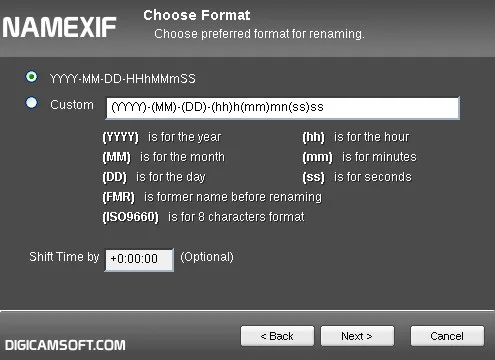
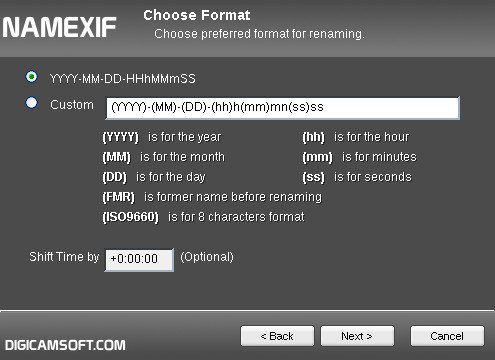
You can build a custom name from year, month, day, hour, minute and second tags, and include the original filename. A positive or negative time shift compensates for differences between camera clocks. When several files share the same timestamp, Namexif adds a suffix to distinguish their names. An eight-character ISO 9660 naming option is also available.
The date-based workflow depends on the recorded metadata: it does not establish the true capture time when a camera clock was wrong. Use the time-shift option when the offset is known. Digicamsoft lists Windows XP, Vista, 7, 8 and 10; Windows 11 compatibility is not confirmed by that publisher page.
What it offers
- Batch-rename photos using EXIF date and time, and videos using their recorded timestamps.
- Customize filenames with date and time tags and the former filename.
- Apply a positive or negative time shift to align files from different cameras.
- Differentiate files with identical timestamps by adding a filename suffix.
- Choose an eight-character ISO 9660 naming format.
Good to know
- Date-based filenames reflect recorded camera timestamps; an incorrect camera clock requires a known time adjustment.
- Publisher-listed Windows support stops at Windows 10; Windows 11 support is unconfirmed.
Product images
Sources
References used for this listing. Retrieval dates do not indicate hands-on testing.
- Namexif: Rename Photos or Videos to EXIF date ↗Retrieved
- Namexif - Download ↗Retrieved
More in utilities
View category ↗
1.1.1.1 with WARP 2026.8.2115.0
Encrypt traffic from your Mac to Cloudflare’s network with WARP, or use DNS-only mode for encrypted DNS queries to the 1.1.1.1 resolver.
1.1.1.1 with WARP 2026.8.2115.0
Encrypt traffic between your Windows PC and Cloudflare, or use encrypted DNS only, with the free 1.1.1.1 with WARP app.

3uTools 9.12.005
Manage iPhone and iPad photos, music, apps and backups from Windows with 3uTools, a free utility that also includes device checks and firmware flashing tools.