
Utilities Windows
Neat Download Manager
Manage file downloads on Windows with pause and resume, file-type filters, bandwidth limits and optional browser integration in the free Neat Download Manager.
- Operating system
- Windows 7 or higher, as listed by the publisher
- Architecture
- Not specified on the publisher pages consulted
- Download package
- EXE setup installer
Publisher lists Windows version 1.4; browser integration uses a separate extension. Drag-and-drop is listed for Mac only.
Link checked · Download guidance
What is Neat Download Manager?
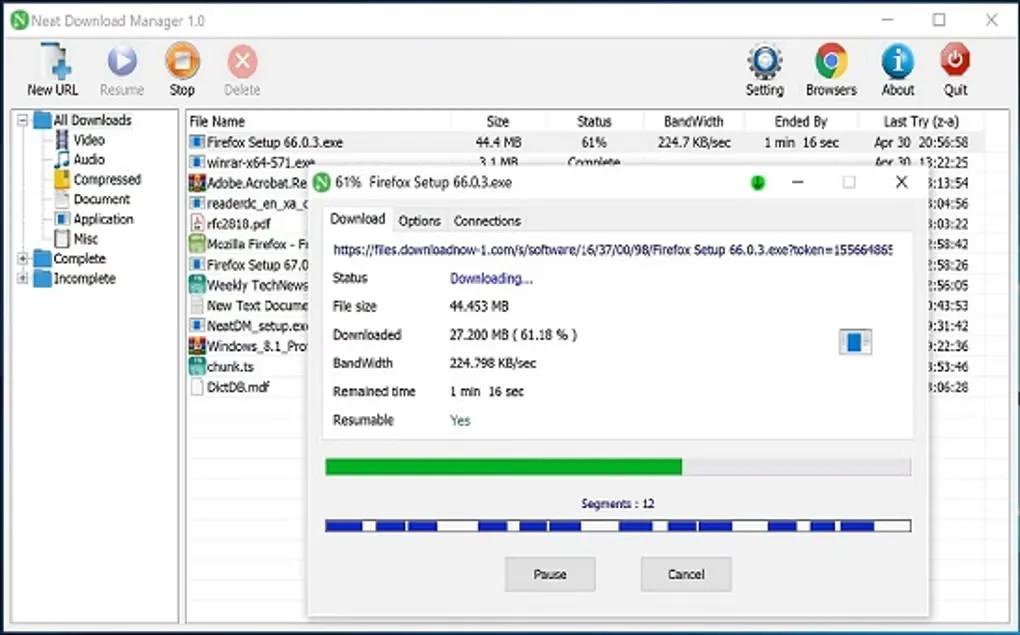
Neat Download Manager keeps internet transfers in a dedicated desktop window instead of a browser download list. It organizes files by type and completion status, supports HTTP, HTTPS and FTP, and uses dynamic segmentation to split transfers into parts. You can pause and resume downloads, limit bandwidth or change the connection count while a transfer is running.
The optional browser extension passes download links to the application. The publisher lists Firefox, Chrome, Microsoft Edge and other Chromium-based browsers as integration options. For browser link capture, the extension and desktop application work together; installing the desktop manager alone is not the same as adding the browser integration.
The publisher lists Windows 7 or higher and labels its Windows setup file version 1.4. The screenshot shows an older Windows 1.0 interface, not a test of the current installer. Drag-and-drop support is explicitly Mac-only on the publisher's feature list, so it should not be expected from this Windows edition.
What it offers
- Organize downloads by completion status and file type, including video and documents.
- Pause and resume transfers, with publisher-listed recovery of interrupted downloads.
- Set bandwidth limits and maximum connection counts while a download is in progress.
- Transfer files over HTTP, HTTPS or FTP, with HTTP proxy, SOCKS and authentication support.
- Send browser download links to the desktop manager through an optional Firefox or Chromium-based browser extension.
Good to know
- The publisher marks drag-and-drop support as Mac-only, not a Windows feature.
- Browser link capture requires the separate browser extension alongside the desktop application.
Product images
Sources
References used for this listing. Retrieval dates do not indicate hands-on testing.
More in utilities
View category ↗
Free Download Manager 6.35.2
Manage file downloads and torrents in one Windows app, with interrupted-download resuming, scheduling and traffic controls in Free Download Manager.
Website Ripper Copier 5.6.3
Save websites for offline browsing or collect selected file types with Website Ripper Copier for Windows, a commercial website downloader with a 30-day trial.
Internet Download Accelerator
Organize Windows downloads with queues, scheduled transfers, speed controls and interrupted-download resuming in Internet Download Accelerator.
Listen N Write Free 1.30.0.10
Transcribe recordings by hand with Listen N Write Free for Windows, combining audio and video playback, keyboard controls and a built-in text editor.

Personal Backup 6.4.14.0
Back up personal files to local drives, external storage or network and FTP servers with Personal Backup, a free Windows utility with scheduled tasks and optional encryption.