
Utilities Windows
NetBalancer
Monitor Windows network traffic by process, inspect connection activity and review usage history. Paid registration adds bandwidth priorities, limits and traffic rules.
- Operating system
- Windows 7, 8 and 10; their server variants
- Architecture
- Native x64 support
- Download package
- EXE installer
Publisher-listed systems only; Windows 11 not confirmed. This link selects the versioned 12.6.1 build 4290 setup file.
Link checked · Download guidance
What is NetBalancer?
NetBalancer shows which Windows processes are using your network connection, with incoming and outgoing speeds, connection details and traffic history. Its system traffic graph and tray display help you follow activity without treating every application as one undifferentiated total.
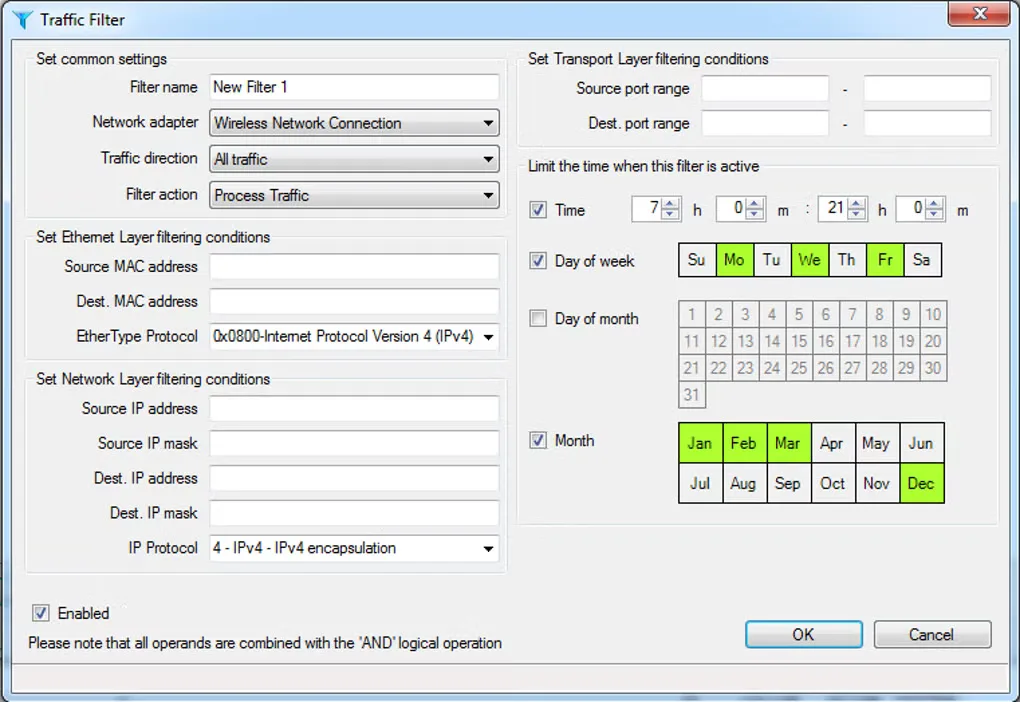
With paid registration, you can give a process a higher or lower network priority, set upload and download limits, or define detailed traffic rules. For example, the publisher describes lowering the priority of a busy download client so other applications can use the connection more comfortably. Time-based rules and deep packet inspection provide more selective control than a single global cap.
The unregistered edition is monitoring-only: it does not support priorities or rules. The publisher lists Windows 7, 8 and 10 and their server variants, with native x64 support; that statement does not confirm Windows 11 compatibility. The gallery image shows a source-provided Traffic Filter dialog, not a verified screenshot of build 4290 running on a current system.
What it offers
- View per-process incoming and outgoing traffic speeds and current network connections.
- Review per-process upload and download history and an overall system traffic graph.
- Monitor network traffic through the system tray, with an optional on-screen widget.
- With registration, set per-process priorities and bandwidth limits, plus global traffic limits.
- With registration, define detailed traffic rules; publisher features include time-based rules and deep packet inspection.
Good to know
- The unregistered version is monitoring-only and supports no priorities or rules; traffic-control features require paid registration.
- Windows 11 compatibility is not established by the publisher compatibility statement reviewed for this entry.
Product images
Sources
References used for this listing. Retrieval dates do not indicate hands-on testing.
More in utilities
View category ↗
1.1.1.1 with WARP 2026.8.2115.0
Encrypt traffic from your Mac to Cloudflare’s network with WARP, or use DNS-only mode for encrypted DNS queries to the 1.1.1.1 resolver.
1.1.1.1 with WARP 2026.8.2115.0
Encrypt traffic between your Windows PC and Cloudflare, or use encrypted DNS only, with the free 1.1.1.1 with WARP app.

3uTools 9.12.005
Manage iPhone and iPad photos, music, apps and backups from Windows with 3uTools, a free utility that also includes device checks and firmware flashing tools.