
Utilities Windows
NETGEAR genie
Manage compatible NETGEAR routers from a Windows desktop dashboard with a network map, WiFi settings and connection diagnostics. Genie is a legacy, end-of-service product.
- Operating system
- Windows; current release support not established
- Architecture
- Not established by publisher evidence
- Download package
- Publisher RAR archive labeled V2.4.64
Legacy End of Service product. Historical desktop manual lists XP SP3, Vista, Windows 7 and 8; these are not confirmed requirements for this package.
Link checked · Download guidance
What is NETGEAR genie?
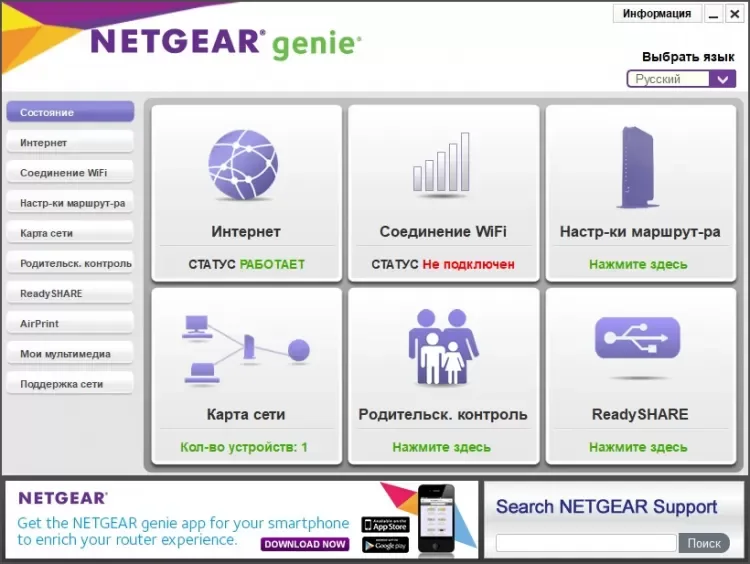
NETGEAR genie brings common home-network tasks into a desktop dashboard. It shows Internet and WiFi connection status, maps connected devices and provides access to settings on compatible NETGEAR routers. The desktop manual also describes connection diagnostics, nearby WiFi channel information, guest-network controls and a traffic meter where the router supports those features.
This is a legacy utility, not a promise of support for current routers or Windows releases. NETGEAR marks Genie as End of Service. Router configuration requires compatible hardware and access to that router; guest access and traffic metering depend on the model. Changing WiFi settings can disconnect wireless clients until they reconnect with the new settings.
The linked publisher package is the Windows RAR archive labeled V2.4.64 on NETGEAR’s support page. It is an archive rather than a standalone installer link. Current Windows compatibility and processor architecture were not established by the publisher evidence. The screenshot illustrates an older desktop interface in Russian and is not proof of the selected package’s exact interface.
What it offers
- View Internet and WiFi connection status from a desktop dashboard.
- See connected computers and devices in a visual network map.
- Access wireless and guest-network settings on compatible routers.
- View WiFi channel information and use connection diagnostics.
- Check Internet usage with the traffic meter on routers that support it.
Good to know
- NETGEAR marks Genie as End of Service; current router and Windows compatibility is not established here.
- Router configuration requires compatible NETGEAR hardware; guest-network and traffic-meter features depend on the router.
- Changing wireless settings can disconnect devices until they rejoin the network.
- The publisher download is a RAR archive, not a standalone EXE link.
Product images
Sources
References used for this listing. Retrieval dates do not indicate hands-on testing.
More in utilities
View category ↗
1.1.1.1 with WARP 2026.8.2115.0
Encrypt traffic from your Mac to Cloudflare’s network with WARP, or use DNS-only mode for encrypted DNS queries to the 1.1.1.1 resolver.
1.1.1.1 with WARP 2026.8.2115.0
Encrypt traffic between your Windows PC and Cloudflare, or use encrypted DNS only, with the free 1.1.1.1 with WARP app.

3uTools 9.12.005
Manage iPhone and iPad photos, music, apps and backups from Windows with 3uTools, a free utility that also includes device checks and firmware flashing tools.