

Utilities Windows
NetSetMan for Windows
Switch saved IP, DNS, Wi-Fi and other network settings with NetSetMan for Windows. The free edition offers eight profiles for non-commercial use.
- Operating system
- Windows 7, 8, 10 and 11
- Architecture
- 32-bit and 64-bit, as listed by the publisher
- Download package
- EXE; combined setup, update and portable options
The free edition has non-commercial licensing and a 14-day testing restriction in network domains and on Windows Enterprise/Server.
Link checked · Download guidance
What is NetSetMan?
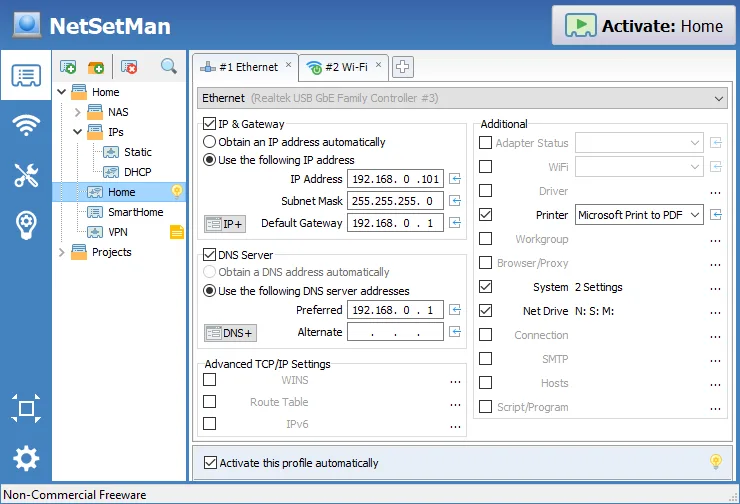
NetSetMan saves network configurations as profiles so you can change settings when moving between locations without re-entering each value in Windows. A profile can bring together IP addresses, gateways and DNS servers with settings such as the default printer and mapped network drives. It supports IPv4 and IPv6, and its Wi-Fi manager organizes saved wireless profiles.
You can activate a profile from the tray menu or use AutoSwitch conditions to select it automatically. The publisher also provides command-line profile activation. The Windows download combines setup, updating and a portable option in one executable.
The non-commercial free edition is limited to eight profiles. Work use, including use on a company notebook, requires a paid Pro license. The publisher also restricts the free edition to 14 days for testing in a network domain or on Windows Enterprise/Server; it is not an unrestricted free option for business networks.
What it offers
- Save and switch profiles containing IP addresses, gateways and DNS settings, with IPv4 and IPv6 support.
- Include a default printer and mapped network drives in a configuration profile.
- Organize, create, delete and connect to saved Wi-Fi profiles.
- Activate profiles from the tray menu, through AutoSwitch conditions or by command line.
- Choose setup, update or portable operation from the publisher's combined executable.
Good to know
- The non-commercial free edition supports eight profiles; Pro provides unlimited profiles.
- Commercial use, including work use and company notebooks, requires a paid NetSetMan Pro license.
- The free edition is limited to 14 days for testing in a network domain or on Windows Enterprise/Server.
Product images
Sources
References used for this listing. Retrieval dates do not indicate hands-on testing.
More in utilities
View category ↗
1.1.1.1 with WARP 2026.8.2115.0
Encrypt traffic from your Mac to Cloudflare’s network with WARP, or use DNS-only mode for encrypted DNS queries to the 1.1.1.1 resolver.
1.1.1.1 with WARP 2026.8.2115.0
Encrypt traffic between your Windows PC and Cloudflare, or use encrypted DNS only, with the free 1.1.1.1 with WARP app.

3uTools 9.12.005
Manage iPhone and iPad photos, music, apps and backups from Windows with 3uTools, a free utility that also includes device checks and firmware flashing tools.