

Utilities Windows
NetworkOpenedFiles for Windows
See which files other computers have open on your Windows shares, identify users and permissions, and export the list with NetworkOpenedFiles.
- Operating system
- Windows XP through Windows 11, including Windows Server, as listed by the publisher
- Architecture
- x64 (64-bit)
- Download package
- ZIP archive containing a standalone executable
This download is 64-bit; the publisher also offers a separate 32-bit package. Remote-computer access requires full administrator rights.
Link checked · Download guidance
What is NetworkOpenedFiles?
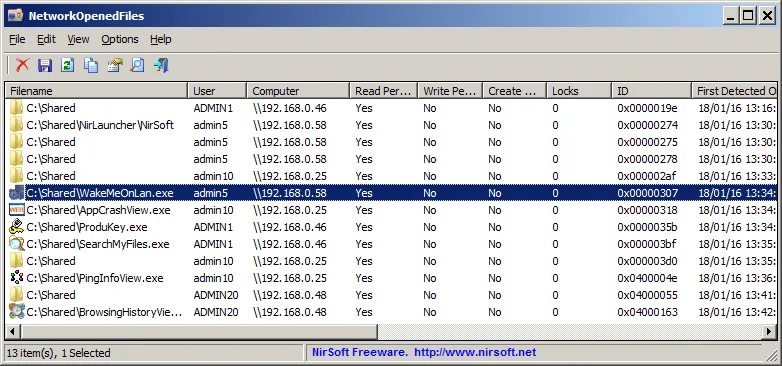
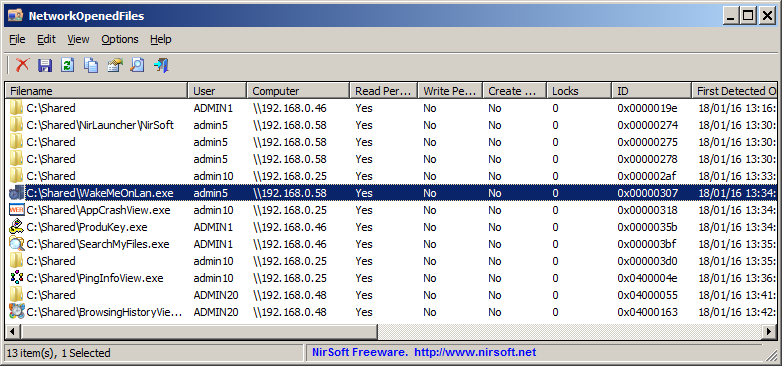
NetworkOpenedFiles shows files on a Windows computer that other computers on the network currently have open. Its table identifies filenames, users, read/write/create permissions and lock counts, with computer names available on Windows 7 or Windows Server 2008 and later. It is useful when you need to identify who is using a shared file rather than inspect general network traffic.
You can filter the list, merge repeated entries with the same filename, user and computer, copy rows to a spreadsheet, or export records as CSV, text, HTML, XML or JSON. Advanced Options can log changes as files open and close. The program also offers a command-line interface and a command to close selected opened files.
The publisher provides separate 32-bit and 64-bit ZIP packages and says the utility needs no installation process or additional DLL files. This entry links to the 64-bit package. You can inspect another computer's opened network files through Advanced Options, but that connection requires full administrator rights. Older supported Windows versions do not populate the Computer column.
What it offers
- Identify shared filenames, users, permissions, lock counts and other file details.
- Filter filenames, users or computers, and merge entries with the same filename, user and computer.
- Copy rows or export the opened-file list to CSV, text, HTML, XML or JSON.
- Log file-opening and closing changes through Advanced Options.
- Close selected opened files or use command-line export and close commands.
Good to know
- Connecting to another computer requires full administrator rights on that computer.
- The Computer column is unavailable on systems older than Windows 7 or Windows Server 2008.
Product images
Sources
References used for this listing. Retrieval dates do not indicate hands-on testing.
More in utilities
View category ↗
1.1.1.1 with WARP 2026.8.2115.0
Encrypt traffic from your Mac to Cloudflare’s network with WARP, or use DNS-only mode for encrypted DNS queries to the 1.1.1.1 resolver.
1.1.1.1 with WARP 2026.8.2115.0
Encrypt traffic between your Windows PC and Cloudflare, or use encrypted DNS only, with the free 1.1.1.1 with WARP app.

3uTools 9.12.005
Manage iPhone and iPad photos, music, apps and backups from Windows with 3uTools, a free utility that also includes device checks and firmware flashing tools.