

Utilities Windows
NewFileTime for Windows
Change creation, modification and last-access timestamps for files and folders with NewFileTime, a free portable Windows utility with batch editing.
- Operating system
- Windows 11, 10, 8.1 and 7; Windows Server versions also listed by publisher
- Architecture
- x64 (selected download)
- Download package
- Portable ZIP archive
Publisher also lists x86/x32 support and separate package URLs. Compatibility is publisher-reported; the application was not installed or run.
Link checked · Download guidance
What is NewFileTime?
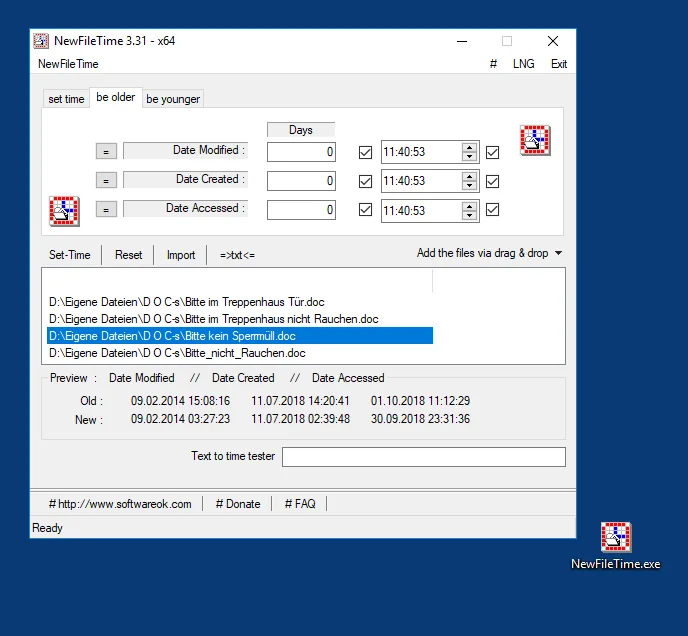
NewFileTime adjusts the dates and times Windows records for files and folders. It suits correcting a batch of timestamps after a clock error or shifting times by a fixed amount. Add items by drag and drop or import a folder, choose which timestamps to change, and apply an exact date and time or make the selected items older or younger.
Folder import can include subfolders, files, folders or a selected combination. The utility also supports deriving timestamps from recognized filename formats and exchanging file times with spreadsheets. It runs without installation; the linked download is the publisher's x64 ZIP package.
Timestamp changes still depend on Windows access permissions and folder protection. Protected locations may prevent changes, so use files you are authorized to edit and check the import scope before applying a batch operation. The publisher screenshot shows an older 3.31 interface, not the listed 8.31 release.
What it offers
- Edit creation, modification and last-access dates and times for files and folders.
- Apply timestamp changes to multiple items using drag and drop or folder import with optional subfolders.
- Set a specific date and time or shift existing timestamps to make files older or younger.
- Derive timestamps from supported filename formats and export or import file times for spreadsheet editing.
- Run as a portable Windows utility without installation.
Good to know
- Windows access rights or folder protection can prevent timestamp changes; some locations require administrative or equivalent permissions.
- Filename-to-time conversion depends on recognized filename formats; inspect the preview before applying changes.
Product images
Sources
References used for this listing. Retrieval dates do not indicate hands-on testing.
- NewFileTime 8.31 Corrections and manipulation of timestamp ↗Retrieved
- NewFileTime — publisher PAD metadata ↗Retrieved
- NewFileTime - License Agreement ↗Retrieved
- Help on Windows 10/11/12 I can not change the file time stamp, why? ↗Retrieved
- Convert File Name to File Time Stamp - Example Android Smartphones! ↗Retrieved
- Summer time, winter time and other file time corrections! ↗Retrieved
More in utilities
View category ↗
1.1.1.1 with WARP 2026.8.2115.0
Encrypt traffic from your Mac to Cloudflare’s network with WARP, or use DNS-only mode for encrypted DNS queries to the 1.1.1.1 resolver.
1.1.1.1 with WARP 2026.8.2115.0
Encrypt traffic between your Windows PC and Cloudflare, or use encrypted DNS only, with the free 1.1.1.1 with WARP app.

3uTools 9.12.005
Manage iPhone and iPad photos, music, apps and backups from Windows with 3uTools, a free utility that also includes device checks and firmware flashing tools.