

Utilities macOS
Nmap for macOS
Discover network hosts, inspect ports and identify services with Nmap for Mac. The publisher's x86-64 macOS installer also includes the Zenmap graphical interface.
- Operating system
- macOS; publisher lists testing on Mac OS X 10.9 and later
- Architecture
- x86-64
- Download package
- DMG disk image containing an installer
Installer offers Nmap, Zenmap, Ncat and Ndiff. Native Apple Silicon support is not established by the cited package documentation; no local installation was performed.
Link checked · Download guidance
What is Nmap?
Nmap maps network hosts and the services they expose. Administrators can use it for network inventory, port inspection and security auditing, with options for service-version and operating-system detection. It works from the command line; the included Zenmap interface adds reusable scan profiles and saved results that can be opened or compared later.
This download is the publisher's Nmap 7.993 disk image for x86-64 macOS. The publisher lists Nmap, Zenmap, Ncat and Ndiff as installer components and says the programs have been tested on Mac OS X 10.9 and later. That statement is publisher documentation, not a compatibility test performed for this entry; native Apple Silicon support is not established for this package.
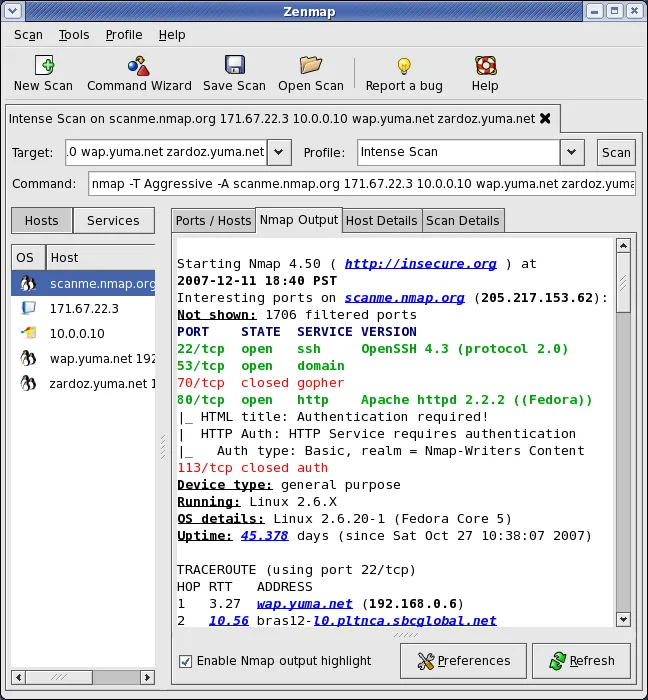
Most raw-packet scan techniques require root privileges on Unix systems, including macOS. Filtered ports can also remain ambiguous: a firewall may prevent Nmap from determining whether a service is listening. The screenshot is a historical publisher example of the cross-platform Zenmap interface showing Nmap 4.50 output, not a capture of version 7.993 running on a current Mac.
What it offers
- Discover available network hosts and inspect TCP or UDP ports.
- Request service-version and operating-system detection for scanned hosts.
- Save recurring scans as profiles in the Zenmap graphical interface.
- Save, reopen and compare scan results in Zenmap.
Good to know
- Most raw-packet scan techniques require root privileges on macOS.
- Filtered ports may remain indeterminate because firewalls can block the responses needed to distinguish open from closed ports.
- The linked macOS package is x86-64; the cited publisher documentation does not establish native Apple Silicon support.
Product images
Sources
References used for this listing. Retrieval dates do not indicate hands-on testing.
- Nmap: the Network Mapper - Free Security Scanner ↗Retrieved
- Download the Free Nmap Security Scanner for Linux/Mac/Windows ↗Retrieved
- Zenmap - Official cross-platform Nmap Security Scanner GUI ↗Retrieved
- Nmap Public Source License ↗Retrieved
- Chapter 15. Nmap Reference Guide ↗Retrieved
- Port Scanning Techniques | Nmap Network Scanning ↗Retrieved
More in utilities
View category ↗
1.1.1.1 with WARP 2026.8.2115.0
Encrypt traffic from your Mac to Cloudflare’s network with WARP, or use DNS-only mode for encrypted DNS queries to the 1.1.1.1 resolver.
1.1.1.1 with WARP 2026.8.2115.0
Encrypt traffic between your Windows PC and Cloudflare, or use encrypted DNS only, with the free 1.1.1.1 with WARP app.

3uTools 9.12.005
Manage iPhone and iPad photos, music, apps and backups from Windows with 3uTools, a free utility that also includes device checks and firmware flashing tools.