
Utilities macOS
NotchNook
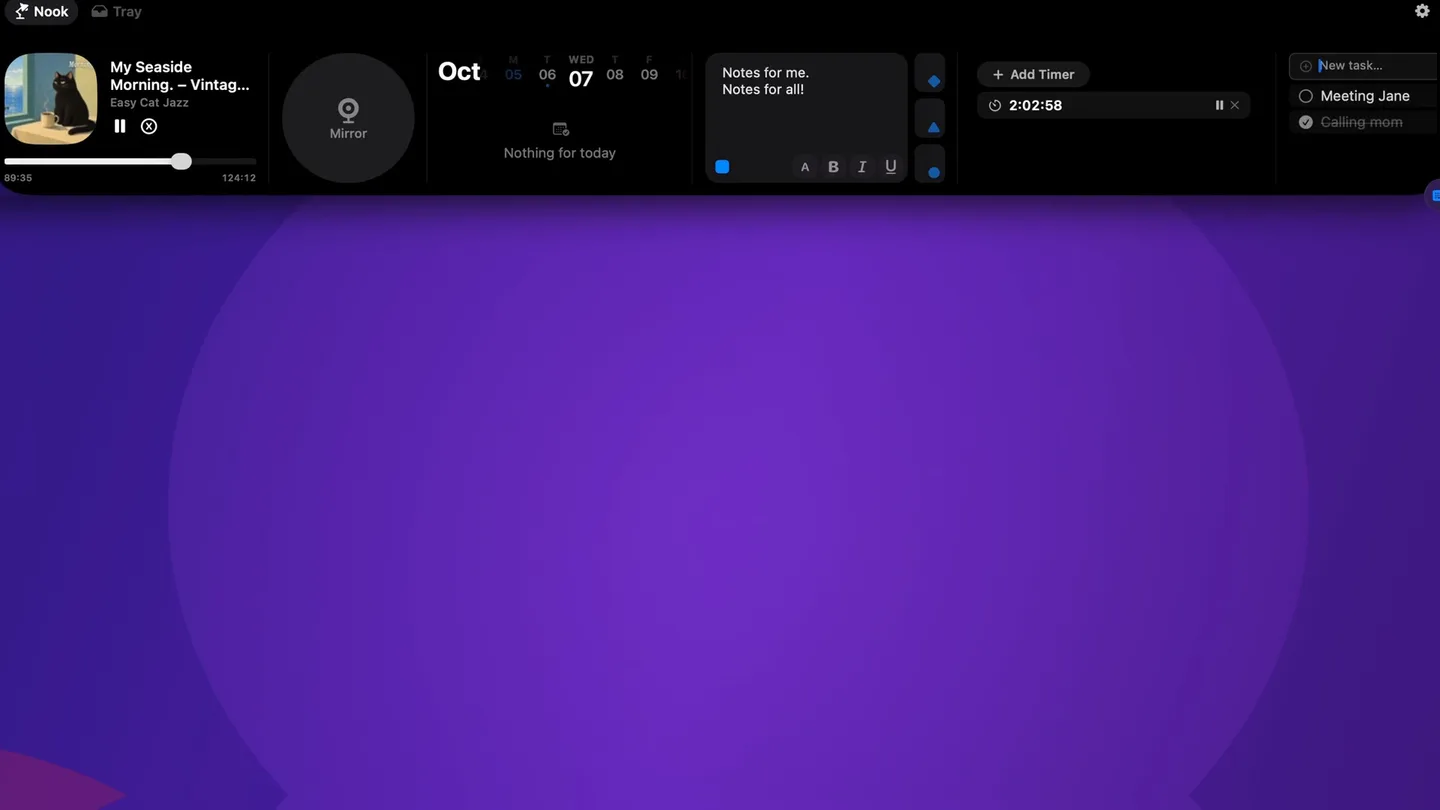
Keep music controls, calendar events, notes, timers and a file tray at the top of your Mac screen with NotchNook Classic, a paid utility with a 48-hour trial.
- Operating system
- macOS 14.6 or later
- Architecture
- Apple silicon and Intel
- Download package
- DMG disk image
Classic edition. Works with or without a notch, including external displays; the publisher lists support for both Mac processor families.
Link checked · Download guidance
What is NotchNook?
NotchNook Classic turns the area around your Mac’s notch into a panel for everyday controls and information. Open the Nook to control music, check calendar events, jot down notes, manage a to-do list or start a timer. The Tray holds files close at hand and can send them through AirDrop. On a display without a notch, a slim handle at the top opens the same panel.
This entry covers the original NotchNook, now called Classic, rather than the separate Pro edition. Classic supports Apple silicon and Intel Macs running macOS 14.6 or later. The free trial lasts 48 hours; continued use requires a paid monthly or lifetime license. Features that need access to Calendar or the camera depend on the corresponding macOS permission.
What it offers
- Control music playback from the Nook.
- View calendar events and use meeting join buttons for Meet, Zoom, Teams and Webex.
- Keep quick notes, to-do items and timers alongside the other widgets.
- Hold files in the Tray and send them through AirDrop.
- Open the Nook on notched screens, notch-free Macs and external displays.
Good to know
- The full-feature trial lasts 48 hours; continued use requires a paid license.
- Requires macOS 14.6 or later; older macOS versions are not supported by the publisher’s current Classic requirements.
- Calendar and camera features require the relevant macOS permissions; declining access leaves those features unavailable.
Product images
Sources
References used for this listing. Retrieval dates do not indicate hands-on testing.
- NotchNook — lo.cafe | Official website ↗Retrieved
- NotchNook Pro — The original notch app for Mac, rebuilt ↗Retrieved
- NotchNook press kit ↗Retrieved
- Official NotchNook Classic release metadata ↗Retrieved
- NotchNook for Mac - Download ↗Retrieved
More in utilities
View category ↗
1.1.1.1 with WARP 2026.8.2115.0
Encrypt traffic from your Mac to Cloudflare’s network with WARP, or use DNS-only mode for encrypted DNS queries to the 1.1.1.1 resolver.
1.1.1.1 with WARP 2026.8.2115.0
Encrypt traffic between your Windows PC and Cloudflare, or use encrypted DNS only, with the free 1.1.1.1 with WARP app.

3uTools 9.12.005
Manage iPhone and iPad photos, music, apps and backups from Windows with 3uTools, a free utility that also includes device checks and firmware flashing tools.