
Utilities Windows
OP Auto Clicker
Automate repeated mouse clicks on Windows with adjustable intervals, a fixed or cursor-following position, and a repeat count or continuous clicking.
- Operating system
- Windows 7, 8 and 10 listed by publisher; Windows 11 listed by Softonic
- Architecture
- Publisher mentions 64-bit system compatibility; this EXE's native architecture is unverified
- Download package
- Portable Windows EXE
Publisher describes the application as portable. Compatibility is source-reported; the executable was not downloaded or run.
Link checked · Download guidance
What is OP Auto Clicker?
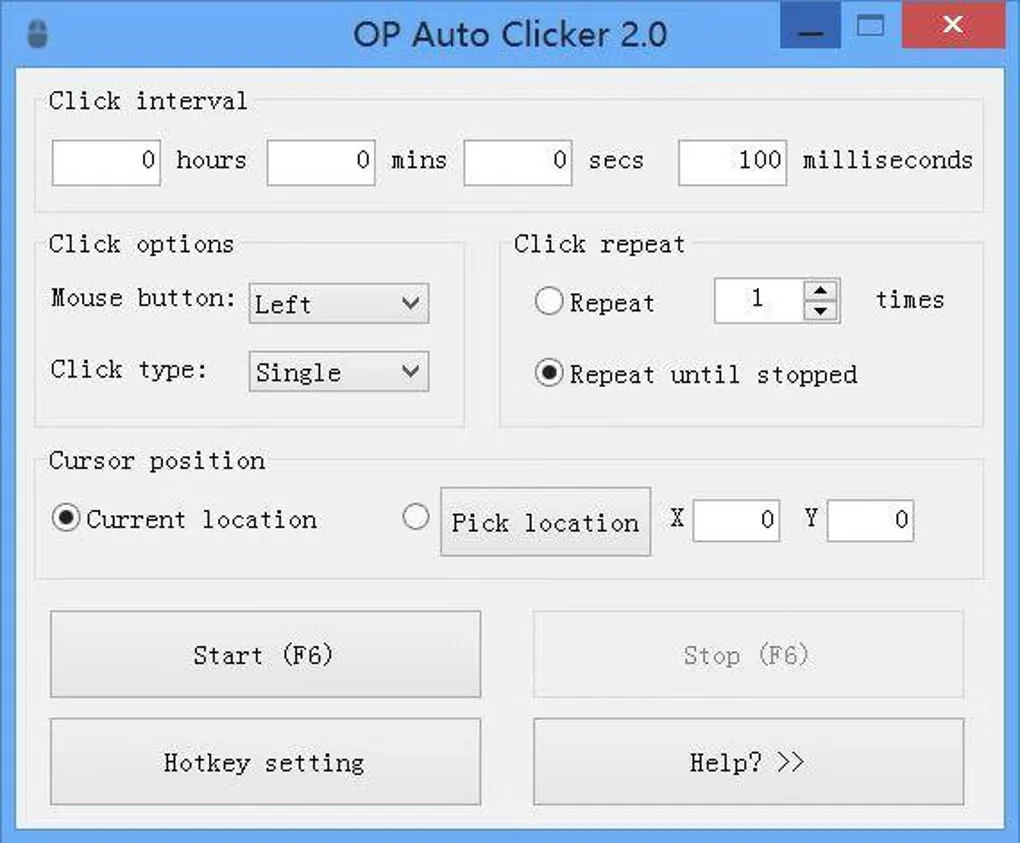
OP Auto Clicker repeats mouse clicks at an interval you choose. Use it for a task that needs the same click repeatedly: select a mouse button and click type, choose a fixed screen position or let clicks follow the cursor, then set a repeat count or keep clicking until stopped. The publisher's Windows guide identifies F6 as the default start hotkey.
The application supports single, double and triple clicks, customizable hotkeys that work in the background, and saved settings, including the last fixed location. The publisher describes it as free, open source and portable. This entry links to the Windows AutoClicker.exe file in the publisher-linked SourceForge project's 4.1 folder.
Its focus is repeated clicking, not recording a complete keyboard-and-mouse workflow: Softonic lists the lack of full macro recording as a limitation. The screenshot shows the older OP Auto Clicker 2.0 interface from the source gallery, not a verified view of version 4.1.
What it offers
- Set the interval between repeated mouse clicks.
- Click at the current cursor location or a selected fixed position.
- Choose the mouse button and single, double or triple clicking.
- Set a repeat count or continue clicking until stopped.
- Customize background hotkeys and retain settings between sessions.
Good to know
- No full macro recording feature; this is a repeated-click utility rather than a complete keyboard-and-mouse workflow recorder.
Product images
Sources
References used for this listing. Retrieval dates do not indicate hands-on testing.
More in utilities
View category ↗
1.1.1.1 with WARP 2026.8.2115.0
Encrypt traffic from your Mac to Cloudflare’s network with WARP, or use DNS-only mode for encrypted DNS queries to the 1.1.1.1 resolver.
1.1.1.1 with WARP 2026.8.2115.0
Encrypt traffic between your Windows PC and Cloudflare, or use encrypted DNS only, with the free 1.1.1.1 with WARP app.

3uTools 9.12.005
Manage iPhone and iPad photos, music, apps and backups from Windows with 3uTools, a free utility that also includes device checks and firmware flashing tools.