

Utilities Windows
OpenVPN for Windows
Connect a Windows PC to a configured VPN with OpenVPN Community Edition, including the OpenVPN GUI tray client and a system service.
- Operating system
- Windows 10 onward, including Windows Server editions, as listed by the publisher
- Architecture
- x86-64 (x64)
- Download package
- MSI installer
Includes OpenVPN GUI and a system service daemon. Separate ARM64 and x86 installers are available from the publisher.
Link checked · Download guidance
What is OpenVPN?
OpenVPN Community Edition creates VPN connections between configured clients and servers. The Windows installer includes OpenVPN GUI, a notification-area frontend for starting and stopping tunnels, importing connection profiles and viewing logs. It suits connecting to a VPN that you or your network administrator already manage.
A download alone is not enough to connect: OpenVPN GUI needs an .ovpn configuration file for your VPN, plus any authentication details required by that server. This entry covers Community Edition and its bundled OpenVPN GUI, not the separate OpenVPN Connect application or Access Server web interface.
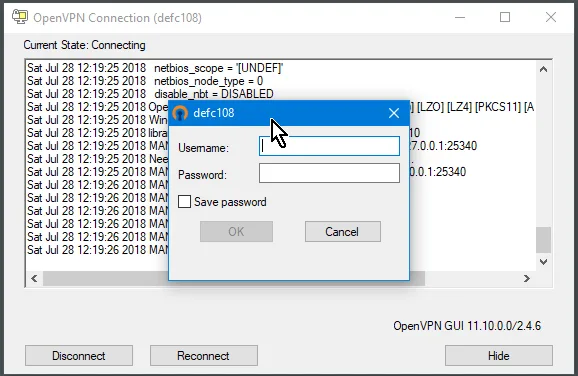
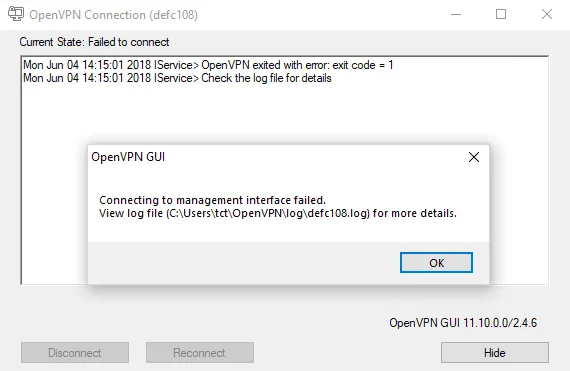
The linked package is the Windows x64 MSI for OpenVPN 2.7.8, installer revision I002. ARM64 and 32-bit installers are separate downloads on the publisher's community page. The gallery uses historical OpenVPN GUI screenshots from the official community documentation; their displayed 2.4.6/GUI 11.10.0.0 interface is not a preview of every detail in 2.7.8.
What it offers
- Start and stop individual VPN tunnels from the OpenVPN GUI notification-area menu.
- Import .ovpn connection profiles through the GUI or use configuration files in the documented config folders.
- View connection status and logs to investigate connection problems.
- Use the bundled system service for configured background connections.
- Build client/server VPN configurations with SSL/TLS and supported certificate or username/password authentication.
Good to know
- Requires a configured VPN server and a matching .ovpn profile; the installer alone does not provide a working VPN connection.
- The linked installer is x64 only; ARM64 and 32-bit Windows require their respective packages.
- Setting up your own server involves networking and authentication configuration; the publisher's how-to assumes basic networking knowledge.
Product images
Sources
References used for this listing. Retrieval dates do not indicate hands-on testing.
- Download OpenVPN Community Edition (Open Source) | OpenVPN ↗Retrieved
- OpenVPN GUI — official repository and README ↗Retrieved
- OpenVPN 2.7.8 — copyright and component license notices ↗Retrieved
- OpenVPN 2.x Community How-To: Complete Setup & Configuration Guide ↗Retrieved
- Using the OpenVPN-GUI for Windows — official community wiki ↗Retrieved
- Download OpenVPN - Free - latest version — browser discovery evidence ↗Retrieved
More in utilities
View category ↗
1.1.1.1 with WARP 2026.8.2115.0
Encrypt traffic from your Mac to Cloudflare’s network with WARP, or use DNS-only mode for encrypted DNS queries to the 1.1.1.1 resolver.
1.1.1.1 with WARP 2026.8.2115.0
Encrypt traffic between your Windows PC and Cloudflare, or use encrypted DNS only, with the free 1.1.1.1 with WARP app.



3uTools 9.12.005
Manage iPhone and iPad photos, music, apps and backups from Windows with 3uTools, a free utility that also includes device checks and firmware flashing tools.