
Utilities Windows
OSFMount
Mount disk images as Windows drives or create temporary RAM disks with OSFMount, a free 64-bit utility from PassMark Software.
- Operating system
- Windows 10 and Windows 11
- Architecture
- 64-bit
- Download package
- EXE installation package
Requires SSE4.2 CPU instructions, administrator privileges, 1 GB RAM and 15 MB free installation space. Publisher directs Windows 7 and 32-bit users to older releases.
Link checked · Download guidance
What is OSFMount?
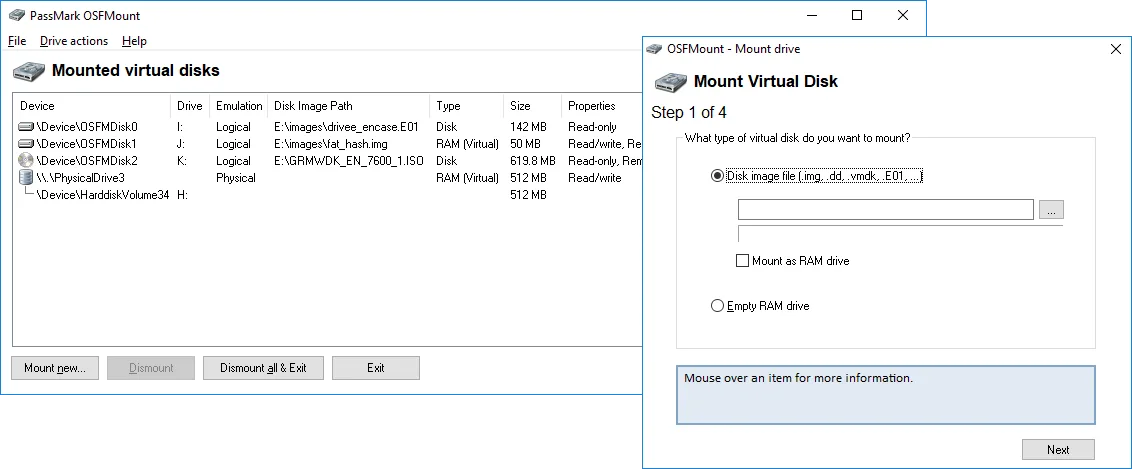
OSFMount mounts local disk image files as a physical disk or a drive letter in Windows. It is useful for examining an image without restoring it to a physical disk, accessing files in an ISO, or making an image available to analysis tools such as OSForensics. Supported formats include raw IMG and DD images, ISO, VMDK, E01 and VHD.
Images mount read-only by default to avoid changing the original file. For writable access, write-cache mode saves changes to a separate delta file while preserving the source image. OSFMount can also create an empty RAM drive or mount an image into RAM. RAM-drive contents are not persistent after shutdown, so a RAM drive is not a substitute for permanent storage.
The linked 3.3.1000 installation package is for 64-bit Windows 10 and 11. It requires an SSE4.2-capable processor and administrator privileges. AFF support is limited to AFFv3 with zlib compression; encrypted or signed AFF images are not supported.
What it offers
- Mount disk images as a physical disk or a Windows drive letter.
- Open supported image formats including IMG, DD, ISO, VMDK, E01 and VHD.
- Keep images read-only by default, or use write-cache mode to store changes in a separate delta file.
- Create empty RAM drives or mount disk images into RAM.
Good to know
- RAM-drive contents do not persist after system shutdown.
- The current installation package requires 64-bit Windows 10 or 11, an SSE4.2-capable CPU and administrator privileges.
- AFF support is AFFv3 with zlib compression only; encryption and signatures are not supported.
Product images
Sources
References used for this listing. Retrieval dates do not indicate hands-on testing.
More in utilities
View category ↗
1.1.1.1 with WARP 2026.8.2115.0
Encrypt traffic from your Mac to Cloudflare’s network with WARP, or use DNS-only mode for encrypted DNS queries to the 1.1.1.1 resolver.
1.1.1.1 with WARP 2026.8.2115.0
Encrypt traffic between your Windows PC and Cloudflare, or use encrypted DNS only, with the free 1.1.1.1 with WARP app.

3uTools 9.12.005
Manage iPhone and iPad photos, music, apps and backups from Windows with 3uTools, a free utility that also includes device checks and firmware flashing tools.