
Utilities Windows
OutlookAttachView for Windows
Find attachments across Outlook messages and save selected files to a folder with OutlookAttachView, a free Windows utility for Microsoft Outlook.
- Operating system
- Windows 2000/XP/Vista/7/8/2003/2008/10/11; Microsoft Outlook 2003–2024 required
- Architecture
- x64; for 64-bit Microsoft Outlook
- Download package
- Portable ZIP archive
Match the utility build to Outlook, not just Windows. A separate standard package is listed by the publisher. Outlook Express is unsupported.
Link checked · Download guidance
What is OutlookAttachView?
OutlookAttachView scans messages stored in Microsoft Outlook and lists their attachments in one table. Select the files you need and save them to a folder instead of opening each message separately. Filters for dates, folders, file extensions, size, senders and recipients help narrow the list. You can also export attachment details to text, CSV, HTML or XML, or use command-line options for extraction and list export.
The utility requires Microsoft Outlook and does not work with Outlook Express. Choose the build that matches Outlook's architecture: the linked x64 ZIP is for 64-bit Outlook, not simply any 64-bit Windows installation. The publisher describes the utility as portable, with no installation process required.
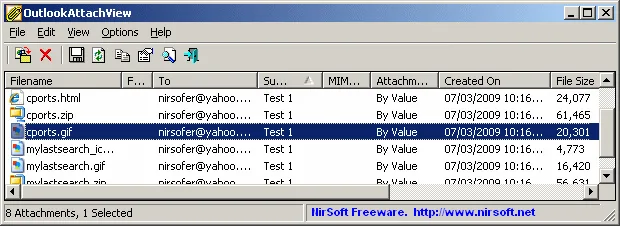
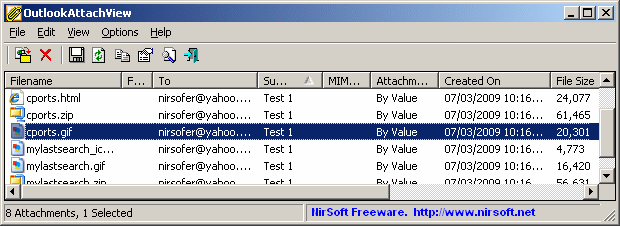
Saving attachment files and exporting a list of attachment details are different operations. Deleting attachments from Outlook is another separate action: OutlookAttachView cannot restore attachments after deleting them. The screenshot shows the publisher's historical Windows interface, not a verified view of version 3.55.
What it offers
- Scan Outlook messages and display their attachments in a single list.
- Save one or more selected attachments to a folder.
- Filter by date, folder, file extension, size, sender or recipient.
- Export attachment details to text, CSV, HTML or XML.
- Use command-line options for attachment extraction and list export.
Good to know
- Requires Microsoft Outlook; Outlook Express is not supported.
- The utility build must match Outlook's architecture; the linked x64 package requires 64-bit Outlook.
- Attachments deleted from Outlook cannot be restored by OutlookAttachView.
Product images
Sources
References used for this listing. Retrieval dates do not indicate hands-on testing.
More in utilities
View category ↗
1.1.1.1 with WARP 2026.8.2115.0
Encrypt traffic from your Mac to Cloudflare’s network with WARP, or use DNS-only mode for encrypted DNS queries to the 1.1.1.1 resolver.
1.1.1.1 with WARP 2026.8.2115.0
Encrypt traffic between your Windows PC and Cloudflare, or use encrypted DNS only, with the free 1.1.1.1 with WARP app.

3uTools 9.12.005
Manage iPhone and iPad photos, music, apps and backups from Windows with 3uTools, a free utility that also includes device checks and firmware flashing tools.