
Utilities Windows
OVITO Basic
Inspect particle simulations and molecular structures in 3D with OVITO Basic, a free Windows application for visualization and pipeline-based data analysis.
- Operating system
- Windows 10 (21H2 or later); Windows 11 (21H2 or later)
- Architecture
- x86_64 (64-bit)
- Download package
- EXE installer
Selected package is OVITO Basic 3.17.1 for Windows x64, not OVITO Pro. Publisher requirements; application not installed or tested.
Link checked · Download guidance
What is OVITO Basic?
OVITO Basic turns particle-based simulation output into an interactive 3D view. It is aimed at researchers working with atomistic, molecular and granular models rather than general-purpose 3D artwork. Load a supported simulation file, inspect the structure from different angles and build a sequence of modifiers for selection, coloring, filtering or analysis. The pipeline is non-destructive: changing or removing a modifier does not alter the original dataset.
For a trajectory, OVITO can recognize numbered file sequences or multiple frames in a supported file, including LAMMPS dump and XYZ data. The timeline lets you move through the simulation. The file-source panel can reload data or replace the source so an existing processing pipeline can be reused with another simulation.
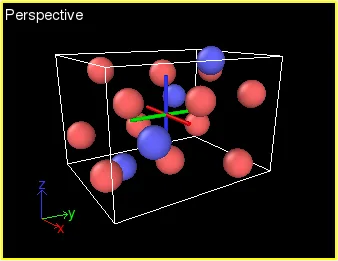
Basic is the free edition, not a trial of every Pro feature. Multiple data pipelines in one scene, integrated Python code generation and several advanced analysis and rendering tools belong to OVITO Pro. The linked download is the Basic 3.17.1 Windows x64 EXE installer; the publisher requires Windows 10 or Windows 11, version 21H2 or later. The screenshot illustrates the shared OVITO particle viewport from the publisher's manual; it is not a capture of a locally tested Windows installation.
What it offers
- Explore particle and molecular simulation data in interactive 3D viewports with rotation, panning and zoom.
- Combine selection, coloring, filtering and analysis modifiers in an adjustable, non-destructive pipeline.
- Load supported simulation trajectories from numbered file sequences or multi-frame files, including LAMMPS dump and XYZ.
- Reload an input file or replace the data source to reuse an existing processing pipeline.
Good to know
- Multiple pipelines in one visualization scene, Python code generation and certain advanced modifiers and rendering engines require OVITO Pro.
- This Windows build requires an x86_64 processor and Windows 10 or Windows 11, version 21H2 or later.
Product images
Sources
References used for this listing. Retrieval dates do not indicate hands-on testing.
- OVITO — Scientific data visualization and analysis software ↗Retrieved
- Installation — OVITO User Manual 3.17.1 documentation ↗Retrieved
- About OVITO — OVITO User Manual 3.17.1 documentation ↗Retrieved
- License information — OVITO User Manual 3.17.1 documentation ↗Retrieved
- OVITO Pro — OVITO User Manual 3.17.1 documentation ↗Retrieved
- Data import — OVITO User Manual 3.17.1 documentation ↗Retrieved
- Viewport windows — OVITO User Manual 3.17.1 documentation ↗Retrieved
- Pipeline concept — OVITO User Manual 3.17.1 documentation ↗Retrieved
More in utilities
View category ↗BKChem 0.13.0
Draw chemical structures and reaction schemes with BKChem, a free chemical drawing program with ring templates and SVG, PDF and PNG export. This entry links to the publisher's stable Windows 0.13.0 installer.
FileAlyzer 2.0.5.57
Inspect file properties, hexadecimal content and executable structures with FileAlyzer, a free Windows file-analysis utility from Safer-Networking.

PeStudio 9.61
Inspect Windows executable files for malware indicators with PeStudio basic, a portable static-analysis tool restricted to private, occasional use.
Plagius Plagiarism Detector
Check documents for suspected plagiarism with Plagius for Windows. Review highlighted passages and their sources; Professional adds local-file and batch comparisons.

TweakPower 2.076
Clean unwanted files, manage startup programs and change Windows settings with TweakPower, a free collection of PC maintenance and customization tools.