

Utilities Windows
PartitionAssistant Recovery for Windows
Scan Windows drives for deleted or lost documents, photos and other files with PartitionAssistant Recovery. The Free edition recovers up to 100 MB.
- Operating system
- Windows 11, 10, 8.1, 8 and 7; Windows Server 2022, 2019, 2016, 2012 and 2008 listed by publisher
- Architecture
- Not specified on the cited publisher page
- Download package
- EXE installer
Publisher-listed compatibility, not independently tested. The linked package is the Free edition; its binary version and CPU architecture were not inspected.
Link checked · Download guidance
What is PartitionAssistant Recovery?
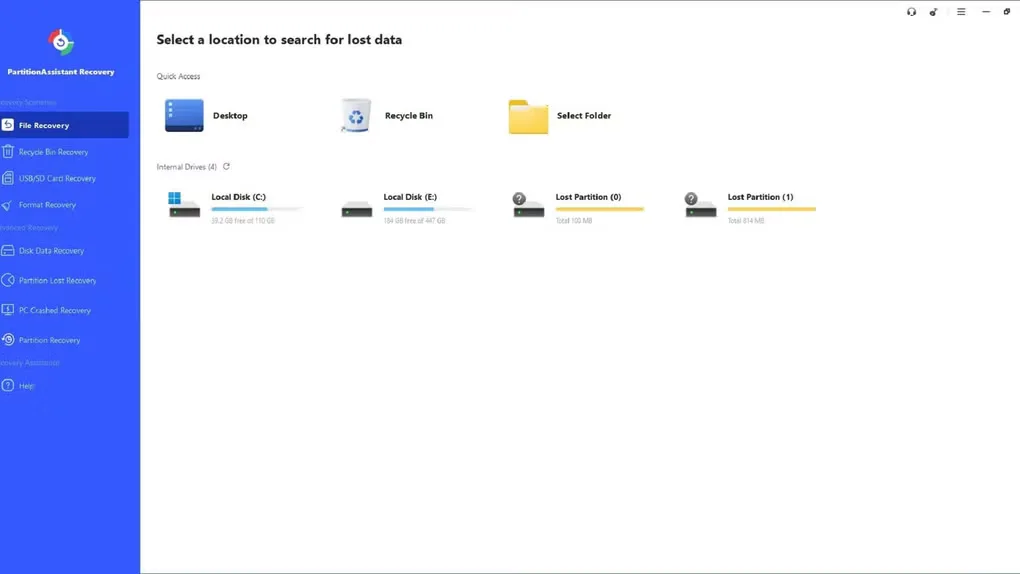
PartitionAssistant Recovery searches Windows storage for deleted or lost files, including documents, photos, videos, audio and archives. It can scan internal and external hard drives, SSDs, USB drives and SD cards. The workflow starts by choosing a location, then scanning it and reviewing the files found before recovery. Supported file previews help you decide which items to restore.
This download is the Free edition, which limits recovered data to 100 MB. Recovering more requires a paid Professional or Technician edition. The publisher also describes recovery from formatted drives before the data is overwritten; a scan is not a guarantee that every lost file can be restored. This is a file-recovery application, separate from AOMEI's Partition Assistant partition-management products.
What it offers
- Scan internal and external hard drives, SSDs, USB drives and SD cards for lost files.
- Search for documents, images, videos, audio files and archives.
- Preview supported files before selecting items to recover.
- Search for files after accidental deletion, an emptied Recycle Bin or drive formatting.
Good to know
- The Free edition recovers up to 100 MB; recovering more requires a paid Professional or Technician edition.
- Recovery depends on the condition of the data; the publisher describes formatted-drive recovery before files are overwritten.
Product images
Sources
References used for this listing. Retrieval dates do not indicate hands-on testing.
More in utilities
View category ↗
1.1.1.1 with WARP 2026.8.2115.0
Encrypt traffic from your Mac to Cloudflare’s network with WARP, or use DNS-only mode for encrypted DNS queries to the 1.1.1.1 resolver.
1.1.1.1 with WARP 2026.8.2115.0
Encrypt traffic between your Windows PC and Cloudflare, or use encrypted DNS only, with the free 1.1.1.1 with WARP app.

3uTools 9.12.005
Manage iPhone and iPad photos, music, apps and backups from Windows with 3uTools, a free utility that also includes device checks and firmware flashing tools.