
Utilities Windows
Patch My PC Home Updater
Install and update supported Windows apps from one library with Patch My PC Home Updater, free for non-commercial home use, with scheduling and bulk uninstall tools.
- Operating system
- Microsoft-supported 64-bit Windows; publisher lists Windows 10 or later and Windows Server 2016 or later
- Architecture
- 64-bit; 32-bit Windows is not supported by Version 5
- Download package
- MSI installer
Requires internet access and Microsoft Windows Desktop Runtime 8.0 (64-bit). The publisher also offers an EXE portable edition. Check Microsoft support status for your particular Windows release.
Link checked · Download guidance
What is Patch My PC Home Updater?
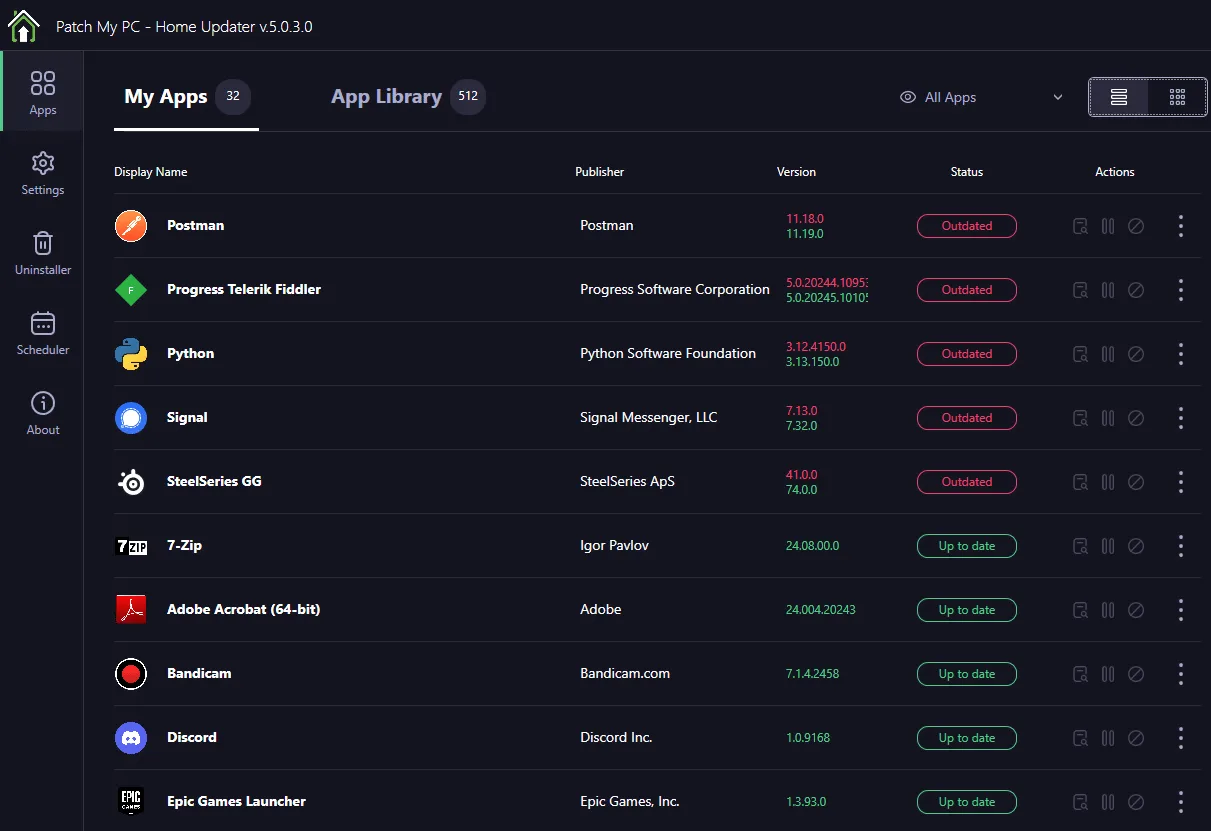
Patch My PC Home Updater brings supported application installs and updates into one Windows utility. Instead of visiting each app's website separately, you can choose new software from the App Library and manage existing supported apps in My Apps. The publisher lists a catalog of more than 500 applications; it is a defined supported list, not a promise to update every program on your computer.
Updates install silently by default, with an option to use a manual custom installation instead. The scheduler lets you choose when automatic updates run, while per-app controls let you exclude an application from automatic updating. A bulk uninstaller is included for removing several applications. Home Updater is the consumer product, distinct from Patch My PC's commercial endpoint-management solutions.
This entry links to the publisher's MSI installer. An EXE portable edition is also available on the official product page. The current product requires 64-bit Windows and Microsoft Windows Desktop Runtime 8.0 (64-bit), plus internet access. The free license is restricted to non-commercial use. Portable application detection has a further boundary: Home Updater only detects and updates portable apps originally downloaded through Home Updater.
What it offers
- Install new applications or update supported existing apps from a catalog the publisher lists as more than 500 applications.
- Run application installs and updates silently by default, or disable silent installation for a manual custom install.
- Schedule automatic updates and disable automatic updating for individual apps.
- Remove multiple applications with the bulk uninstaller.
- Manage supported portable apps downloaded through Home Updater.
Good to know
- Free Home Updater is restricted to non-commercial consumer use; it is not licensed for a business environment.
- Updates cover the supported catalog, not every installed program; portable apps are detected and updated only if originally downloaded through Home Updater.
- Requires internet access, Microsoft Windows Desktop Runtime 8.0 (64-bit) and a Microsoft-supported 64-bit Windows version. Version 5 does not support 32-bit Windows.
Product images
Sources
References used for this listing. Retrieval dates do not indicate hands-on testing.
More in utilities
View category ↗
1.1.1.1 with WARP 2026.8.2115.0
Encrypt traffic from your Mac to Cloudflare’s network with WARP, or use DNS-only mode for encrypted DNS queries to the 1.1.1.1 resolver.
1.1.1.1 with WARP 2026.8.2115.0
Encrypt traffic between your Windows PC and Cloudflare, or use encrypted DNS only, with the free 1.1.1.1 with WARP app.

3uTools 9.12.005
Manage iPhone and iPad photos, music, apps and backups from Windows with 3uTools, a free utility that also includes device checks and firmware flashing tools.