
Utilities Windows
PDFgear
Edit existing PDF text and images, organize pages, convert documents and use OCR with PDFgear, a free PDF editor and reader for Windows 10 and 11.
- Operating system
- Windows 10 and Windows 11
- Architecture
- Installer architecture not specified in the inspected publisher sources
- Download package
- EXE installer
Publisher lists a 1 GHz processor, 512 MB RAM (1 GB recommended) and 500 MB free disk space. Internet is required for PDF chat, Product Help and Live Updates.
Link checked · Download guidance
What is PDFgear?
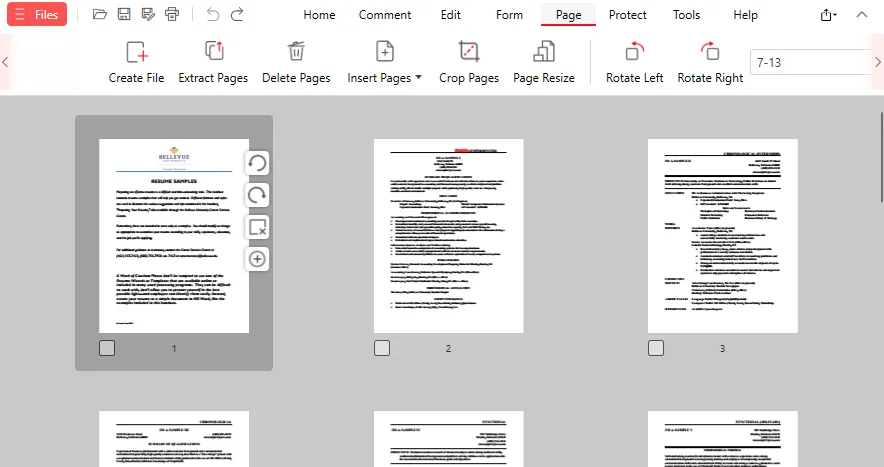
PDFgear combines PDF reading and editing with tools for handling document pages. Use it to change existing text, move or replace images, add comments, fill forms and apply a typed, drawn or image-based signature. Page tools let you reorder, rotate, extract or delete pages, while merge and split options help assemble or separate documents.
For scanned documents, OCR makes text searchable and selectable. Conversion tools work with supported Office and image formats, and compression offers a choice of quality levels. The publisher lists the Windows application as free to use without sign-up or added watermarks.
Reading, editing, organizing and printing can run locally without an internet connection. The AI assistant is different: it needs internet access, and PDF content and chat inputs may be sent to an AI service provider after in-app consent. Consider that distinction before using AI with confidential documents.
What it offers
- Edit existing PDF text and move, resize or replace images.
- Annotate documents, fill forms and add typed, drawn or image-based signatures.
- Reorder, rotate, extract or delete pages; merge and split PDFs.
- Use OCR to make scanned PDFs searchable and their text selectable.
- Convert between PDF and supported Office or image formats, with batch conversion and adjustable compression.
Good to know
- AI features require an internet connection; PDF content and chat inputs may be sent to an AI service provider after in-app consent.
- Product Help and Live Updates also require an internet connection.
Product images
Sources
References used for this listing. Retrieval dates do not indicate hands-on testing.
More in utilities
View category ↗
1.1.1.1 with WARP 2026.8.2115.0
Encrypt traffic from your Mac to Cloudflare’s network with WARP, or use DNS-only mode for encrypted DNS queries to the 1.1.1.1 resolver.
1.1.1.1 with WARP 2026.8.2115.0
Encrypt traffic between your Windows PC and Cloudflare, or use encrypted DNS only, with the free 1.1.1.1 with WARP app.

3uTools 9.12.005
Manage iPhone and iPad photos, music, apps and backups from Windows with 3uTools, a free utility that also includes device checks and firmware flashing tools.