

Utilities Windows
PDFsam Basic for Windows
Split, merge, rotate and extract PDF pages offline with PDFsam Basic, a free, open-source desktop tool. This download is the Windows x64 MSI installer.
- Operating system
- Windows 10 or above (64-bit)
- Architecture
- x64
- Download package
- MSI installer
Publisher requirements list 256 MB RAM and at least 70 MB disk space. This entry links the standalone MSI, not the separate Windows downloader.
Link checked · Download guidance
What is PDFsam Basic?
PDFsam Basic reorganizes PDF documents on your computer. Use it to combine separate files, break a long document into smaller PDFs, extract selected pages or correct page orientation without uploading the documents to an online service. The publisher describes local, offline processing with no watermarks.
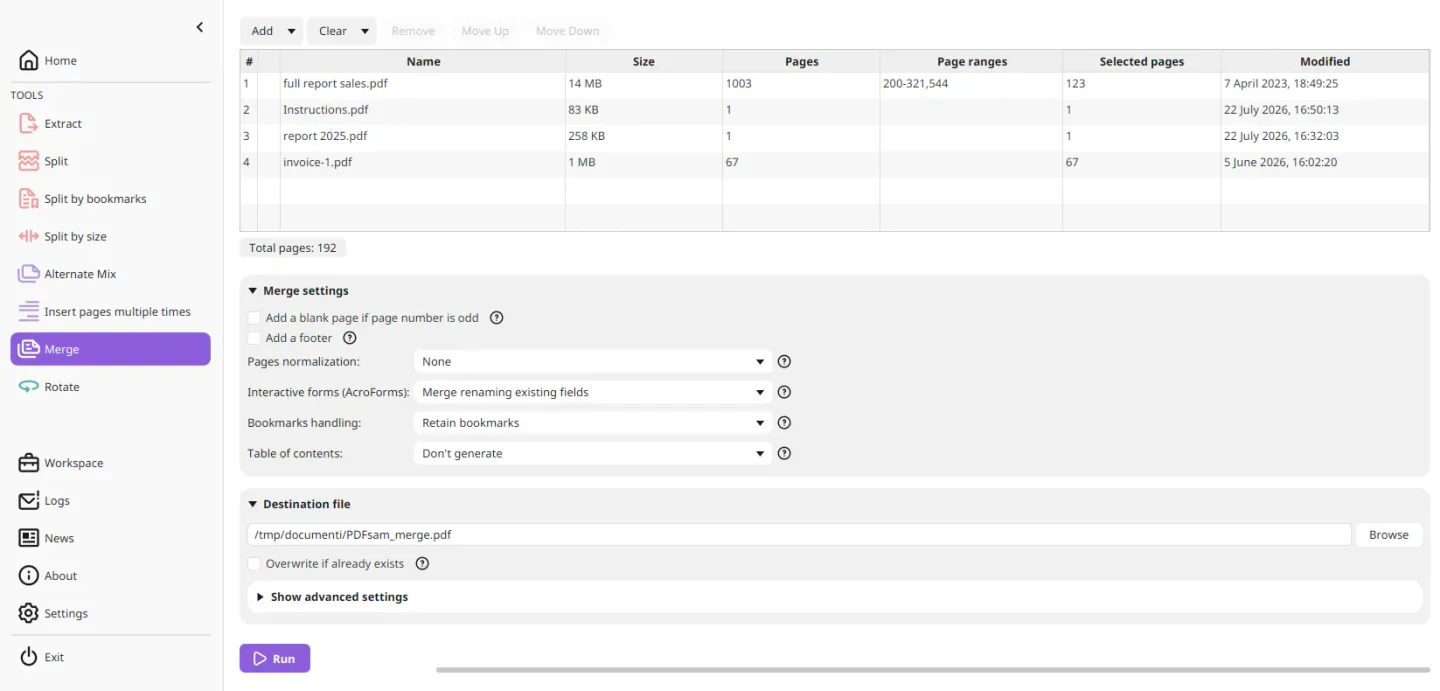
The merge tool accepts page ranges from each input file and includes options for bookmarks, interactive forms and a table of contents. Splitting can follow page numbers, a bookmark level or an approximate target file size. Alternate Mix interleaves pages, which is useful when a single-sided scanner produces separate odd- and even-page files. A separate tool inserts the same PDF pages repeatedly within another document.
Basic is a page-management application rather than the publisher's full PDF editor: editing content, conversion and OCR are offered through PDFsam Enhanced. Choose it for assembling and separating existing PDFs, not for rewriting their text.
The linked package is the standalone 64-bit Windows MSI for version 6.0.6, listed separately from the publisher's Windows downloader. The published system requirements specify Windows 10 or above, 64-bit. The screenshot illustrates the shared Basic merge interface from the publisher's feature page; it is not a capture of an installation performed for this entry.
What it offers
- Merge whole PDFs or selected page ranges, with bookmark, interactive-form and table-of-contents options.
- Split by page numbers, every specified number of pages, bookmark level or approximate file size.
- Extract individual pages or ranges into a new PDF and rotate all or selected pages by 90, 180 or 270 degrees.
- Interleave pages with Alternate Mix or insert the same pages repeatedly within another PDF.
- Process documents locally without uploading them; the publisher states that Basic adds no watermarks.
Good to know
- Content editing, conversion and OCR belong to the separate PDFsam Enhanced product, not this Basic page-management download.
- Split by size targets an approximate size rather than an exact output file size.
- This MSI is for 64-bit Windows 10 or above, not 32-bit Windows.
Product images
Sources
References used for this listing. Retrieval dates do not indicate hands-on testing.
More in utilities
View category ↗
1.1.1.1 with WARP 2026.8.2115.0
Encrypt traffic from your Mac to Cloudflare’s network with WARP, or use DNS-only mode for encrypted DNS queries to the 1.1.1.1 resolver.
1.1.1.1 with WARP 2026.8.2115.0
Encrypt traffic between your Windows PC and Cloudflare, or use encrypted DNS only, with the free 1.1.1.1 with WARP app.

3uTools 9.12.005
Manage iPhone and iPad photos, music, apps and backups from Windows with 3uTools, a free utility that also includes device checks and firmware flashing tools.