
Utilities Windows
PDFTK Builder
Merge, split, reorder and rotate PDF pages with PDFTK Builder, a free Windows interface for PDFTK that also adds stamps, backgrounds and page numbers.
- Operating system
- Windows; Softonic lists Windows 8
- Architecture
- Not specified by the publisher
- Download package
- EXE installer
Publisher's full installation includes PDFTK 1.41. No installation or modern Windows compatibility test performed.
Link checked · Download guidance
What is PDFTK Builder?
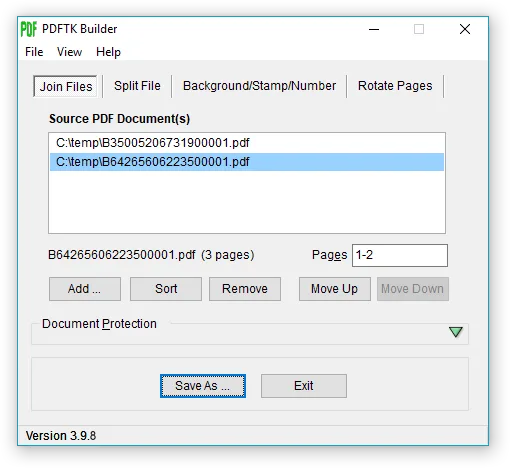
PDFTK Builder is Angus Johnson's graphical interface for PDFTK. It works on PDF pages and documents: combine several files, select page ranges, rearrange pages or split a document into one numbered PDF file per page. The Join view lets you control the order of the source documents and choose which pages to include.
Other tabs add a background or foreground stamp from another PDF, apply page numbers, or rotate a selected page range by 90 or 180 degrees. Document protection offers separate owner and user passwords; the publisher distinguishes restrictions on document actions from a password required to open the file.
This is a page-management utility rather than a full editor for rewriting text or changing page layouts. Backgrounds and stamps must be supplied as PDF documents, and page-number placement defaults are adjusted through PdftkBuilder.ini. The publisher lists version 3.10.0 and a page update dated July 2018; modern Windows compatibility has not been established here. The screenshot is the publisher's older 3.9.8 interface, not evidence of a 3.10.0 installation.
What it offers
- Join multiple PDFs in a chosen order and select page ranges to reorder, omit or duplicate pages.
- Split each page of a PDF into a separate numbered PDF document.
- Apply a PDF background or foreground stamp and add page numbers.
- Rotate selected page ranges left or right by 90 degrees, or by 180 degrees.
- Set owner and user passwords for document permissions and opening access.
Good to know
- Not a full text or page-layout editor; its documented tools focus on page and document management.
- Backgrounds and stamps require another PDF; page-number placement defaults are changed in PdftkBuilder.ini.
- The publisher page was last updated in July 2018; Windows 10 and 11 compatibility is not verified here.
Product images
Sources
References used for this listing. Retrieval dates do not indicate hands-on testing.
More in utilities
View category ↗
1.1.1.1 with WARP 2026.8.2115.0
Encrypt traffic from your Mac to Cloudflare’s network with WARP, or use DNS-only mode for encrypted DNS queries to the 1.1.1.1 resolver.
1.1.1.1 with WARP 2026.8.2115.0
Encrypt traffic between your Windows PC and Cloudflare, or use encrypted DNS only, with the free 1.1.1.1 with WARP app.

3uTools 9.12.005
Manage iPhone and iPad photos, music, apps and backups from Windows with 3uTools, a free utility that also includes device checks and firmware flashing tools.