
Utilities Windows
PhonerLite
Make and receive SIP calls on Windows with PhonerLite, a free softphone with separate account profiles, call controls and audio-device selection. A SIP provider or local IP-PBX account is required.
- Operating system
- Windows; exact minimum version is not established by the cited product and package pages
- Architecture
- 64-bit
- Download package
- EXE installer
Selected package: PhonerLiteSetup64_346.exe. Separate 32-bit and portable ZIP packages are listed. Publisher warns of Windows certificate-trust and Smart App Control restrictions.
Link checked · Download guidance
What is PhonerLite?
PhonerLite turns a Windows PC with a microphone and speakers or a headset into a SIP telephone. It is useful when you already have a VoIP provider account or an extension on a local IP-PBX and want to handle calls from the desktop. Separate SIP profiles let you keep different accounts configured independently; the software is free for private and business use, but is not open source.
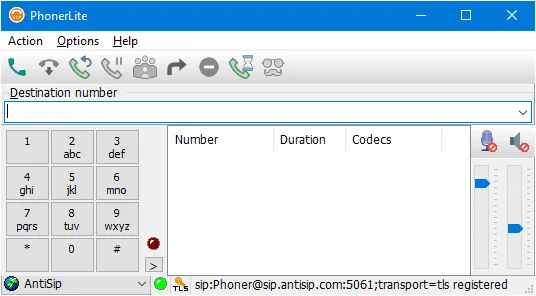
Initial setup starts at Configuration > New, where the publisher's wizard asks for the SIP server address, username and password supplied by your provider or PBX. Registration must succeed before calling. The main window puts call controls on the left, current calls in the center and microphone, speaker and volume settings on the right. It supports hold, forwarding and call transfer, plus recording an active call to a WAV file through its context menu. Phone book and log book functions accompany the calling interface.
The selected download is the publisher's version 3.46 Windows 64-bit EXE installer, not the separate 32-bit or portable ZIP package. TLS, SRTP and ZRTP are listed capabilities, not a guarantee that every connection uses encryption. You still need compatible SIP service and working audio devices. The publisher also warns that Windows may not recognize its CAcert signing certificate, and that Windows 11 Smart App Control can block the installer. No installer execution, call test or independent security assessment was performed for this entry.
What it offers
- Configure multiple SIP profiles independently for different accounts.
- Use call controls for dialing, redial, hold, forwarding and transfer.
- Select microphone and speaker devices and adjust their volume in the main window.
- Record an active call to WAV from its context menu, with the file name stored in the log book.
- Use supported SIP transports and encryption standards, including TLS, SRTP and ZRTP.
Good to know
- Requires SIP account credentials from a compatible VoIP provider or local IP-PBX; the application alone does not supply an account.
- The publisher warns that its CAcert signing certificate may be unrecognized by Windows and that Windows 11 Smart App Control can block setup.
- PhonerLite selects sound devices, but selecting ports on those devices requires the Windows sound mixer.
Product images
Sources
References used for this listing. Retrieval dates do not indicate hands-on testing.
- PhonerLite: Free SIP Softphone for Windows ↗Retrieved
- PhonerLite: Download ↗Retrieved
- PhonerLite: General ↗Retrieved
- PhonerLite: First Steps ↗Retrieved
- PhonerLite: Features ↗Retrieved
- PhonerLite: License ↗Retrieved
More in utilities
View category ↗miniSIPServer V70 (build 20261020)
Run a SIP-based VoIP phone system on Windows with miniSIPServer. The linked five-client edition is free; larger editions have a 30-day trial.
CubicSDR 0.2.5
Explore radio signals with spectrum and waterfall displays, tune multiple channels and listen through a supported SDR receiver. This download is the older Windows x64 0.2.5 build.

Volume² 1.1.9.469
Change Windows volume with mouse-wheel actions or global hotkeys, choose an on-screen display and schedule audio-device changes with Volume².

JTDX 2.2.159
Decode weak amateur-radio signals and work digital modes including FT8, FT4 and JT65 with JTDX, a free, open-source Windows application derived from WSJT-X.
GridTracker2 2.261019.5
Map amateur-radio contacts, review WSJT-X activity and follow award progress with GridTracker2, a free Windows companion for your radio logbook.