
Utilities Windows
PNGGauntlet for Windows
Reduce PNG file sizes without losing image quality, batch-optimize images, or convert JPG, GIF, TIFF and BMP files to PNG. This free Windows utility requires .NET 4.0 and is no longer updated.
- Operating system
- Windows; Softonic lists Windows 11
- Architecture
- Not specified by the inspected publisher pages
- Download package
- EXE installer
Requires .NET 4.0. No longer updated. Current Windows compatibility is not independently verified; the inspected publisher pages provide no current support matrix.
Link checked · Download guidance
What is PNGGauntlet?
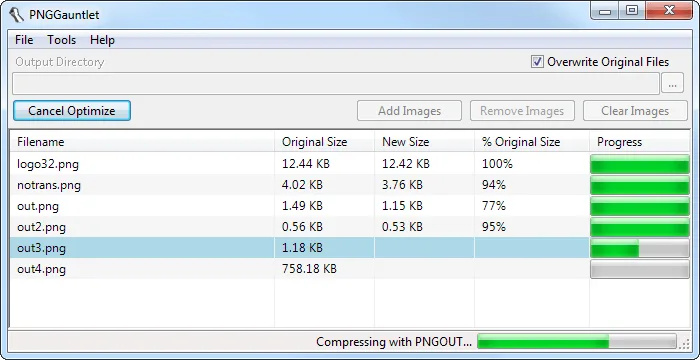
PNGGauntlet is a Windows image-compression utility for reducing PNG file sizes without changing their visual quality. It combines PNGOUT, OptiPNG and DeflOpt in one interface, with parallel batch processing for multiple images. The file list shows original and new sizes alongside progress, making it useful for preparing web graphics or working through an image folder.
It also converts JPG, GIF, TIFF and BMP images to PNG. Conversion is not always a size saving: the publisher's help says PNGGauntlet normally leaves an image in its original format if conversion would make it larger. An option can force conversion even in that case. Compression can be slow; disabling OptiPNG trades some compression for speed.
The publisher says PNGGauntlet is no longer updated and lists .NET 4.0 as a requirement. Softonic lists Windows 11, but that catalog entry is not a compatibility test or a publisher support commitment. The linked download is the publisher's 3.1.2 EXE installer; its endpoint was checked with HEAD only. The software has not been installed, run or independently security-assessed for this entry.
What it offers
- Lossless PNG compression using PNGOUT, OptiPNG and DeflOpt.
- Parallel batch processing to compress multiple images at once.
- Convert JPG, GIF, TIFF and BMP images to PNG.
- Compare original and new file sizes and follow per-file compression progress.
Good to know
- The publisher says PNGGauntlet is no longer updated; current Windows compatibility and security have not been independently verified for this entry.
- Requires the .NET Framework 4.0 according to the publisher.
- Compression can be slow; the publisher suggests disabling OptiPNG for faster processing at the cost of some compression.
- Converting other formats to PNG can increase file size; by default, PNGGauntlet skips conversions that would make a file larger.
Product images
Sources
References used for this listing. Retrieval dates do not indicate hands-on testing.
More in utilities
View category ↗
1.1.1.1 with WARP 2026.8.2115.0
Encrypt traffic from your Mac to Cloudflare’s network with WARP, or use DNS-only mode for encrypted DNS queries to the 1.1.1.1 resolver.
1.1.1.1 with WARP 2026.8.2115.0
Encrypt traffic between your Windows PC and Cloudflare, or use encrypted DNS only, with the free 1.1.1.1 with WARP app.


3uTools 9.12.005
Manage iPhone and iPad photos, music, apps and backups from Windows with 3uTools, a free utility that also includes device checks and firmware flashing tools.