
Utilities Windows
PrintFolder
Print or save a text list of a folder's files with PrintFolder, a free Windows utility available from the folder's right-click menu.
- Operating system
- Windows; Softonic lists Windows 8
- Architecture
- Not specified by the publisher
- Download package
- ZIP archive
Publisher offers this legacy utility as-is without support. Windows 10/11 compatibility and archive contents have not been verified.
Link checked · Download guidance
What is PrintFolder?
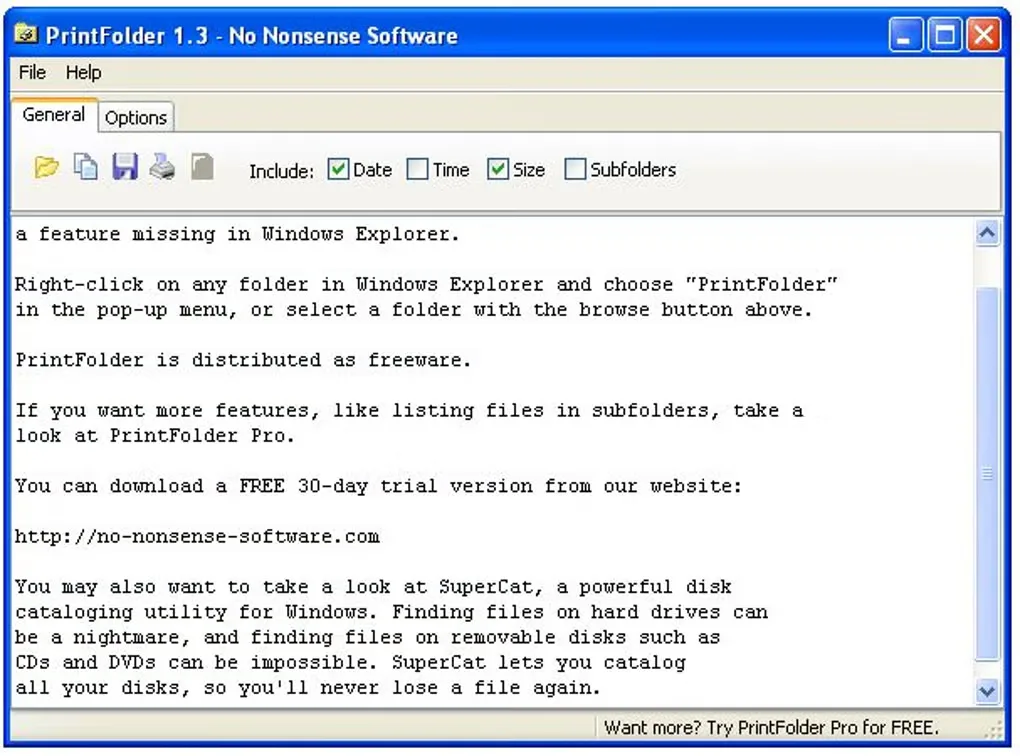
PrintFolder creates a text list of the files in a selected folder so you can keep a written inventory without typing filenames yourself. Choose a folder in the program or right-click it in Windows Explorer and select PrintFolder. The publisher identifies this free utility as version 1.3.
The interface includes controls for date, time and file size alongside the list, plus save and print controls. Output is plain text rather than an HTML catalog. This is the freeware PrintFolder, not the separate PrintFolder Pro product or the similarly named PrintFolders.
No Nonsense Software offers PrintFolder among its unsupported Windows utilities, provided as-is. Softonic lists Windows 8, but the publisher does not establish compatibility with current Windows releases. This entry does not claim Windows 10 or Windows 11 testing, ongoing maintenance or recursive subfolder listing.
What it offers
- Print or save a list of the files in a selected folder.
- Open a folder from the program or its Windows Explorer context-menu entry.
- Use the visible date, time and size controls to configure list details.
Good to know
- The publisher provides this utility as-is without support.
- Lists are generated in TXT format; HTML export is not documented for this version.
- Current Windows compatibility is not established by the publisher; the Softonic listing names Windows 8.
Product images
Sources
References used for this listing. Retrieval dates do not indicate hands-on testing.
- Freeware – No Nonsense Software ↗Retrieved
- PrintFolder - Download ↗Retrieved
More in utilities
View category ↗
1.1.1.1 with WARP 2026.8.2115.0
Encrypt traffic from your Mac to Cloudflare’s network with WARP, or use DNS-only mode for encrypted DNS queries to the 1.1.1.1 resolver.
1.1.1.1 with WARP 2026.8.2115.0
Encrypt traffic between your Windows PC and Cloudflare, or use encrypted DNS only, with the free 1.1.1.1 with WARP app.

3uTools 9.12.005
Manage iPhone and iPad photos, music, apps and backups from Windows with 3uTools, a free utility that also includes device checks and firmware flashing tools.