

Development Windows
Proxyman for Windows
Inspect HTTP and HTTPS traffic on Windows with Proxyman, a debugging proxy for examining API requests, modifying responses and mocking server replies.
Version 26.2.0 · Direct publisher file
Link checked · Download guidance
What is Proxyman?
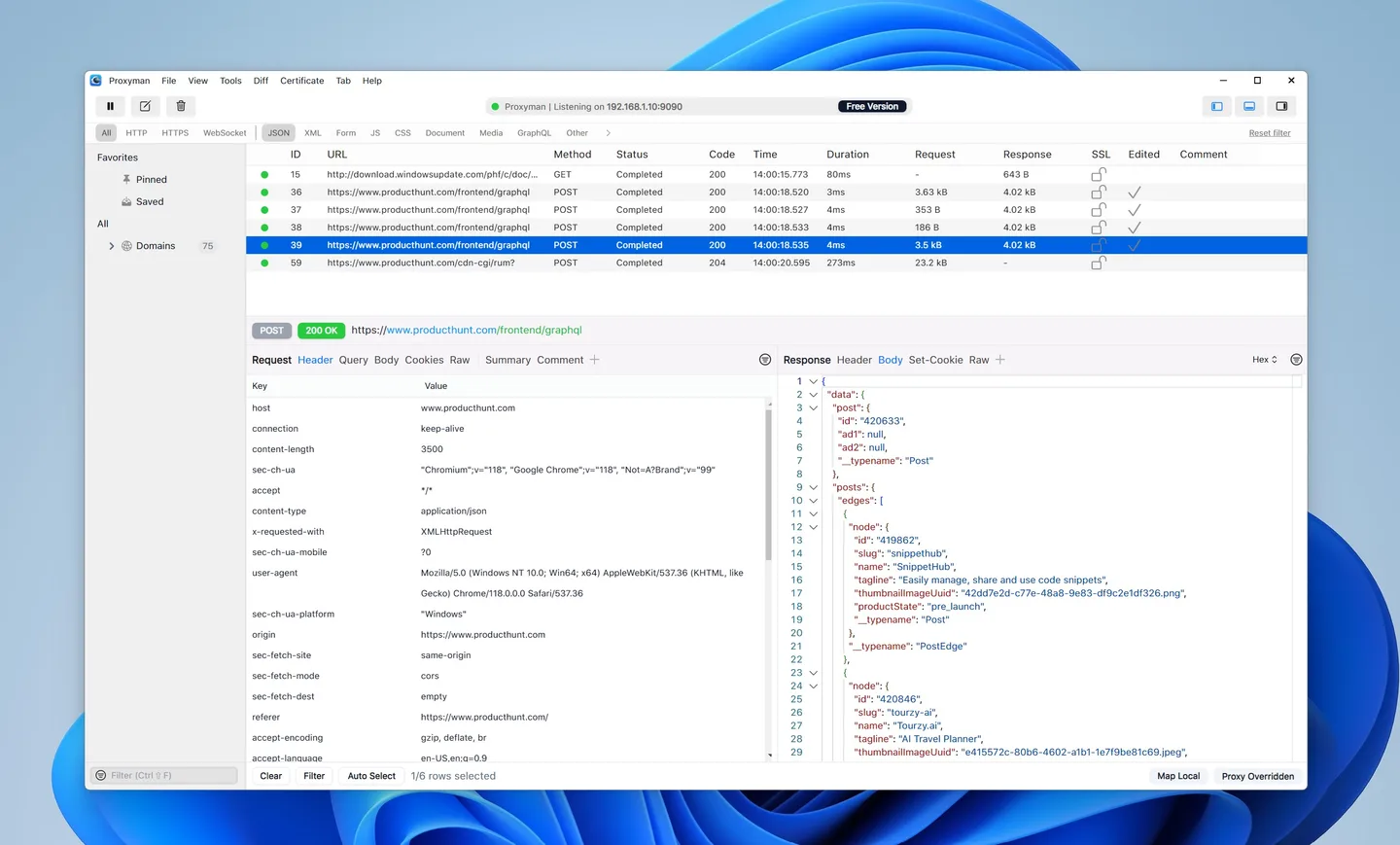
Proxyman captures HTTP and HTTPS requests and responses so developers and testers can investigate web applications and APIs. On Windows, its request list and detail panes let you examine headers and response bodies, then narrow the capture using URL, header, query, body or content-type filters. Compose and Repeat help you send a request again while checking how a service responds.
For debugging changes without editing the client, Breakpoint can pause and modify requests or responses, while Map Local substitutes a local file for a server response. Diff and Scripting provide additional ways to compare traffic and change its contents. These are product capabilities, not a promise that every tool is unrestricted in the evaluation version.
HTTPS inspection requires setting up and trusting the Proxyman certificate and enabling SSL Proxying for the traffic you want to decrypt. The evaluation option has limited features; paid licenses unlock premium tools. The linked download is the publisher's Windows EXE for version 26.2.0, released on October 27, 2026. The screenshot is a publisher-provided Windows interface example, not a capture of that release running here.
What it offers
- Capture and inspect HTTP/HTTPS requests, headers and response bodies.
- Filter traffic by URL, headers, query, body and content type.
- Compose requests or repeat captured requests when investigating an API.
- Use Breakpoint and Map Local to modify traffic or substitute local response data; evaluation restrictions apply.
- Compare traffic with Diff and modify requests or responses with Scripting; evaluation restrictions apply.
Good to know
- The evaluation version has limited features; premium tools require a paid license for unrestricted use.
- Decrypting HTTPS content requires a trusted Proxyman certificate and enabled SSL Proxying rules.
Product images
Sources
References used for this listing. Retrieval dates do not indicate hands-on testing.
- Proxyman - Download — Windows discovery and developer identity ↗Retrieved
- Proxyman for Windows · HTTP/HTTPS Debugging Proxy ↗Retrieved
- ProxymanApp/proxyman-windows-linux — official public tracker ↗Retrieved
- Proxyman · Changelog for Windows ↗Retrieved
- Proxyman · Pricing ↗Retrieved
- SSL Proxying — Proxyman documentation ↗Retrieved
More in development
View category ↗
010 Editor 17.0
Inspect and edit binary files on Mac with 010 Editor, a paid text and hex editor with Binary Templates, file comparison and a 30-day trial.
010 Editor 17.0
Inspect and edit binary files with 010 Editor for Windows, a text and hex editor with Binary Templates, file comparison and scripting. Includes a 30-day trial.
10x Editor
Edit and navigate C++ projects on Windows with a built-in parser, workspace search and Visual Studio project support. A paid license is required after the 30-day trial.