

Utilities Windows
PrtScr for Windows
Capture a window, the full screen or a freehand selection with PrtScr, a free Windows screenshot utility with annotations and JPG, BMP and PNG export.
What is PrtScr?
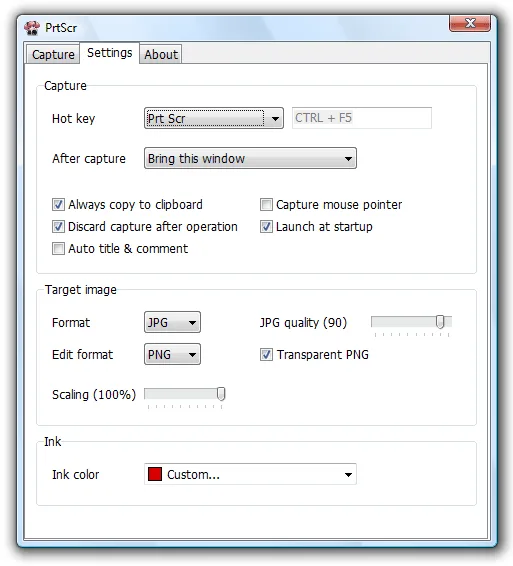
PrtScr turns the Print Screen key into a capture workflow for Windows. Grab the whole screen, the active window, a rectangle or an irregular area drawn with the mouse. You can add freehand annotations before finishing the capture, include the mouse pointer and work across multiple monitors.
After capture, save the image to the desktop or another location, copy it to the clipboard, email it or hand it to an external editor. Output options include JPG, BMP and PNG, with resizing before export. Choose PNG when a freehand selection needs transparency: JPG and BMP output remains rectangular and opaque. Editing and printing also depend on the applications associated with those image formats on your PC.
The publisher offers version 1.8 and lists Windows XP, Vista, 7, 10 and 11 as requirements. Its help notes that a standard installation enables startup loading and takes over the normal Print Screen action; manual loading and a custom hotkey are alternatives.
What it offers
- Capture the full screen, active window, rectangular region or freehand selection.
- Draw annotations before capture and optionally include the mouse pointer.
- Use Print Screen or a custom hotkey, with support for multiple monitors.
- Export JPG, BMP or PNG images, including transparent PNG, and resize before export.
- Save captures, copy them to the clipboard or pass them to email, printing and external editing tools.
Good to know
- JPG and BMP exports are opaque rectangles; use PNG to preserve a freehand selection's transparency.
- Edit and print actions depend on the applications associated with JPG, PNG and BMP files on your system.
- A standard installation enables Windows startup loading and replaces the normal Print Screen action; manual loading and a custom hotkey are available.
Product images
Sources
References used for this listing. Retrieval dates do not indicate hands-on testing.
More in utilities
View category ↗
1.1.1.1 with WARP 2026.8.2115.0
Encrypt traffic from your Mac to Cloudflare’s network with WARP, or use DNS-only mode for encrypted DNS queries to the 1.1.1.1 resolver.
1.1.1.1 with WARP 2026.8.2115.0
Encrypt traffic between your Windows PC and Cloudflare, or use encrypted DNS only, with the free 1.1.1.1 with WARP app.

3uTools 9.12.005
Manage iPhone and iPad photos, music, apps and backups from Windows with 3uTools, a free utility that also includes device checks and firmware flashing tools.