

Utilities macOS
PrusaSlicer for macOS
Prepare 3D models for printing on a Mac with PrusaSlicer, a free, open-source slicer with printer profiles, support controls and layer-by-layer previews.
- Operating system
- macOS; exact minimum version for this package not independently established
- Architecture
- Universal binary: Intel and Apple Silicon
- Download package
- DMG disk image
Publisher identifies 2.9.6 as universal. Check its requirements before installing on an older Mac; source listings disagree on the minimum OS version.
Link checked · Download guidance
What is PrusaSlicer?
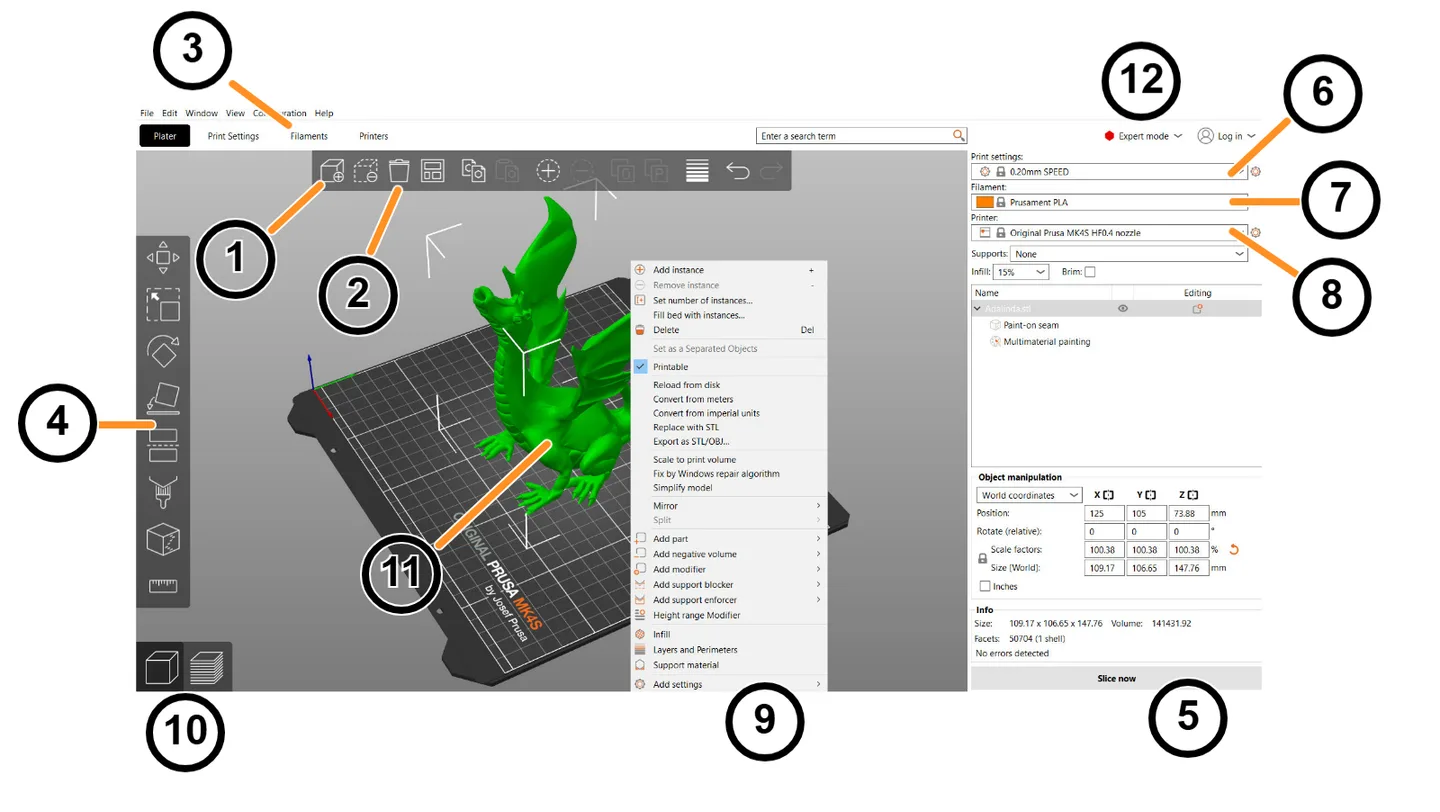
PrusaSlicer converts 3D models into instructions for a 3D printer. On a Mac, it provides a workspace for arranging models, selecting a printer and filament profile, adjusting print settings and inspecting the sliced result before export. It supports FFF filament printers and mSLA resin printers, including machines beyond Prusa's own range.
For a filament-printing workflow, import a model, check its orientation and choose settings that match the printer and material. Infill, layer height, supports and brim controls let you change how the part is prepared. The preview lets you inspect individual layers before exporting G-code. Simple, Advanced and Expert modes expose different levels of control; a command-line interface is also available.
This entry links to the publisher's PrusaSlicer 2.9.6 DMG. The publisher identifies it as a universal macOS binary for Intel and Apple Silicon. Printer and material selection still matters: different materials require different temperatures, cooling and print speeds. The 2.9.6 release notes also state that INDX printer profiles are not bundled and require an online configuration update. The screenshot is an annotated publisher documentation image illustrating the shared interface, not a capture of this Mac package running.
What it offers
- Import STL, STEP, 3MF, OBJ and AMF models for print preparation.
- Select printer, filament and print profiles; adjust layer height, infill, supports and brim.
- Inspect generated print instructions in a 3D preview with individual-layer navigation.
- Use Simple, Advanced or Expert interface modes, or the command-line interface.
- Prepare jobs for FFF filament and mSLA resin printers, with multi-material features for compatible setups.
Good to know
- Printer and material profiles must match the intended job; materials need different temperature, cooling and speed settings.
- PrusaSlicer 2.9.6 does not bundle INDX printer profiles; the release notes require an online update through Configuration > Configuration Wizard.
- The publisher lists at least 4 GB RAM and OpenGL 2.0 graphics support, with 8 GB RAM or more recommended.
Product images
Sources
References used for this listing. Retrieval dates do not indicate hands-on testing.
- PrusaSlicer for Mac - Download ↗Retrieved
- Download PrusaSlicer | Prusa Knowledge Base ↗Retrieved
- PrusaSlicer — publisher product and macOS download ↗Retrieved
- Publisher GitHub release metadata — PrusaSlicer 2.9.6 ↗Retrieved
- PrusaSlicer 2.9.6 README — features and license ↗Retrieved
- First print with PrusaSlicer (2.9) | Prusa Knowledge Base ↗Retrieved
- UI overview | Prusa Knowledge Base ↗Retrieved
- Minimum system requirements | Prusa Knowledge Base ↗Retrieved
More in utilities
View category ↗
1.1.1.1 with WARP 2026.8.2115.0
Encrypt traffic from your Mac to Cloudflare’s network with WARP, or use DNS-only mode for encrypted DNS queries to the 1.1.1.1 resolver.
1.1.1.1 with WARP 2026.8.2115.0
Encrypt traffic between your Windows PC and Cloudflare, or use encrypted DNS only, with the free 1.1.1.1 with WARP app.

3uTools 9.12.005
Manage iPhone and iPad photos, music, apps and backups from Windows with 3uTools, a free utility that also includes device checks and firmware flashing tools.