

Development Windows
PSPad for Windows
Edit code and plain text on Windows with PSPad, a free programmer’s editor with syntax highlighting, project tools, file comparison and a built-in HEX editor.
- Operating system
- Microsoft Windows
- Architecture
- 32-bit (x86)
- Download package
- EXE installer
Publisher offers portable ZIP packages separately and marks the separate 64-bit installer experimental. Supported Windows version numbers are not established here.
Link checked · Download guidance
What is PSPad?
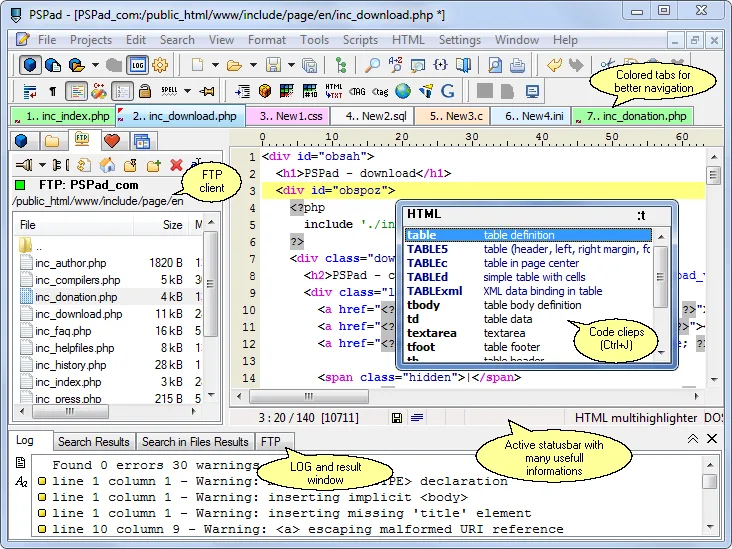
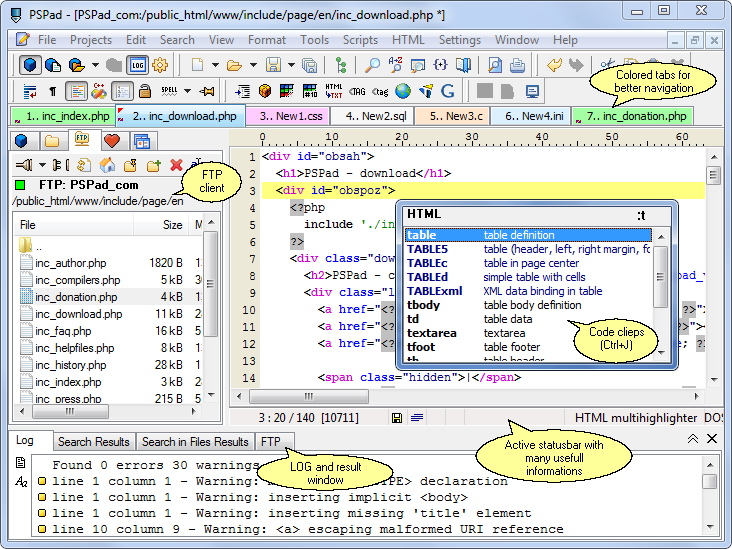
PSPad brings source-code editing and plain-text work into one Windows application. Syntax highlighting and code folding help organize code, while projects, multiple open documents and saved sessions keep related files together. Search and replace across files, record repeatable edits as macros or compare text with highlighted differences.
For web work, PSPad includes code templates and an FTP client for editing remote files. A HEX editor handles binary content, and external compiler integration can capture output in a log window. These are publisher-described capabilities; the application has not been installed or tested for this entry.
This download is the publisher-linked 32-bit EXE installer for version 5.5.2 (851), released on 6 August 2026. A separate 64-bit installer is marked experimental, and portable ZIP packages are offered separately. Spell-check dictionaries are not bundled: download the required dictionary separately to use that feature. The publisher gallery screenshot illustrates the interface but is not identified as this release.
What it offers
- Syntax highlighting, code folding and templates for source-code editing.
- Projects, multiple documents and saved desktop sessions for related files.
- Search and replace in files, macro recording and color-highlighted text comparison.
- Built-in FTP client and HEX editor.
- External compiler integration with captured output and a log window.
Good to know
- Spell-check dictionaries are not included in the distribution and must be downloaded separately.
- The publisher labels its separate 64-bit installer experimental; the linked download is the 32-bit installer.
Product images
Sources
References used for this listing. Retrieval dates do not indicate hands-on testing.
- PSPad - text and code editor ↗Retrieved
- PSPad download - freeware text editor ↗Retrieved
- PSPad licence - freeware text editor ↗Retrieved
- PSPad author - freeware text editor ↗Retrieved
- PSPad screenshots - freeware text editor ↗Retrieved
More in development
View category ↗
010 Editor 17.0
Inspect and edit binary files on Mac with 010 Editor, a paid text and hex editor with Binary Templates, file comparison and a 30-day trial.
010 Editor 17.0
Inspect and edit binary files with 010 Editor for Windows, a text and hex editor with Binary Templates, file comparison and scripting. Includes a 30-day trial.
10x Editor
Edit and navigate C++ projects on Windows with a built-in parser, workspace search and Visual Studio project support. A paid license is required after the 30-day trial.