
Utilities Windows
Puran Utilities
Clean unwanted files, manage startup items and run selected maintenance tools from one Windows utility suite. Puran Utilities also includes disk checking and file recovery tools.
- Operating system
- Windows XP/2003/Vista/2008/7/8/10/11
- Architecture
- Native 64-bit Windows support listed by publisher; setup architecture not independently inspected
- Download package
- EXE setup installer
Publisher lists one setup download; installer contents and runtime compatibility were not tested.
Link checked · Download guidance
What is Puran Utilities?
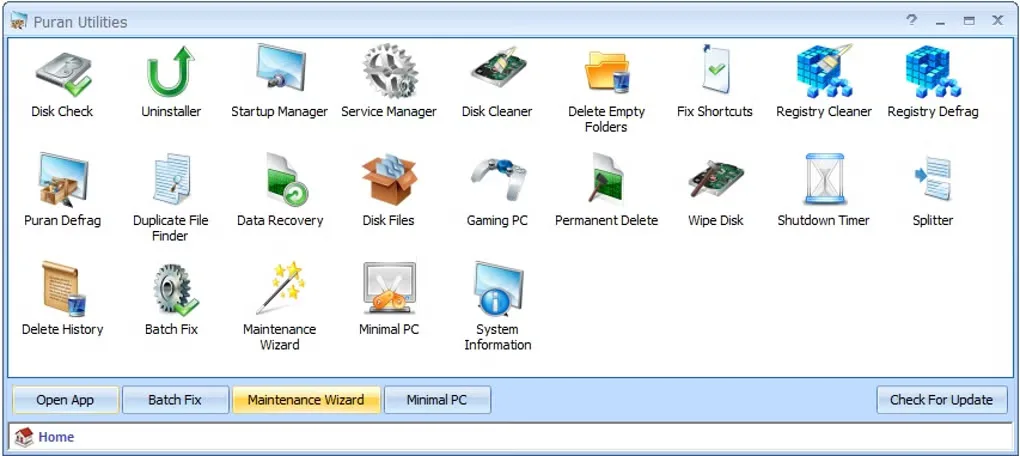
Puran Utilities brings more than 20 Windows maintenance tools into one suite. Use it to find junk or duplicate files, manage startup entries and services, remove unwanted software, or check a disk with Windows chkdsk. File recovery and file-distribution tools cover different storage tasks rather than promising a single automatic fix for every PC problem.
You can choose individual tools or use Batch Fix and Maintenance Wizard to run selected tasks. Review those choices before using deletion or disk-wiping tools: they are designed to make data unrecoverable, not to provide a backup.
The publisher lists Windows 11 and 10 alongside older Windows releases, with native 64-bit support. This entry links to the publisher’s EXE setup package. Softonic displays a “Possible issues” warning; the download-header check confirms an available file endpoint, not that the installer is safe. The gallery image depicts an older launcher and is not proof of the current version’s exact layout.
What it offers
- Find junk files and duplicate files with separate cleanup tools.
- Enable or disable Windows startup items and services.
- Check disks using chkdsk and access file recovery tools.
- Run selected maintenance utilities through Batch Fix or Maintenance Wizard.
- Use separate tools for software removal, file-distribution inspection and scheduled shutdown tasks.
Good to know
- Permanent Delete and Wipe Disk are intended to prevent recovery; do not use them on data you need to keep.
- Softonic displays “Possible issues”. The installer has not been executed or independently scanned for this entry; HEAD verification is not a safety assessment.
- The publisher uses a mutable setup filename. Version 3.2.1 and its release date come from the product history, not inspection of the installer contents.
Product images
Sources
References used for this listing. Retrieval dates do not indicate hands-on testing.
- Puran Utilities - Optimize your PC for best performance ↗Retrieved
- Puran Utilities Download ↗Retrieved
- Puran Software — Freeware License ↗Retrieved
- Puran Utilities - Download ↗Retrieved
More in utilities
View category ↗
1.1.1.1 with WARP 2026.8.2115.0
Encrypt traffic from your Mac to Cloudflare’s network with WARP, or use DNS-only mode for encrypted DNS queries to the 1.1.1.1 resolver.
1.1.1.1 with WARP 2026.8.2115.0
Encrypt traffic between your Windows PC and Cloudflare, or use encrypted DNS only, with the free 1.1.1.1 with WARP app.

3uTools 9.12.005
Manage iPhone and iPad photos, music, apps and backups from Windows with 3uTools, a free utility that also includes device checks and firmware flashing tools.