
Development Windows
QueueExplorer
Inspect, edit and move broker messages in a Windows desktop interface for Azure Service Bus, RabbitMQ, MSMQ and ActiveMQ. Commercial software with a 14-day trial; the linked installer is the older 5.0.58 release.
- Operating system
- Windows 10 and 11; Windows Server 2016, 2019 and 2022 listed in current publisher documentation
- Architecture
- x86 (selected 5.0.58 installer, per package manifest)
- Download package
- EXE installer (Inno Setup)
Requires .NET Framework 4.8 or later. Requirements are from current 5.x documentation, not a local install test. Selected installer is older than publisher-listed 5.1.2.
Link checked · Download guidance
What is QueueExplorer?
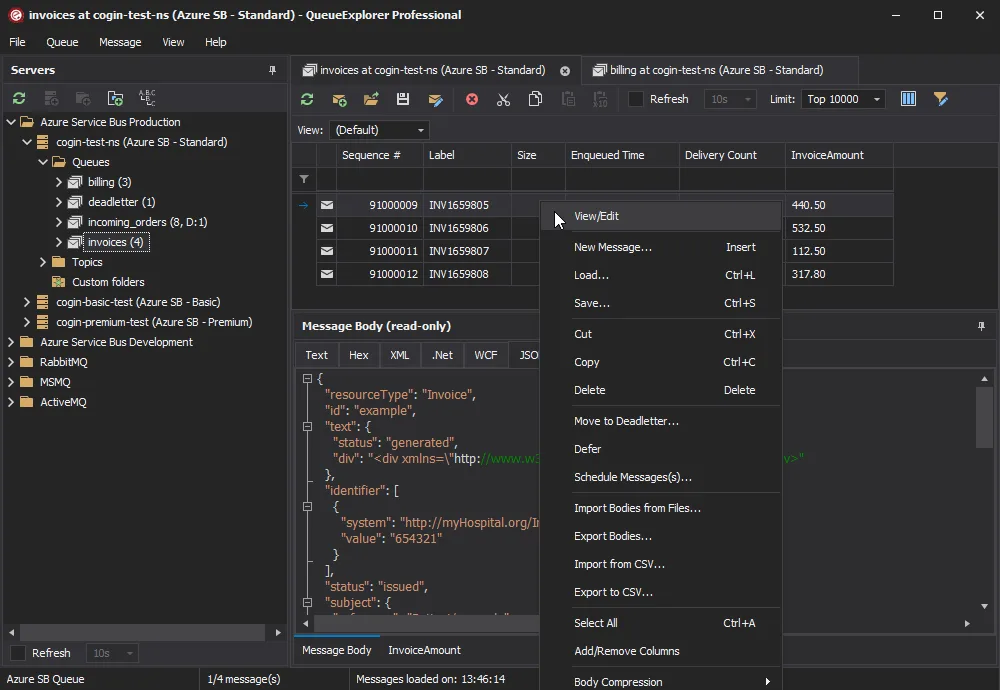
QueueExplorer is a desktop message-queue management tool from Cogin for developers and administrators who need to investigate application traffic. It brings Azure Service Bus, RabbitMQ, MSMQ and ActiveMQ connections into one interface, with tools to inspect message bodies and properties rather than only configure a broker. JSON, XML, WCF, hexadecimal and text viewers help make different payload formats readable.
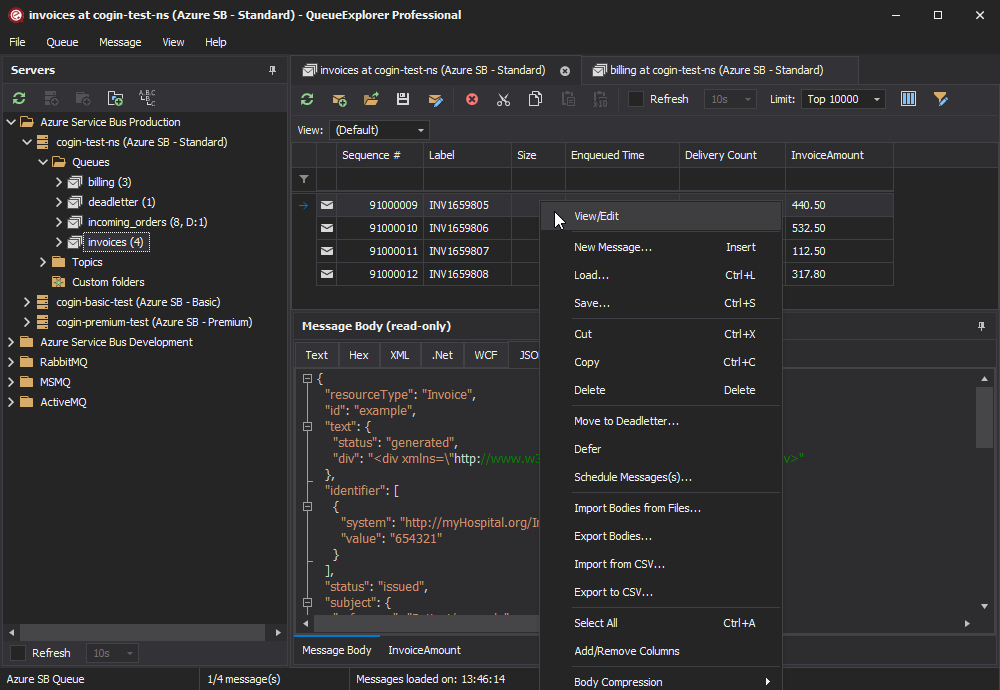
A typical investigation starts by choosing a connection and queue, filtering the loaded messages and inspecting the relevant body and headers. Supported operations include copying or moving messages between queues, saving messages to files, loading them again and creating test traffic. Standard supports multiple connections and tabs. Professional adds schema comparison and migration, extracted JSON/XPath/Regex columns, reusable Queue Views and custom folders; the screenshot shows Professional rather than a promise that every feature belongs to Standard.
The direct download here is the publisher-hosted 5.0.58 Windows installer, released October 1, 2025. Cogin’s release history lists 5.1.2 dated October 29, 2026, so this link must not be mistaken for that newer release. QueueExplorer is paid software after its trial, not a permanently free utility. Message editing and replay also follow broker semantics: sending a modified message can place it at the end of a queue rather than preserve its original position.
What it offers
- Inspect message bodies with JSON, XML, WCF, hexadecimal and text viewers.
- Browse, filter, edit, copy, move, save and load messages on supported messaging systems.
- Use multiple broker connections and tabs in Standard or Professional.
- Create and send test messages, including bulk message traffic.
- Professional adds schema migration/comparison, custom data columns, Queue Views and custom folders.
Good to know
- The linked 5.0.58 installer is older than the publisher’s listed 5.1.2 release and does not include subsequent fixes.
- Commercial license required after the 14-day trial; advanced schema and custom-column features require Professional.
- Windows desktop requires .NET Framework 4.8 or higher. MSMQ access also requires the Message Queueing service; RabbitMQ access requires its management plugin.
- Operations depend on broker capabilities and connection permissions. Sending an edited or new message normally puts it at the end of the queue, subject to priority.
Product images
Sources
References used for this listing. Retrieval dates do not indicate hands-on testing.
- QueueExplorer - manage queues like they are files, for Azure Service Bus, RabbitMQ, MSMQ, and ActiveMQ ↗Retrieved
- QueueExplorer Professional features ↗Retrieved
- QueueExplorer History ↗Retrieved
- System requirements — QueueExplorer 5.x documentation ↗Retrieved
- Limitations — QueueExplorer 5.x documentation ↗Retrieved
- Purchase QueueExplorer ↗Retrieved
- Install QueueExplorer 5.0.58 with winget | Cogin | Wingetly ↗Retrieved
- QueueExplorer - Download — discovery and conflicting catalog metadata ↗Retrieved
More in development
View category ↗
010 Editor 17.0
Inspect and edit binary files on Mac with 010 Editor, a paid text and hex editor with Binary Templates, file comparison and a 30-day trial.
010 Editor 17.0
Inspect and edit binary files with 010 Editor for Windows, a text and hex editor with Binary Templates, file comparison and scripting. Includes a 30-day trial.
10x Editor
Edit and navigate C++ projects on Windows with a built-in parser, workspace search and Visual Studio project support. A paid license is required after the 30-day trial.