

Utilities Windows
Radmin for Windows
Control networked Windows PCs, transfer files and assist remote users with Radmin. The publisher offers a 30-day trial; Radmin Viewer is free.
- Operating system
- Windows 11 (64-bit), Windows 10 (32-bit and 64-bit); publisher also lists older Windows and Windows Server versions.
- Architecture
- 32-bit and 64-bit Windows support; Windows 11 is listed as 64-bit only.
- Download package
- English ZIP package
Publisher labels the release 3.5.2; selected archive filename is Radmin_3.5.2.1_EN.zip. Archive contents were not downloaded or inspected.
Link checked · Download guidance
What is Radmin?
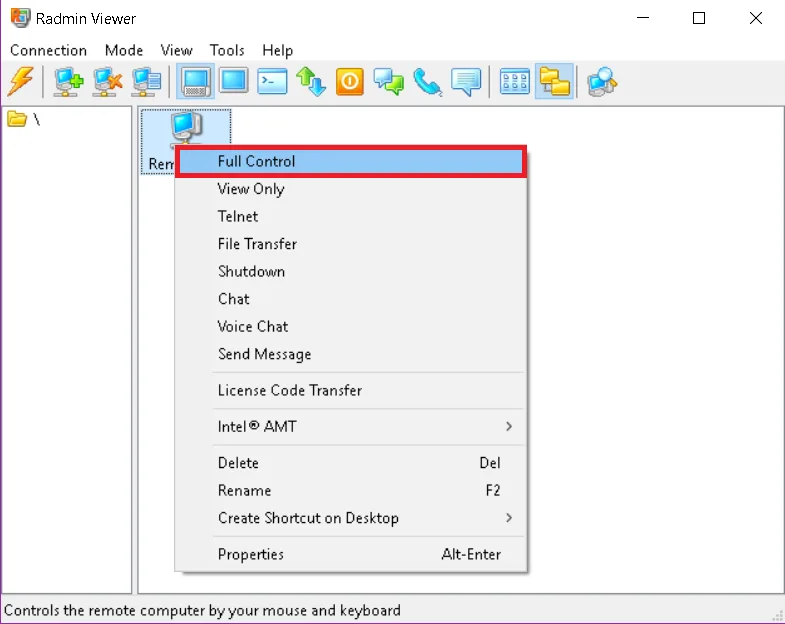
Radmin is remote desktop software for supporting Windows users and maintaining unattended PCs and servers. You can control a remote desktop, view it without taking control, transfer files or communicate through text and voice chat. A connection phonebook keeps remote computers organized, and a built-in scanner checks for running Radmin Servers.
The two components have different roles: install Radmin Server on the computer you want to access and Radmin Viewer on the computer you connect from. Configure a user and access permissions on the Server before connecting. Both computers need a reachable TCP/IP connection; access across separate networks can require router configuration or the separately offered Radmin VPN. Installing Server requires administrator rights.
This entry links to the publisher’s English ZIP package. The download page calls the release Radmin 3.5.2, while the linked filename carries 3.5.2.1. Radmin is commercial software with a fully functional 30-day trial, not a permanently free remote-control package. Viewer is free, but a Standard license covers one remote computer. The publisher limits simultaneous connections to one Server to five by default.
What it offers
- Control or view a remote Windows desktop, including windowed and full-screen display modes.
- Transfer files through an Explorer-like interface; Delta Copy updates changed parts and supports resuming interrupted copies.
- Communicate with the remote user through text chat, voice chat or messages.
- Organize computers in a connection phonebook and scan for running Radmin Servers.
- Use individual user permissions or Windows authentication; the publisher documents AES-256 encryption for transferred data.
Good to know
- The fully functional trial lasts 30 days. Continued Server use requires a paid license; free Viewer does not make Server free.
- Server must be installed and configured on the remote PC, with administrator rights for installation. Both computers need a reachable TCP/IP connection.
- One Server permits five simultaneous connections by default; increasing that limit requires additional Client Access licensing.
Product images
Sources
References used for this listing. Retrieval dates do not indicate hands-on testing.
- Radmin: Reliable Remote Desktop Software for IT Pros ↗Retrieved
- Radmin — Download Radmin 3.5.2 ↗Retrieved
- Radmin — Buy Radmin online ↗Retrieved
- Radmin Helpdesk — Radmin Installation Guide ↗Retrieved
- Radmin Helpdesk — Radmin 3.x System Requirements ↗Retrieved
- Radmin Helpdesk — Radmin 3 Key Features List ↗Retrieved
- Radmin Remote Administrator - Download ↗Retrieved
More in utilities
View category ↗
1.1.1.1 with WARP 2026.8.2115.0
Encrypt traffic from your Mac to Cloudflare’s network with WARP, or use DNS-only mode for encrypted DNS queries to the 1.1.1.1 resolver.
1.1.1.1 with WARP 2026.8.2115.0
Encrypt traffic between your Windows PC and Cloudflare, or use encrypted DNS only, with the free 1.1.1.1 with WARP app.

3uTools 9.12.005
Manage iPhone and iPad photos, music, apps and backups from Windows with 3uTools, a free utility that also includes device checks and firmware flashing tools.