

Utilities Windows
RAMMap for Windows
See how Windows allocates physical memory with RAMMap, a Sysinternals utility for inspecting process working sets, cached files and memory pages.
What is RAMMap?
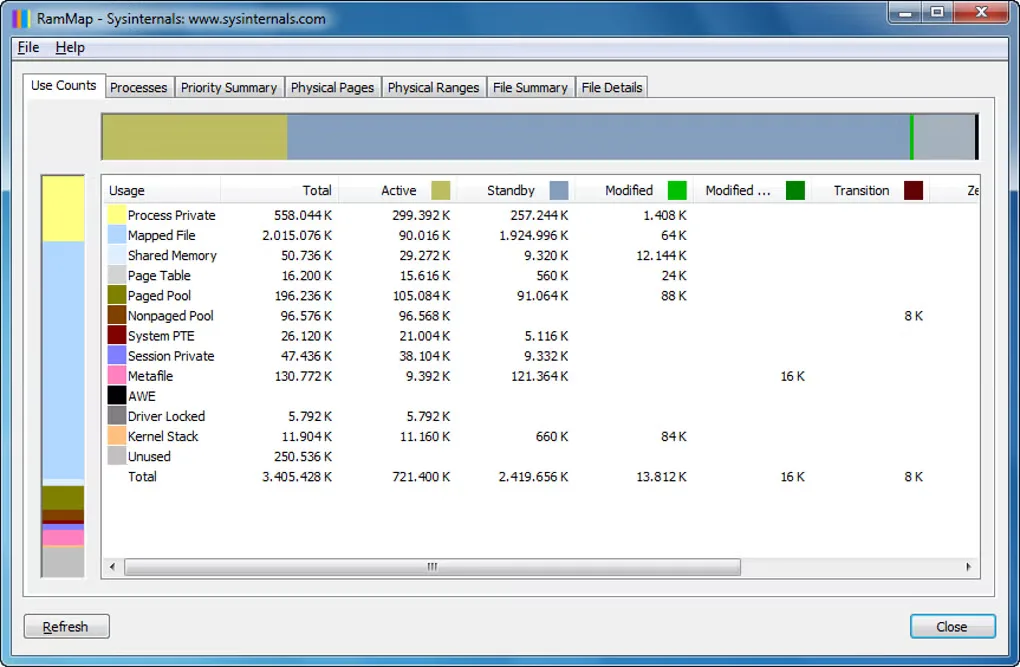
RAMMap breaks down physical memory use on Windows so you can investigate where RAM is going. Its Use Counts view groups allocations by type and paging list, while Processes shows working set sizes. File Summary and File Details help connect cached data to individual files rather than treating every occupied byte as application memory.
For deeper investigation, the utility includes views of physical pages, physical address ranges and prioritized standby lists. Refresh updates the display, and saved memory snapshots can be loaded again for later inspection. The interface uses Windows memory-management terminology; Microsoft points readers to Windows Internals for explanations of its labels and allocation algorithms.
Treat saved snapshots as potentially sensitive before sharing them: the Sysinternals license warns that files saved by its tools can contain personal or other sensitive information. The download here is the ZIP archive linked by Microsoft. The screenshot illustrates an older Windows-style interface, not a verified view of the current package.
What it offers
- Summarize physical memory allocations by usage type and paging list in Use Counts.
- Inspect process working set sizes and prioritized standby list sizes.
- Examine individual physical pages and physical memory address ranges.
- View file data held in RAM and the physical pages associated with a file.
- Refresh the display and save or load memory snapshots.
Good to know
- Interpreting the detailed views requires familiarity with Windows memory-management labels; Microsoft refers readers to Windows Internals for definitions.
- Saved Sysinternals tool files can contain personal or sensitive information; inspect snapshots before sharing them.
Product images
Sources
References used for this listing. Retrieval dates do not indicate hands-on testing.
More in utilities
View category ↗
1.1.1.1 with WARP 2026.8.2115.0
Encrypt traffic from your Mac to Cloudflare’s network with WARP, or use DNS-only mode for encrypted DNS queries to the 1.1.1.1 resolver.
1.1.1.1 with WARP 2026.8.2115.0
Encrypt traffic between your Windows PC and Cloudflare, or use encrypted DNS only, with the free 1.1.1.1 with WARP app.

3uTools 9.12.005
Manage iPhone and iPad photos, music, apps and backups from Windows with 3uTools, a free utility that also includes device checks and firmware flashing tools.