

Utilities Android
RAR for Android
Create RAR and ZIP archives or extract RAR, ZIP, 7z and other formats on Android with RARLAB’s archiver and basic file manager.
Version 7.23 build 134 · Direct publisher file
Link checked · Download guidance
What is RAR?
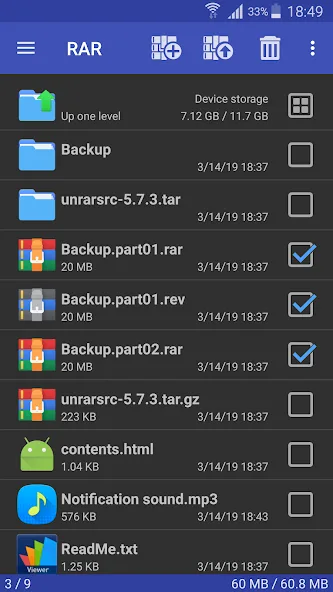
RAR handles archive creation and extraction on Android, with a file browser for selecting files and managing folders. Use it to package files as RAR or ZIP, open password-protected archives, or extract multipart RAR files. The publisher also lists encryption, recovery records and repair commands for damaged RAR and ZIP archives.
Creation and extraction support are different: RAR creates RAR and ZIP archives, while its extraction list also includes TAR, GZ, BZ2, XZ, 7z, ISO and ARJ. Do not choose it expecting to create every format it can open. The publisher lists the Android app as free, and its Google Play listing includes in-app purchases.
The download here is the publisher-hosted APK for version 7.23 build 134, not the XAPK filename shown by Softonic. Minimum Android version and CPU architecture coverage were not established from the publisher pages checked.
What it offers
- Create RAR and ZIP archives on Android.
- Extract RAR, ZIP, TAR, GZ, BZ2, XZ, 7z, ISO and ARJ archives.
- Open password-protected and multipart RAR archives.
- Use encryption, recovery records and repair commands for RAR and ZIP archives.
- Copy, move, rename and delete files or folders through the built-in file manager.
Good to know
- Archive creation is limited to RAR and ZIP in the publisher’s description; the additional listed formats are for extraction.
- Google Play lists in-app purchases despite the publisher identifying the app as free.
Product images
Sources
References used for this listing. Retrieval dates do not indicate hands-on testing.
- RARLAB — WinRAR and RAR archiver downloads ↗Retrieved
- RAR - Apps on Google Play ↗Retrieved
- RAR for Android - Download ↗Retrieved
More in utilities
View category ↗
1.1.1.1 with WARP 2026.8.2115.0
Encrypt traffic from your Mac to Cloudflare’s network with WARP, or use DNS-only mode for encrypted DNS queries to the 1.1.1.1 resolver.
1.1.1.1 with WARP 2026.8.2115.0
Encrypt traffic between your Windows PC and Cloudflare, or use encrypted DNS only, with the free 1.1.1.1 with WARP app.

3uTools 9.12.005
Manage iPhone and iPad photos, music, apps and backups from Windows with 3uTools, a free utility that also includes device checks and firmware flashing tools.