

Utilities macOS
Rectangle for macOS
Move and resize Mac windows with keyboard shortcuts or by dragging them to screen edges. Rectangle is a free, open-source window manager for macOS.
Version 2.0.4 · Direct publisher file
Link checked · Download guidance
What is Rectangle?
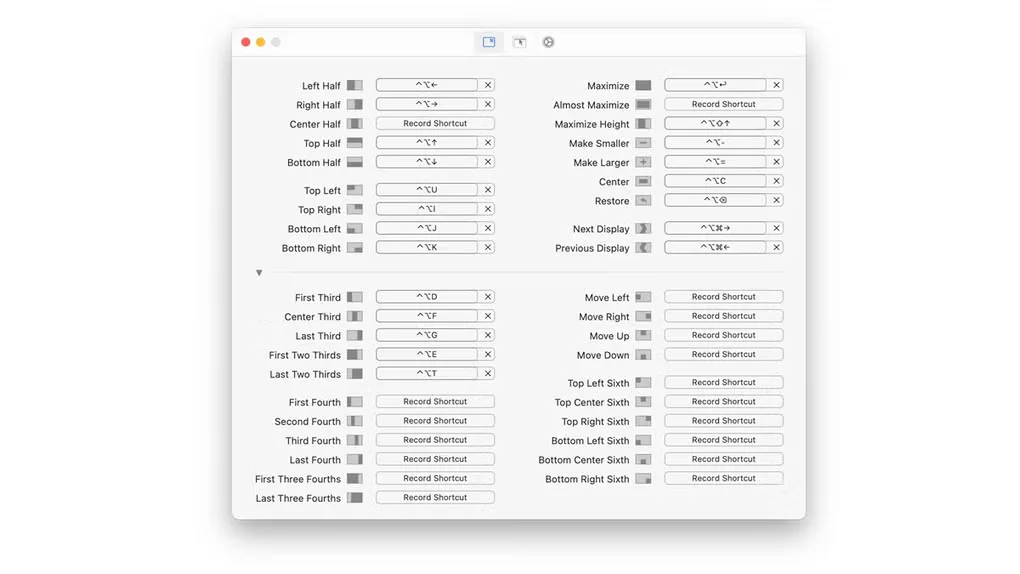
Rectangle arranges application windows into useful positions on your Mac, including halves, quarters and thirds. Use keyboard shortcuts to place the focused window, or drag a window to a screen edge or corner to preview and apply a snap position. Repeated shortcuts can cycle through window sizes, and portrait display layouts are supported.
The linked download is Rectangle 2.0.4, the free application, not the separate Rectangle Pro trial. The publisher lists macOS 14 or later for the current release; older macOS versions require an older release from the publisher.
Window placement still depends on what each application permits. Rectangle cannot override an application's minimum window size, so smaller layouts can leave overlapping windows. The free application also does not move windows between macOS desktops or Spaces.
What it offers
- Move and resize windows with configurable keyboard shortcuts.
- Snap windows by dragging them to screen edges or corners.
- Arrange windows in halves, quarters and thirds, or maximize and center them.
- Repeat shortcuts to cycle through window sizes, including layouts for portrait displays.
Good to know
- The current release requires macOS 14 or later; older macOS versions need an older release.
- Cannot override an application's minimum window size, which can cause overlap in small layouts.
- Does not move windows to other macOS desktops or Spaces.
Product images
Sources
References used for this listing. Retrieval dates do not indicate hands-on testing.
More in utilities
View category ↗
1.1.1.1 with WARP 2026.8.2115.0
Encrypt traffic from your Mac to Cloudflare’s network with WARP, or use DNS-only mode for encrypted DNS queries to the 1.1.1.1 resolver.
1.1.1.1 with WARP 2026.8.2115.0
Encrypt traffic between your Windows PC and Cloudflare, or use encrypted DNS only, with the free 1.1.1.1 with WARP app.

3uTools 9.12.005
Manage iPhone and iPad photos, music, apps and backups from Windows with 3uTools, a free utility that also includes device checks and firmware flashing tools.