

Utilities Windows
Reg Organizer for Windows
Uninstall programs and search for leftovers, manage startup applications, clean Windows files, and edit the registry with Reg Organizer, a paid utility with a 30-day trial.
- Operating system
- Windows 11 / 10 / 8 / 7
- Architecture
- 32-bit and 64-bit Windows, as listed by the publisher
- Download package
- EXE installation package
Publisher lists 256 MB RAM, 50 MB disk space, and administrator rights. The portable version is a separate download. Package architecture was not inspected.
Link checked · Download guidance
What is Reg Organizer?
Reg Organizer brings Windows maintenance tools together: an application uninstaller that searches for leftover traces, a startup manager, disk cleanup, and advanced registry editing. It suits users who want to review installed applications and startup entries alongside registry keys rather than switch between separate utilities.
Its registry tools can search and replace entries, import and export keys, and display a .reg file as a tree before importing it. A registry file editor can also combine branches into modular files for transferring settings. Windows cleanup and system tweaks are additional tools, not a guarantee of faster performance.
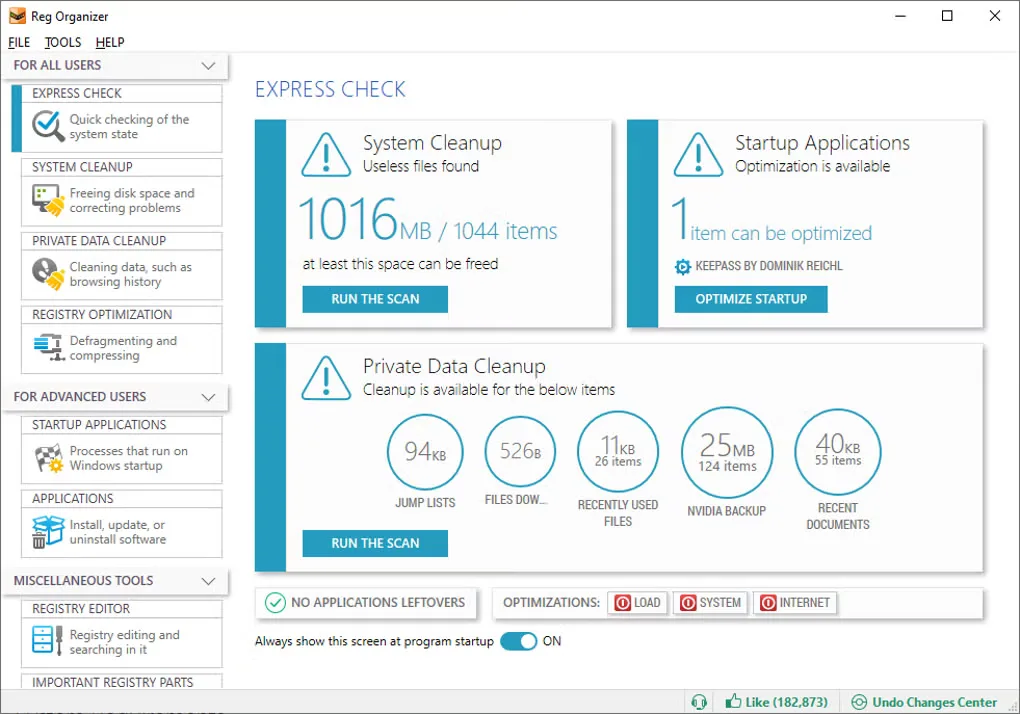
Reg Organizer is not freeware. The publisher permits a 30-day evaluation; a purchased license removes functional and time limits. Administrator rights are required. This entry links to the installation package, not the separately offered portable version. The gallery screenshot illustrates the Express Check interface; it is not proof of the current installer version or of results on your computer.
What it offers
- Uninstall applications and search for files and registry traces left behind.
- Review applications that run at Windows startup with the advanced startup manager.
- Clean unnecessary Windows files, including unwanted updates and old Windows versions.
- Search and replace registry entries, import and export keys, and copy key values.
- Preview .reg files as a tree and edit registry files before importing them.
Good to know
- The evaluation period is 30 days; unrestricted use requires a purchased license.
- Administrator rights are required for the Windows application.
Product images
Sources
References used for this listing. Retrieval dates do not indicate hands-on testing.
More in utilities
View category ↗
1.1.1.1 with WARP 2026.8.2115.0
Encrypt traffic from your Mac to Cloudflare’s network with WARP, or use DNS-only mode for encrypted DNS queries to the 1.1.1.1 resolver.
1.1.1.1 with WARP 2026.8.2115.0
Encrypt traffic between your Windows PC and Cloudflare, or use encrypted DNS only, with the free 1.1.1.1 with WARP app.

3uTools 9.12.005
Manage iPhone and iPad photos, music, apps and backups from Windows with 3uTools, a free utility that also includes device checks and firmware flashing tools.