
Utilities Windows
Registry Workshop
Search, compare and edit the Windows registry with Registry Workshop, an advanced editor with undo history, registry backups and a 30-day trial.
Version 5.1.0 · Direct publisher file
Link checked · Download guidance
What is Registry Workshop?
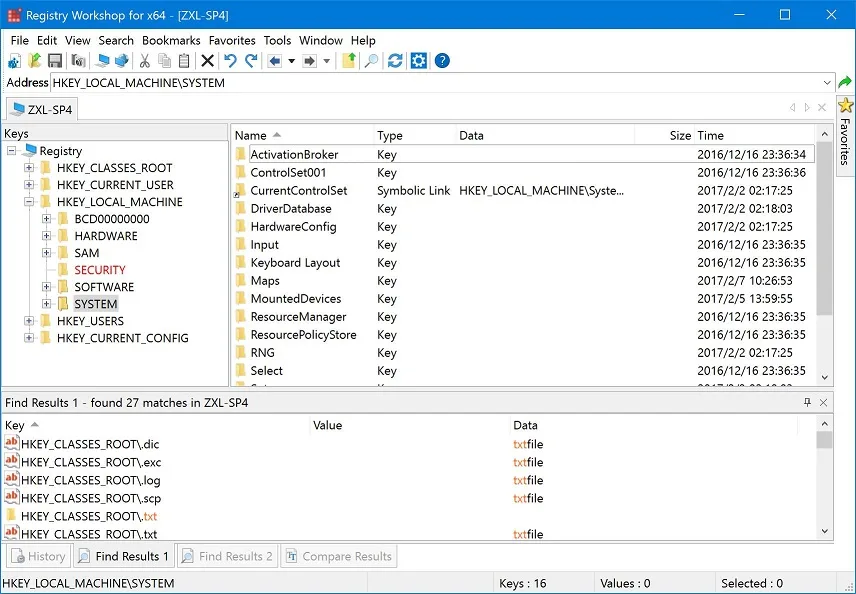
Registry Workshop is a Windows registry editor for administrators, developers and experienced users who need to inspect or change keys and values. It combines search and replace with registry comparison, bookmarks and multiple local registry windows. You can also edit .REG and .POL files without treating them as plain text.
Undo and redo history can be saved to disk and reloaded at startup. The editor also provides registry backup and restore. Undo is not universal: the publisher explicitly excludes changes to key permissions, so those changes cannot rely on the same reversal mechanism.
The publisher offers version 5.1.0 as a fully functional 30-day trial. Its system requirements list Windows XP, Vista, 7, 8 and 10; Windows 11 support is not established by that list. The linked download is the English EXE package.
What it offers
- Search and replace registry keys, values and data.
- Compare registries between computers or compare .REG files.
- Save undo and redo history to disk and reload it at startup.
- Edit .REG and .POL files and back up or restore the registry.
- Navigate with an address bar, bookmarks, favorites and multiple local registry windows.
Good to know
- Changes to registry key permissions are excluded from the publisher’s undo support.
- The fully functional trial lasts 30 days; it is not presented as unrestricted freeware.
- The publisher lists Windows XP through Windows 10; Windows 11 compatibility is not established.
Product images
Sources
References used for this listing. Retrieval dates do not indicate hands-on testing.
More in utilities
View category ↗
1.1.1.1 with WARP 2026.8.2115.0
Encrypt traffic from your Mac to Cloudflare’s network with WARP, or use DNS-only mode for encrypted DNS queries to the 1.1.1.1 resolver.
1.1.1.1 with WARP 2026.8.2115.0
Encrypt traffic between your Windows PC and Cloudflare, or use encrypted DNS only, with the free 1.1.1.1 with WARP app.


3uTools 9.12.005
Manage iPhone and iPad photos, music, apps and backups from Windows with 3uTools, a free utility that also includes device checks and firmware flashing tools.