
Utilities Windows
Regshot
Compare two Windows registry snapshots and optional folder scans with Regshot, a free, open-source utility that writes text or HTML change reports.
Version 1.9.0 · Direct publisher file
Link checked · Download guidance
What is Regshot?
Regshot records a Windows registry snapshot before a change and compares it with a second snapshot taken afterward. It is useful for inspecting differences around a software installation or a system-setting change. The report lists modifications between those two points; you can also include selected folders and their subfolders in the comparison.
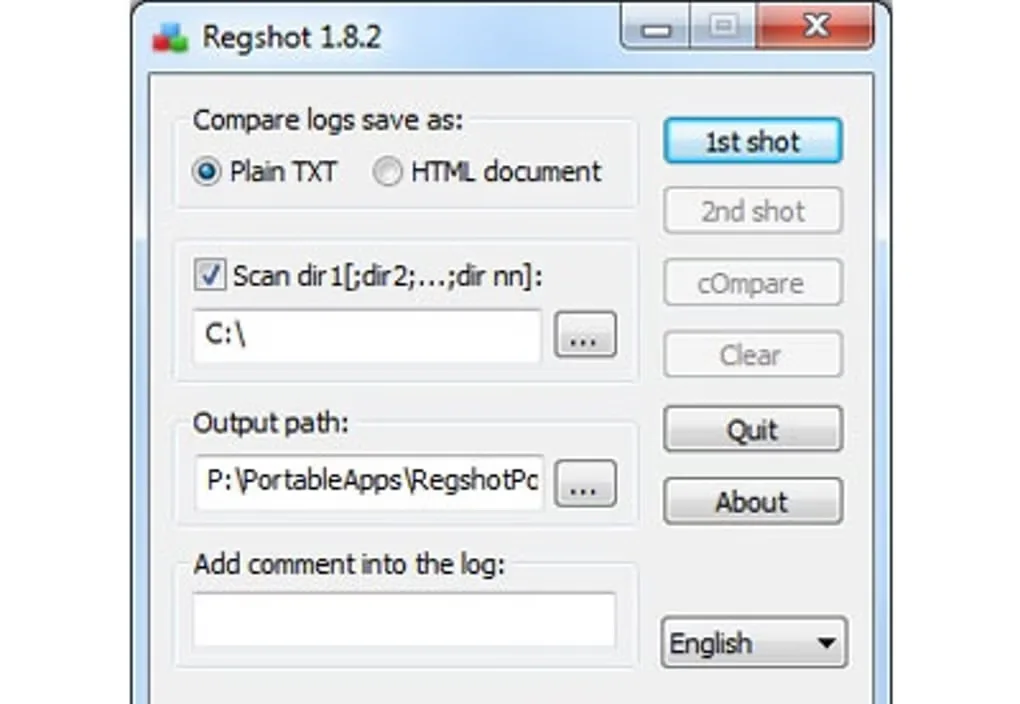
The documented workflow is to take the first shot, make the change you want to examine, take the second shot and choose Compare. Select plain text or HTML output, set an output folder and optionally add a comment to the report. Use Shot and save if you need a snapshot after closing Regshot: a Shot-only capture is not retained when the program exits. Multiple scan folders are separated with semicolons.
This entry links to the project’s 1.9.0 archive, dated February 2, 2013, rather than the separately listed 1.9.1 beta. The accompanying readme documents x64 and Unicode versions but does not establish compatibility with current Windows releases. Keep the same ANSI or Unicode build type when reloading saved hive files, because cross-loading between those build types is unsupported. The gallery image shows the older 1.8.2 interface, not a tested 1.9.0 installation.
What it offers
- Compare two snapshots of the Windows registry and list the modifications between them.
- Include selected folders and their subfolders in change comparisons.
- Generate plain-text or HTML reports with an optional comment and a chosen output path.
- Save snapshots as hive files and load previously saved snapshots.
- Scan multiple folders by separating their paths with semicolons.
Good to know
- ANSI hive files cannot be loaded in Unicode builds, or Unicode hive files in ANSI builds.
- Shot-only snapshots are lost when Regshot exits; use Shot and save to retain a snapshot.
- The selected 1.9.0 release dates from 2013; compatibility with current Windows versions has not been established by the cited release readme.
Product images
Sources
References used for this listing. Retrieval dates do not indicate hands-on testing.
More in utilities
View category ↗
1.1.1.1 with WARP 2026.8.2115.0
Encrypt traffic from your Mac to Cloudflare’s network with WARP, or use DNS-only mode for encrypted DNS queries to the 1.1.1.1 resolver.
1.1.1.1 with WARP 2026.8.2115.0
Encrypt traffic between your Windows PC and Cloudflare, or use encrypted DNS only, with the free 1.1.1.1 with WARP app.

3uTools 9.12.005
Manage iPhone and iPad photos, music, apps and backups from Windows with 3uTools, a free utility that also includes device checks and firmware flashing tools.