
Utilities Windows
RemoteApp Tool
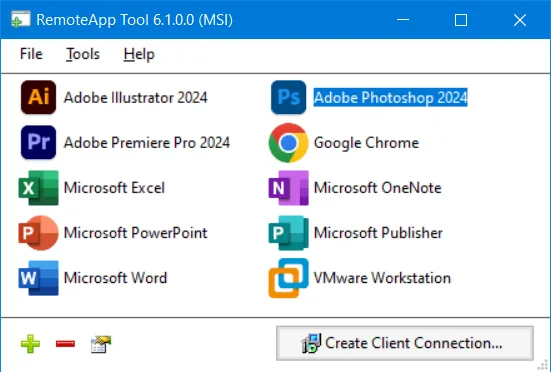
Create and manage Windows RemoteApps, generate RDP connection files and package client connections as MSI installers with RemoteApp Tool.
Version 6.1.0.0 · Direct publisher file
Link checked · Download guidance
What is RemoteApp Tool?
RemoteApp Tool manages applications that run on a Windows host and are accessed from another computer through Microsoft RemoteApp. It is aimed at administrators who want to publish individual applications rather than present a whole remote desktop. The utility creates and manages RemoteApp entries and generates RDP files for client connections.
Deployment options include Remote Desktop Gateway settings, file type associations and signed RDP files. You can select application icons, configure session timeouts and back up RemoteApp definitions. Generating MSI installers for client connections additionally requires WiX Toolset v3; the tool itself requires Microsoft .NET Framework 4.
The host edition matters more than whether the utility opens. The publisher lists Windows 10 Pro and Windows 11 Pro among compatible editions, but warns that incompatible editions such as Windows 10 Home cannot host working RemoteApps. Client Windows editions normally permit only one active connection at a time. This entry links to the publisher’s 6.1.0.0 MSI installer, which does not work on Windows XP; the publisher offers a separate ZIP for that older system.
What it offers
- Create and manage RemoteApps on compatible Windows desktops and servers.
- Generate RDP connection files or, with WiX Toolset v3, MSI installers for clients.
- Configure Remote Desktop Gateway and session timeout options.
- Choose application icons, associate file types and sign RDP files.
- Back up RemoteApp definitions.
Good to know
- An incompatible host edition, including Windows 10 Home, cannot host working RemoteApps even if the utility runs.
- Client Windows editions normally allow one active connection at a time; the publisher lists specific Enterprise virtual-desktop/multi-session exceptions.
- Requires Microsoft .NET Framework 4; creating client MSI packages also requires WiX Toolset v3. The linked MSI installer does not support Windows XP.
Product images
Sources
References used for this listing. Retrieval dates do not indicate hands-on testing.
- RemoteApp Tool — publisher README ↗Retrieved
- RemoteApp Tool — Windows compatibility chart ↗Retrieved
- RemoteApp Tool — project license ↗Retrieved
- RemoteApp Tool - Download ↗Retrieved
More in utilities
View category ↗
1.1.1.1 with WARP 2026.8.2115.0
Encrypt traffic from your Mac to Cloudflare’s network with WARP, or use DNS-only mode for encrypted DNS queries to the 1.1.1.1 resolver.
1.1.1.1 with WARP 2026.8.2115.0
Encrypt traffic between your Windows PC and Cloudflare, or use encrypted DNS only, with the free 1.1.1.1 with WARP app.

3uTools 9.12.005
Manage iPhone and iPad photos, music, apps and backups from Windows with 3uTools, a free utility that also includes device checks and firmware flashing tools.