
Utilities Windows
ResourcesExtract for Windows
Extract icons, bitmaps, cursors and other embedded resources from DLL, OCX and EXE files with NirSoft's free Windows utility.
- Operating system
- Publisher lists Windows 98 through Windows 8
- Architecture
- 32-bit (selected package); separate 64-bit build available
- Download package
- ZIP archive; executable requires no installation according to publisher
Windows 98/ME needs the separate non-Unicode package. Windows 10/11 compatibility is not established by the publisher's listed requirements.
Link checked · Download guidance
What is ResourcesExtract?
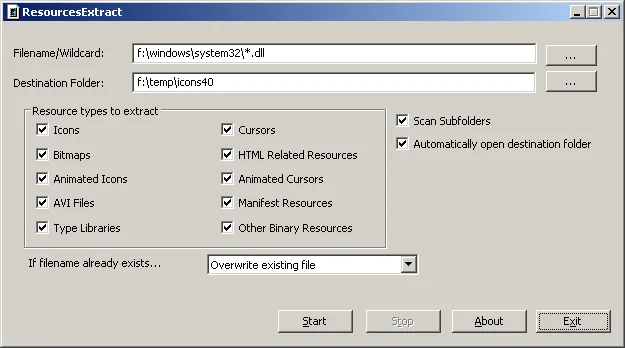
ResourcesExtract saves embedded resources from Windows DLL, OCX and EXE files into a folder you choose. It is useful when you need the icons, bitmaps, cursors, HTML files or AVI resources held inside a program file. Select one source file or a wildcard pattern, choose the resource types and set the destination folder.
The utility supports a graphical interface and command-line extraction. Subfolder scanning and a multiple-files mode help process collections of files; the latter can place each DLL's resources in a separate subfolder. Saved configurations can also be used for command-line runs without displaying the interface. The publisher says the executable needs no installation or additional DLL files.
This link selects the publisher's 32-bit ZIP package. NirSoft also offers separate 64-bit and Windows 98/ME non-Unicode packages. Its published system requirements stop at Windows 8, so this entry does not establish Windows 10 or Windows 11 compatibility.
What it offers
- Extract icons, bitmaps, cursors, AVI files and HTML resources from DLL, OCX and EXE files.
- Select a single source file or use a wildcard pattern to scan multiple files.
- Scan subfolders and control scanning depth.
- Save resources from each DLL to a separate subfolder using Multiple Files Mode.
- Run extraction through the graphical interface or command line, including saved configurations.
Good to know
- The publisher's system requirements list Windows 98 through Windows 8; Windows 10 and 11 compatibility is not established by that documentation.
- Windows 98/ME requires the separate non-Unicode package, not the 32-bit package linked here.
Product images
Sources
References used for this listing. Retrieval dates do not indicate hands-on testing.
More in utilities
View category ↗
1.1.1.1 with WARP 2026.8.2115.0
Encrypt traffic from your Mac to Cloudflare’s network with WARP, or use DNS-only mode for encrypted DNS queries to the 1.1.1.1 resolver.
1.1.1.1 with WARP 2026.8.2115.0
Encrypt traffic between your Windows PC and Cloudflare, or use encrypted DNS only, with the free 1.1.1.1 with WARP app.

3uTools 9.12.005
Manage iPhone and iPad photos, music, apps and backups from Windows with 3uTools, a free utility that also includes device checks and firmware flashing tools.