

Utilities Windows
RetroArch for Windows
Run emulator and game-engine cores through one interface with RetroArch for Windows. Organize your own games into playlists, configure controllers and apply shaders; games and required BIOS files are not included.
- Operating system
- Windows 11, 10, 8.1, 8 and 7, as listed on the publisher's modern Windows download section
- Architecture
- x64 (64-bit Intel/AMD)
- Download package
- EXE installer
Selected download is the standalone Windows x64 build. Separate 32-bit and legacy Windows packages are listed by the publisher; core and BIOS requirements vary by system.
Link checked · Download guidance
What is RetroArch?
RetroArch is a frontend for emulators, game engines and media players. Instead of using a separate interface for each supported system, you load a compatible core and your own content through a shared menu. It suits a Windows PC used for several retro systems, with common controller, sound and video settings.
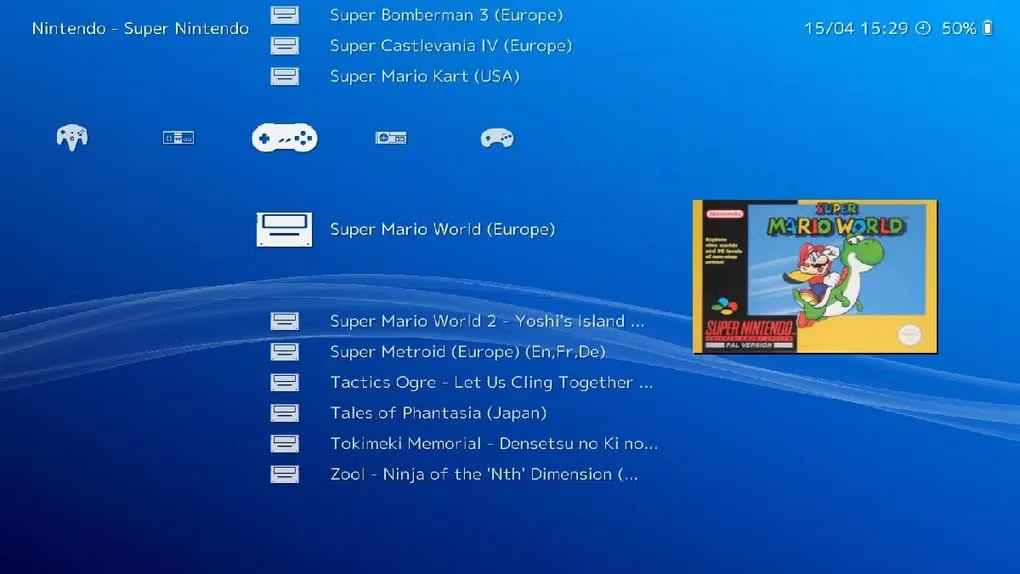
You can scan recognized games into system playlists, browse a collection with optional thumbnails, remap controls and use graphical shaders. The standalone desktop edition includes a Core Downloader, so it differs from the Steam edition, where cores are distributed through Steam instead. This entry links to the publisher's Windows x64 EXE installer for version 1.22.2, not the 32-bit or legacy Windows packages.
RetroArch does not include games and cannot play them without a suitable core. Some cores also require specific BIOS files. Supply your own content and firmware in accordance with local laws, and check the documentation for the core you intend to use. Automatic library scanning only adds games that match RetroArch's database; a file not appearing in a scanned playlist is not, by itself, proof that it cannot be loaded manually.
What it offers
- Load libretro emulator and game-engine cores through a shared frontend.
- Scan recognized games into system playlists and add optional collection thumbnails.
- Use common controller profiles or manually remap buttons.
- Apply shaders to change the appearance of supported game output.
- Download cores through the standalone desktop edition's built-in Core Downloader.
Good to know
- Games are not included: playing requires a compatible core and your own legally obtained content; some cores also need BIOS files.
- Automatic playlist scanning only adds games that match RetroArch's database.
- The Steam edition lacks the standalone build's Core Updater and distributes its available cores through Steam.
Product images
Sources
References used for this listing. Retrieval dates do not indicate hands-on testing.
- RetroArch - Download — Windows listing and expanded gallery ↗Retrieved
- RetroArch - Frontend for Emulators, Game Engines and Media Players ↗Retrieved
- Download RetroArch - Classic Games on Windows, Mac, Linux, Android, iOS & Consoles ↗Retrieved
- Getting Started with RetroArch: From Install to Your First Game ↗Retrieved
- libretro/RetroArch — official repository and license ↗Retrieved
More in utilities
View category ↗
1.1.1.1 with WARP 2026.8.2115.0
Encrypt traffic from your Mac to Cloudflare’s network with WARP, or use DNS-only mode for encrypted DNS queries to the 1.1.1.1 resolver.
1.1.1.1 with WARP 2026.8.2115.0
Encrypt traffic between your Windows PC and Cloudflare, or use encrypted DNS only, with the free 1.1.1.1 with WARP app.

3uTools 9.12.005
Manage iPhone and iPad photos, music, apps and backups from Windows with 3uTools, a free utility that also includes device checks and firmware flashing tools.