
Utilities Windows
Run-Command for Windows
Launch programs and folders from saved commands with Run-Command, a portable Windows Run-dialog alternative with categorized favorites and administrator launch controls.
- Operating system
- Windows 11, 10, 8.1 and 7; Windows Server editions also listed by publisher
- Architecture
- x64
- Download package
- Portable ZIP archive
Selected download is the publisher's x64 Portable package. Separate 32-bit packages exist; compatibility is publisher-reported, not independently tested.
Link checked · Download guidance
What is Run-Command?
Run-Command provides an alternative to the Windows Run dialog for opening programs, folders and frequently used commands. Save commands as favorites and organize them into categories instead of typing the same paths repeatedly. The launcher supports Windows environment variables and a customizable keyboard shortcut, with a separate control for running a command as administrator.
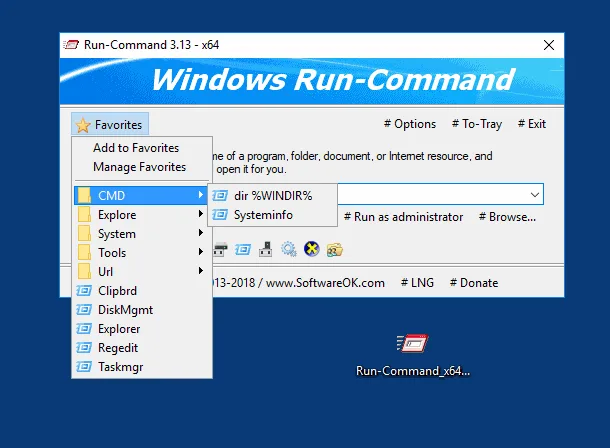
The publisher describes Run-Command as portable and not requiring installation. This entry links to the publisher's Windows x64 portable ZIP; 32-bit packages are separate. SoftwareOK lists version 6.41, released on May 6, 2026. The screenshot is a publisher-provided example of the older 3.13 x64 interface, not a capture of the listed release.
Administrator launch still depends on Windows permissions: User Account Control can require consent or administrator credentials. Package choice also matters for the Control Panel menu; the publisher says to use the x64 build on x64 Windows for correct display.
What it offers
- Save frequently used commands as favorites and group them into categories.
- Open programs and folders from a command input field.
- Use Windows environment variables in commands.
- Choose a custom keyboard shortcut for the launcher.
- Request an administrator launch through a dedicated control.
Good to know
- Elevated commands require appropriate Windows permissions; User Account Control may request consent or administrator credentials.
- The publisher warns that the Control Panel menu can display incorrectly with the wrong build; use Run-Command x64 on x64 Windows.
Product images
Sources
References used for this listing. Retrieval dates do not indicate hands-on testing.
- Run-Command 6.41 — official product page ↗Retrieved
- Run-Command — publisher PAD metadata ↗Retrieved
- Run-Command — License Agreement ↗Retrieved
- Run-Command — Control Panel menu and architecture ↗Retrieved
- Run-Command — administrator launch and UAC ↗Retrieved
- Create Favorite fast open Folders or Start Programs! — publisher screenshot ↗Retrieved
More in utilities
View category ↗
1.1.1.1 with WARP 2026.8.2115.0
Encrypt traffic from your Mac to Cloudflare’s network with WARP, or use DNS-only mode for encrypted DNS queries to the 1.1.1.1 resolver.
1.1.1.1 with WARP 2026.8.2115.0
Encrypt traffic between your Windows PC and Cloudflare, or use encrypted DNS only, with the free 1.1.1.1 with WARP app.

3uTools 9.12.005
Manage iPhone and iPad photos, music, apps and backups from Windows with 3uTools, a free utility that also includes device checks and firmware flashing tools.