
Utilities Windows
RunAsDate for Windows
Run a Windows application with a chosen date and time without changing the system clock. RunAsDate is a portable freeware utility from NirSoft.
- Operating system
- Windows 2000, XP, Server 2003, Server 2008, Vista, 7, 8 and 10, as listed by NirSoft
- Architecture
- 32-bit; separate x64 edition for 64-bit applications
- Download package
- Portable executable in a ZIP archive
Linked ZIP is the standard edition. Match RunAsDate to the target application's architecture. Publisher page does not state Windows 11 support.
Link checked · Download guidance
What is RunAsDate?
RunAsDate gives a selected Windows application a different date and time while leaving the computer's clock unchanged. It suits checking how your own software handles time-dependent behavior without changing the clock for every other program. The utility intercepts supported Windows time APIs; it does not create a separate Windows environment.
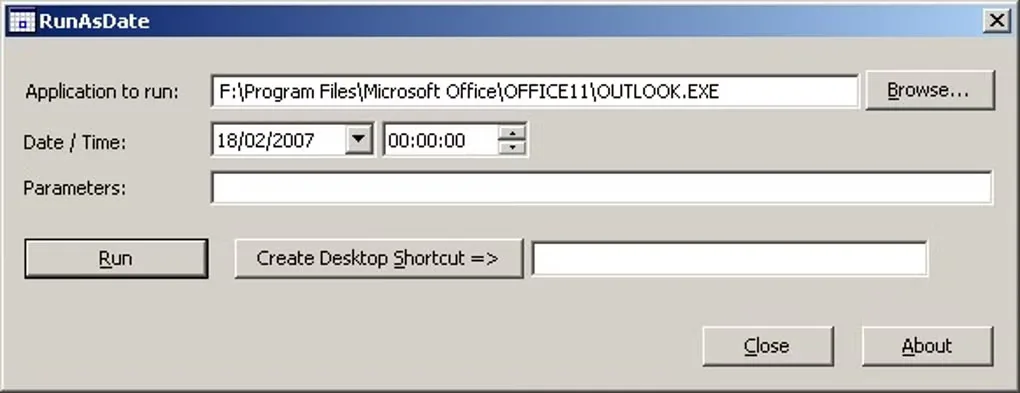
Choose an executable and a date and time in the main window, optionally supply program parameters, and start the application. You can also set a relative time offset, create a desktop shortcut for a particular configuration or use command-line options. Different applications can run with different simulated times. The publisher describes the program as portable: no installation process is required.
The linked ZIP is the standard 32-bit edition. NirSoft provides a separate x64 edition for 64-bit target applications; the RunAsDate edition must match the application you want to run. The publisher lists Windows versions through Windows 10 but does not state Windows 11 support on this page.
Time simulation has limits. Applications that obtain their time from a remote server or another source may ignore it, and some applications can crash. Immediate Mode can be troublesome, particularly with .NET programs. Attaching to a running process carries a higher crash risk and has no detach option. This is not a guaranteed way to extend software trials; the publisher explicitly rejects that promise.
What it offers
- Supply a chosen date and time to a selected application without changing the system clock.
- Set an absolute date or a relative offset in units from seconds to years.
- Run multiple applications with different simulated dates and times.
- Create desktop shortcuts or use command-line options for repeatable configurations.
Good to know
- Applications using a remote time source or another unsupported source may not be affected.
- Some applications may crash; Immediate Mode can cause problems, particularly with .NET programs.
- Attaching to an existing process has a higher crash risk and no detach option; the publisher advises against attaching system or critical processes.
- The 32-bit and x64 editions must match the target application's architecture.
Product images
Sources
References used for this listing. Retrieval dates do not indicate hands-on testing.
More in utilities
View category ↗
1.1.1.1 with WARP 2026.8.2115.0
Encrypt traffic from your Mac to Cloudflare’s network with WARP, or use DNS-only mode for encrypted DNS queries to the 1.1.1.1 resolver.
1.1.1.1 with WARP 2026.8.2115.0
Encrypt traffic between your Windows PC and Cloudflare, or use encrypted DNS only, with the free 1.1.1.1 with WARP app.

3uTools 9.12.005
Manage iPhone and iPad photos, music, apps and backups from Windows with 3uTools, a free utility that also includes device checks and firmware flashing tools.